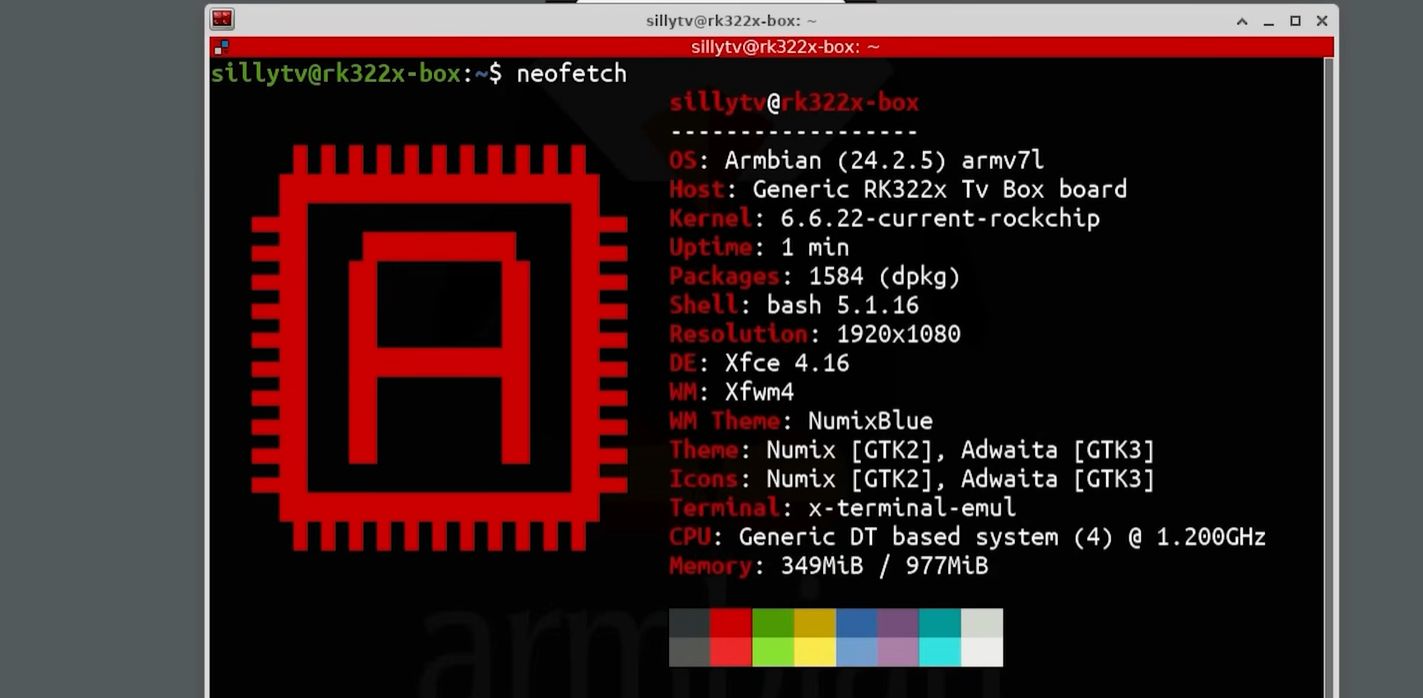
Somewhere between “wow, this is suspiciously cheap” and “why does this remote look like it came free with a cereal box,” there lives a strange little category of hardware: the no-name Android TV box. These plastic pucks and rectangles have flooded online marketplaces for years, promising 4K streaming, lightning-fast performance, and enough buzzwords to make even a toaster blush. But once the novelty wears off, many of them end up in drawers, junk bins, or that mysterious shelf where electronics go to think about what they’ve done.
Here is the plot twist: some of these sketchy Android TV boxes can actually become useful little Linux machines. Not every box is worth the trouble, and some are a minefield of poor firmware, mystery components, and questionable security. Still, for hobbyists, tinkerers, and budget-minded makers, repurposing Android TV boxes as Linux boxes can be a surprisingly clever way to squeeze value out of cheap ARM hardware.
The trick is knowing what you are really buying, what Linux can realistically do on it, and when to walk away before a ten-dollar streaming gadget turns into a ten-hour emotional support project. Let’s talk about the appeal, the risks, the practical use cases, and why this weird corner of the Linux world is equal parts treasure hunt and comedy routine.
Why People Repurpose Android TV Boxes in the First Place
The appeal is obvious. A typical Android TV box already looks a lot like a tiny single-board computer that someone has hidden in a glossy plastic shell. You often get an ARM processor, RAM, onboard storage, HDMI output, USB ports, Wi-Fi, Bluetooth, and Ethernet. In other words, the ingredients of a perfectly serviceable low-power Linux system are already sitting there, pretending to be a streaming gadget.
For people who enjoy tinkering, that is irresistible. A repurposed box can become a mini server, a simple desktop, a retro gaming unit, a network utility machine, a media backend, or a lightweight development environment. If the hardware cooperates, it can do real work while sipping power and taking up almost no space on a desk.
There is also the price factor. Even when new, many Android TV boxes cost less than name-brand maker boards or mini PCs. On the secondhand market, prices can be downright ridiculous. If a box boots Linux reliably, the value proposition can be excellent. It is the computing equivalent of rescuing a suspicious-looking thrift store lamp and discovering it is actually kind of stylish once you remove the haunted shade.
Why These Boxes Are “Dodgy” in the First Place
Hardware Roulette Is Real
The biggest problem with off-brand Android TV boxes is inconsistency. Two boxes sold under the same product name may not have the same internals at all. One unit may contain the processor advertised in the listing, while another may use a completely different chip. That means the Linux image that works beautifully on one “X-whatever Pro Max Ultra Turbo” may fail spectacularly on another identical-looking unit.
This is not just annoying. It changes everything. Linux support on ARM hardware depends heavily on the exact system-on-chip, bootloader behavior, storage layout, and device tree. If the vendor swapped the board revision, changed the wireless chip, or cut corners on memory components, your project can go from “fun weekend experiment” to “why am I staring at a serial console at 2 a.m.?”
Documentation Is Often Terrible
A well-supported maker board usually comes with schematics, board documentation, community guides, and a vendor that at least pretends to care. Cheap Android TV boxes often come with none of that. In the Linux world, documentation is oxygen. Without it, every step becomes detective work: identifying the board, finding the right boot method, choosing the correct device tree, and figuring out which features are real versus marketing fan fiction.
Security Is a Legitimate Concern
This is where the word dodgy stops being cute and starts wearing a serious face. Low-cost, off-brand Android boxes have been tied to malware problems and certification issues. Some uncertified devices have been sold with software that raised major security concerns, which is a good reason to distrust the factory image. In plain English: if the original firmware feels cursed, replacing it with a clean Linux setup is not just a hobby move. It can be a hygiene move.
Of course, flashing Linux does not magically turn mystery hardware into a trusted enterprise platform. But it can remove you from the vendor’s neglected or questionable software stack, which is often the point.
What Makes a Good Candidate for Linux
Start With the Chipset, Not the Brand Name
If you want to repurpose an Android TV box, the real question is not “What brand is it?” The real question is “What is actually inside it?” Boxes built around common ARM families from Rockchip, Amlogic, or Allwinner tend to attract the most experimentation. That does not guarantee success, but it gives you a better shot at finding community knowledge, boot images, and troubleshooting notes.
Ideally, you want a 64-bit ARM chip, at least 2 GB of RAM, and enough storage to avoid constant compromise. More RAM means more breathing room for modern Linux tasks. More storage means less frustration when you install packages, logs accumulate, or containers start reproducing like rabbits.
Ports Matter More Than Marketing Slogans
Ignore dramatic claims about “ultra-fast 8K AI cloud turbo cinema mode.” Focus on the ports. A good repurposing candidate usually has HDMI, at least one full-size USB port, Ethernet, and preferably a microSD slot. Ethernet is especially valuable because Wi-Fi and Bluetooth support can be hit or miss under Linux. If wireless breaks, wired networking becomes your lifeboat.
USB ports also expand your options. You can attach a keyboard, storage drive, serial adapter, or USB Ethernet dongle. A microSD slot is handy because many experiments begin by booting from removable media rather than erasing internal storage immediately. That is the hardware version of testing the water with one toe instead of cannonballing into uncertainty.
How Linux Repurposing Usually Works
Step One: Identify the Board Correctly
Before anything else, you need accurate hardware identification. Sometimes software tools, boot logs, or Android system information will help. Sometimes the only reliable path is opening the case and reading the board markings directly. Glamorous? No. Effective? Yes.
This is critical because Linux on ARM depends on the right kernel support and the right device tree. The device tree tells the operating system what hardware exists and how it is wired together. If that description is wrong, Linux may boot with broken USB, dead network, nonfunctional storage, or no display at all. That is why getting the model right is half the battle.
Step Two: Boot From SD or USB if Possible
Many hobbyists start by booting a Linux image from microSD or USB rather than overwriting internal eMMC storage on day one. That approach lowers the stakes. If the box boots from removable media, you can test performance, networking, USB, and basic stability without immediately risking the factory installation or bricking the device.
In the best-case scenario, the box boots from external media like it was born for this. In the worst-case scenario, you discover the bootloader is stubborn, locked down, half-baked, or allergic to your plans. Some boxes require reset-button tricks, odd boot sequences, or serial-console intervention. This is why Android TV box repurposing is not quite the same as flashing a Raspberry Pi image and then going out for coffee with a smug expression.
Step Three: Expect Partial Support
A successful Linux boot does not automatically mean every component works. Video output may be fine while Wi-Fi fails. Ethernet may work while Bluetooth naps indefinitely. Audio may function only after extra tweaking. Hardware video decoding may be limited, unstable, or unavailable depending on the box and software stack.
This is normal. Community Linux support for TV boxes is often practical rather than polished. That is why these boxes tend to shine most in server-style roles, headless tasks, simple desktops, command-line projects, and specialized single-purpose jobs. The more you need perfect multimedia support, the more likely you are to miss the convenience of proper vendor-backed hardware.
Best Uses for a Repurposed Android TV Box
1. A Tiny Home Server
This is one of the smartest uses. A TV box running Linux can handle lightweight services such as file sharing, ad blocking, local dashboards, backup utilities, home automation components, download tools, or simple web applications. It is small, quiet, and efficient. For always-on workloads that do not demand heavy compute power, it can be a charming little worker.
2. A Headless Linux Utility Machine
Need a box for SSH access, scripting, cron jobs, Docker experiments, or network troubleshooting? This is where these devices can punch above their price. Once you stop expecting them to be polished multimedia stars and start treating them like tiny Linux appliances, they become far more lovable.
3. A Basic Desktop or Kiosk
Some better-supported boxes can run a lightweight desktop environment well enough for browsing, text editing, and dashboard-style tasks. “Well enough” is doing some heavy lifting here, but if your expectations are sane, it can work. Think simple terminal station, wall display, or dedicated kiosk rather than full-time productivity powerhouse.
4. Retro Gaming or Emulation
Depending on the processor and graphics support, a repurposed box may be decent for emulation and classic gaming. Again, support varies wildly, so the experience ranges from “surprisingly smooth” to “this menu lags like it is wading through peanut butter.” Still, for tinkerers who enjoy squeezing entertainment out of modest hardware, it is a fun avenue.
When It Is Not Worth the Trouble
Repurposing an Android TV box is not always the smartest move. If the box has only 1 GB of RAM, flaky power delivery, weak storage, or zero community information, your time may be worth more than the hardware. A cheap project is only cheap until it starts charging fees in frustration.
It is also not ideal if you need something mission-critical. For a reliable home server, production kiosk, or family media setup, supported hardware is usually the saner choice. No-name TV boxes are for experiments, low-cost utility roles, and projects where a little weirdness is part of the fun, not a career-ending surprise.
In other words, use a repurposed TV box when you enjoy tinkering and can tolerate imperfection. Do not use one when you need total predictability, official support, or your weekend back.
Practical Advice Before You Dive In
First, assume nothing printed on the sales page is sacred. Verify the chipset and board. Second, boot from removable media before touching internal storage whenever possible. Third, keep your expectations realistic: Ethernet and command-line Linux are easier wins than flawless multimedia or polished desktop acceleration.
It also helps to think in roles rather than dreams. Do not ask, “Can this become my everything computer?” Ask, “Can this become a tiny file server, a dashboard box, or a network utility node?” Projects go better when the goal matches the hardware.
And yes, keep a serial adapter nearby if you plan to do serious experimentation. Not because you definitely need it, but because the universe enjoys teaching humility through boot failures.
Conclusion
Repurposing dodgy Android TV boxes as Linux boxes is one of those ideas that sounds slightly ridiculous until it works. Then it feels brilliant. Beneath the cheap plastic, silly branding, and questionable factory software, there is often a small ARM computer waiting for a more respectable second life.
The catch is that this is not a plug-and-play paradise. These boxes vary wildly, support is often community-driven, and security concerns make caution mandatory. But if you choose the hardware carefully, verify what is actually inside, and aim for realistic use cases, a bargain-bin TV box can turn into a genuinely useful Linux machine.
Not every dodgy box deserves redemption. Some should be recycled with honors and no further questions. But the ones that cooperate can become the scrappy underdogs of the homelab world: inexpensive, weird, unexpectedly capable, and much more fun than they have any right to be.
Extra Field Notes: What the Experience Usually Feels Like in Real Life
In practice, repurposing an Android TV box into a Linux box is less like installing a normal operating system and more like joining a low-budget detective show. First, you unbox the device and immediately notice that everything about it feels just a little too optimistic. The product page promised elite performance, futuristic graphics, and enough streaming power to impress a moon base. The actual box weighs about as much as a sandwich and arrives with a remote that feels one angry glance away from disintegration.
Then the adventure starts. You boot the stock Android build and discover menus that look vaguely familiar but somehow wrong, as if Android wandered into a costume shop and made a series of poor choices. Maybe the settings app is awkward. Maybe the launcher is full of mysterious shortcuts. Maybe the whole thing moves with the confidence of a shopping cart missing a wheel. That is usually the moment when the Linux idea stops sounding eccentric and starts sounding necessary.
Once you begin research, the emotional rhythm becomes familiar. Excitement when you find a community post from someone with “the same box.” Suspicion when you realize their “same box” has a different board revision, different Wi-Fi chip, and apparently a different personality. Brief triumph when the device finally boots from an SD card. Immediate confusion when Ethernet works, USB works, HDMI works, but Wi-Fi disappears like it owes somebody money.
Yet this is also where the charm lives. When one of these boxes finally settles into Linux, it can feel absurdly satisfying. A piece of hardware that once existed mainly to push questionable apps and overpromise on streaming suddenly becomes clean, quiet, and useful. It boots into a proper Linux environment. It serves files. It runs scripts. It hosts small services. It behaves like a tiny computer that has completed a redemption arc.
Another common experience is learning to appreciate modest goals. People often begin with dreams of a perfect media center, desktop workstation, or all-in-one household server. Then reality arrives wearing muddy boots. Hardware decoding is partial. Wireless support is quirky. Storage performance is not exactly heroic. Eventually, the best results come when the owner gives the box one clear job and lets it do that job in peace. The box that fails as a dream machine may succeed beautifully as a dashboard host, SSH endpoint, simple NAS helper, or home automation sidekick.
There is also a strong “junk drawer alchemy” feeling to the whole thing. A USB keyboard from 2014, an old Ethernet cable, a spare power supply, and a half-forgotten microSD card suddenly become the supporting cast for a project that costs almost nothing and teaches a lot. Even failures are oddly educational. You learn how ARM booting differs from x86. You learn why device trees matter. You learn that “community-supported” can mean either “lovingly documented” or “bring snacks and patience.”
So the real experience of repurposing dodgy Android TV boxes as Linux boxes is not smooth, but it is memorable. It is equal parts repair, experiment, and reality check. And when it works, it produces a uniquely satisfying result: a cheap, once-sketchy streaming gadget reborn as a respectable little Linux machine that finally has better manners than its original software ever did.