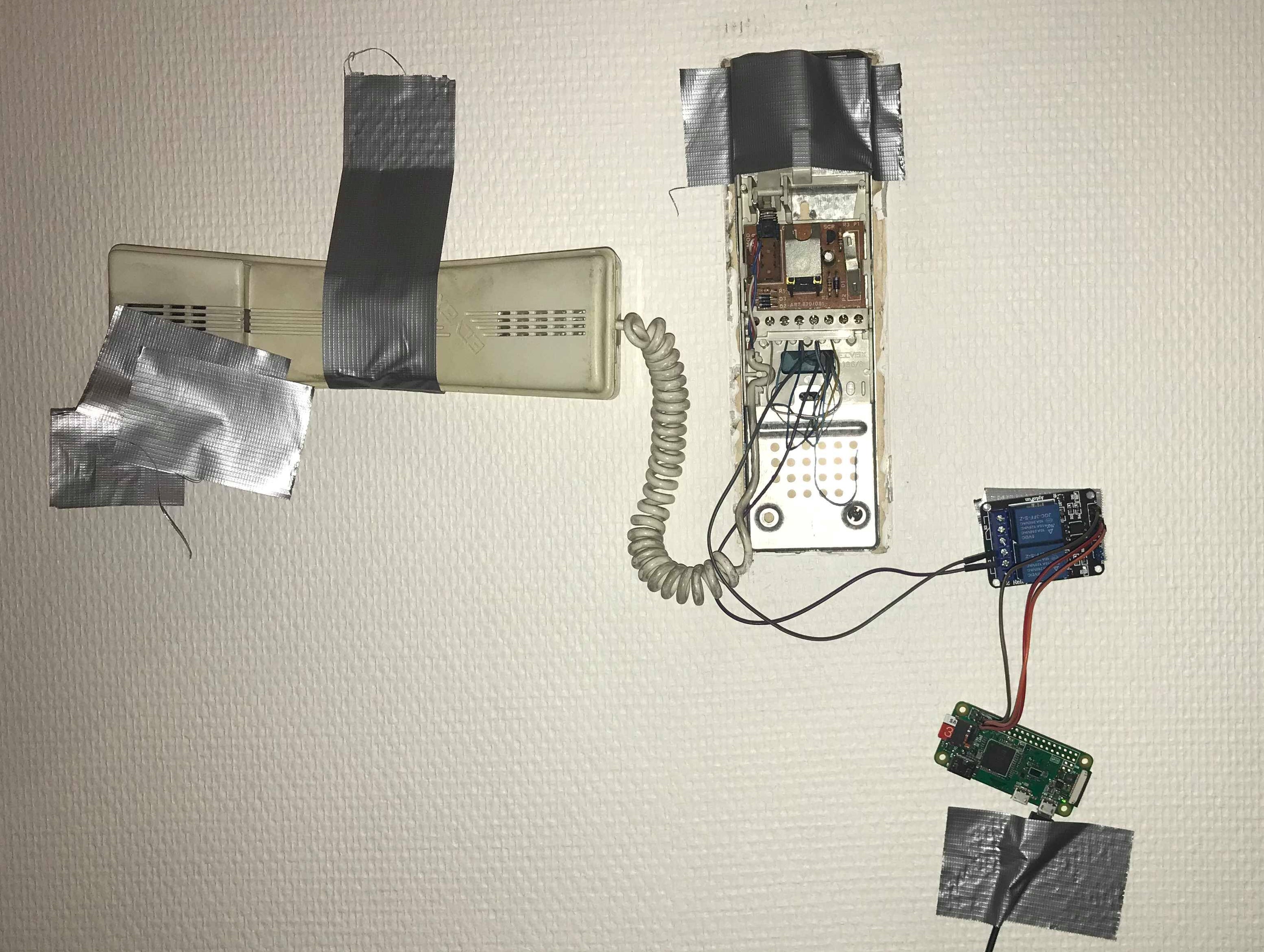
There are smart home projects that arrive in glossy boxes with QR codes, cloud subscriptions, and packaging so premium it feels rude to recycle it. Then there are the projects built because a real-life annoyance keeps ringing the buzzer at the worst possible time. “Quick And Dirty: Operate An Intercom Via Telegram” belongs proudly to the second category. It is the kind of practical hack that says, “I do not need a futuristic building management platform. I need to let the delivery driver into the lobby without sprinting downstairs like I am training for the Olympics.”
The basic idea is simple: connect an old apartment intercom or door buzzer to a small controller, use Telegram as the remote-control interface, and trigger the door-release button through a relay. Done carefully, this setup can let you receive a Telegram notification, confirm who is at the door, and press a virtual “Open” button from your phone. Done carelessly, it can become a tiny robot with the judgment of a sleepy raccoon. That is why this guide focuses on both the fun and the responsibility of operating an intercom via Telegram.
What Does It Mean to Operate an Intercom Via Telegram?
To operate an intercom via Telegram means using Telegram’s bot system as the user interface for a physical access-control action. A Telegram bot can receive commands, send alerts, display inline buttons, and communicate with a local device such as a Raspberry Pi, ESP32, or similar microcontroller. The local device then interacts with the intercom circuit, usually by closing a relay for a short moment, just like a human pressing the door-unlock button.
In a typical apartment intercom, the door-release button does not “talk” to the internet. It simply completes a circuit. The hack is to place a relay across the same two points that the button normally connects. When the Telegram command is approved, the controller energizes the relay for one or two seconds. The intercom thinks the button was pressed. The door unlocks. Somewhere, a package avoids a rainstorm. Technology has earned its coffee.
Why Telegram Works So Well for This Kind of Hack
Telegram is popular among makers because bots are relatively easy to create, the API is well documented, and the mobile app already handles notifications, authentication to the user’s account, media messages, and quick replies. Instead of building a custom mobile app from scratch, you can let Telegram do the heavy lifting. Your intercom project becomes a conversation: the bot says, “Someone is at the door,” and you reply, “Open,” “Ignore,” or “Send photo.”
For quick prototypes, long polling is often easier than webhooks because the device asks Telegram for new updates and does not need to expose a public server. For more polished setups, webhooks can be faster and cleaner, but they generally require HTTPS and a publicly reachable endpoint. If your goal is quick and dirty, polling on a Raspberry Pi sitting inside the apartment is usually the friendlier starting point.
The Basic Parts You Need
1. A Small Controller
A Raspberry Pi Zero, Raspberry Pi 3/4/5, ESP8266, ESP32, or similar board can handle the job. A Raspberry Pi is convenient if you want Python, camera support, logs, and easy package installation. An ESP32 is smaller, cheaper, and very capable if you prefer microcontroller firmware. The controller needs network access and at least one output pin to drive the relay circuit.
2. A Relay or Opto-Isolated Switching Module
The relay is the electronic finger that presses the intercom button. For most intercoms, you want a dry-contact relay, meaning the relay contacts are electrically isolated from the controller. This matters because old intercom systems can use voltages and wiring conventions that are not friendly to modern electronics. If you are unsure, use an opto-isolated relay module and treat the intercom circuit like a mysterious old dragon: useful, but not something you poke casually.
3. Power Supply
Do not power a Raspberry Pi from a sketchy voltage divider connected to the intercom line. That may work just long enough to make you overconfident, and then it may become a tiny heater with regrets. Use a proper USB power adapter, a regulated buck converter, or another stable power source rated for the controller. Reliable power is the difference between a useful smart intercom and a doorbell that needs emotional support.
4. Optional Camera, Microphone, or Doorbell Detection
A minimal system only sends a Telegram message when you ask it to open the door. A better system can detect when the intercom rings, send a notification, and optionally attach a snapshot from a camera pointed at the entrance. Some systems can also capture audio, but audio integration can become more complex depending on the intercom design. Start simple, then add features only after the unlock action is safe and reliable.
How the System Works Step by Step
The workflow is straightforward. First, you create a Telegram bot using BotFather and save the bot token securely. Next, you find your Telegram chat ID and configure your script so only approved chat IDs can issue commands. Then the controller runs a small service that listens for Telegram messages or button callbacks. When the authorized user taps “Open Door,” the service activates a GPIO pin, which triggers the relay for a short pulse. Afterward, the bot sends a confirmation message such as “Door released for 1.5 seconds.”
The most important detail is authorization. Never allow every Telegram user who finds your bot to control the relay. A proper bot should ignore unknown chat IDs, restrict commands to specific users, and avoid printing the bot token in logs. The bot token is basically the key to your bot kingdom. Treat it like a password, not like a recipe for banana bread.
A Practical Example: The “Open Door” Button
Imagine the intercom rings. Your controller detects voltage or sound from the intercom buzzer and sends this Telegram message:
“Someone rang the intercom. Open the building door?”
Under the message are two inline buttons: Open for 2 seconds and Ignore. If you tap “Open,” the bot receives a callback query. The script checks whether the callback came from your approved Telegram ID. If yes, it toggles the relay. If no, it responds with nothing or sends a polite “not authorized” message. Security does not need to be dramatic. Sometimes it just needs to be stubborn.
Long Polling vs. Webhooks for Intercom Control
For a private home intercom project, long polling is often the simplest choice. The Raspberry Pi or ESP32 connects outward to Telegram, requests updates, and processes commands. This avoids opening ports on your home network. It is also easier to test because the bot can run from behind a normal residential router.
Webhooks are better when you want a production-grade bot with lower latency and a public HTTPS endpoint. Telegram sends updates directly to your server. However, this approach requires more network setup and careful protection. If you expose anything to the internet, you should understand reverse proxies, certificates, firewall rules, and update hygiene. Quick and dirty should not mean “free sample for attackers.”
Wiring the Intercom: The Part Where You Slow Down
Every intercom is different. Some systems use a simple button that shorts two terminals. Others combine audio, call signal, ground, and lock release in ways that look like spaghetti after a thunderstorm. Before connecting anything, identify the door-release contacts with a multimeter and, ideally, a wiring diagram for the intercom model. Press the physical unlock button and observe which terminals change state.
The safest common approach is to wire the relay’s normally open contacts in parallel with the existing unlock button. When the relay closes, it imitates the button press. Do not inject voltage into the intercom unless the design specifically requires it and you know what you are doing. For many door-release circuits, the relay should behave like a plain switch, not a power source.
Security Rules You Should Not Skip
Use an Allowlist
The bot should accept commands only from your Telegram user ID or a small list of trusted IDs. Group chats are risky unless you carefully validate the sender. A command like /open should never work just because someone guessed your bot username.
Use Short Relay Pulses
Keep the relay activation brief, usually one to three seconds. A stuck relay or buggy script should not hold the door release indefinitely. Add software timeouts and consider hardware fail-safe behavior where possible.
Log Every Unlock
Save timestamps for every command, approved user, and relay activation. Logs are useful for troubleshooting and accountability. You do not need a full surveillance state in your hallway, but you do want to know whether the bot opened the door at 2:14 p.m. or whether you imagined it before lunch.
Protect the Token
Store the Telegram bot token in an environment variable or protected configuration file. Do not hard-code it into a public GitHub repository. Many smart home disasters begin with “I only shared the repo for a second.”
Keep the Device Updated
A remote-controlled intercom is an IoT device with physical consequences. Keep the operating system, dependencies, and router firmware updated. Use strong passwords, disable unused services, and avoid exposing SSH to the public internet.
Quick and Dirty Does Not Mean Reckless
The charm of this project is that it solves a real problem with minimal parts. But the moment a project controls a door, it becomes more serious than blinking an LED. You are no longer just automating convenience; you are participating in access control. That means you should consider local building rules, landlord approval, fire safety requirements, and whether your modification affects other residents.
In many apartment buildings, the intercom equipment belongs to the building, not the tenant. Modifying it without permission can violate rules or create liability. The right way to approach this project is to keep changes reversible, avoid damaging shared wiring, and use the hack only on equipment you are authorized to modify. The best smart home device is the one that does not turn a delivery convenience into an awkward conversation with property management.
Useful Improvements After the First Version Works
Once the basic Telegram-controlled relay works, the project can grow in several practical directions. A camera snapshot is one of the most valuable upgrades because it lets you confirm who is at the door. A second improvement is a “delivery mode” that works only during a short time window. For example, you can enable door release for the next 20 minutes while expecting a package, then automatically disable it.
Another useful feature is rate limiting. If the bot receives repeated open requests, it should slow down or lock out commands temporarily. You can also add two-step confirmation: first tap “Open,” then tap “Confirm.” This reduces accidental pocket-unlocks, which are the smart-home equivalent of butt-dialing your front door.
Common Mistakes to Avoid
The first mistake is assuming all intercoms are low voltage and safe. Many are, but assumptions are how magic smoke escapes from electronics. Measure before connecting. The second mistake is using a relay board that draws more current than the GPIO pin can safely provide. A controller pin should drive a transistor, optocoupler, or relay input circuit, not directly power a relay coil.
The third mistake is forgetting startup behavior. Some relay modules briefly switch during boot because GPIO pins float before the software initializes. For a lamp, that is annoying. For a door release, that is unacceptable. Choose the right relay logic, add pull-up or pull-down resistors if needed, and test power cycles repeatedly before trusting the system.
The fourth mistake is building a system with no manual fallback. The original intercom button should still work. If the Pi crashes, Wi-Fi fails, Telegram is unavailable, or your phone battery dies, you should not be locked into a comedy sketch starring a cardboard box and a confused courier.
Experience Notes: What It Feels Like to Build and Use This Hack
The first experience most people have with a Telegram intercom project is surprise. It is surprising how little code is needed to make a physical device respond to a chat message. One moment Telegram is where your friends send memes; the next moment it is politely operating a relay inside an old plastic intercom box. That feeling is addictive in the best maker way. It reminds you that automation does not always need a massive platform. Sometimes it needs a bot token, a relay, a controller, and the confidence to read a wiring diagram without whimpering.
The second experience is humility. Old intercoms are not always documented, and even when documentation exists, the actual building wiring may have been modified by three electricians, one enthusiastic uncle, and time itself. You may open the wall unit expecting labeled terminals and instead find a nest of wires that looks like it has been making independent life choices. This is where patience matters. Take photos before touching anything. Label wires. Use a multimeter. Test the physical button. Do not rush, because the “dirty” part of quick and dirty should describe the prototype, not the forensic report.
The third experience is the joy of small reliability improvements. At first, you may simply send /open. Then you realize buttons are better. Then you add confirmation messages. Then you add logs. Then you add a status command that tells you whether the bot is alive. Each tiny improvement makes the system feel less like a hack and more like a tool. It is still homemade, but it becomes the kind of homemade that works every day without demanding applause.
The fourth experience is learning that security is not a single switch. You can have a private Telegram bot, but still make mistakes with the token. You can have an allowlist, but still forget that group chats expose commands to more people. You can hide the Pi inside the intercom box, but still leave SSH using a weak password. A good intercom-via-Telegram setup is layered: Telegram account security, bot allowlists, local network protection, short relay pulses, logs, and physical fallback. None of those layers is glamorous. Together, they are what keep the project from becoming a neighborhood magic trick.
The final experience is convenience. When the system works, it feels wonderfully boring. A visitor rings. Your phone buzzes. You check the context. You tap a button. The door opens. That is the quiet magic of practical home automation: not showing off, not replacing common sense, just removing one annoying little friction point from daily life. And yes, the first time a package lands safely inside instead of being left outside like bait for porch pirates, you may feel like a genius. Try to remain humble. The relay can hear you.
Conclusion
“Quick And Dirty: Operate An Intercom Via Telegram” is a perfect example of practical hacking: small hardware, simple software, and a real-world problem solved with personality. A Telegram bot can become a clean remote interface for an old intercom, while a Raspberry Pi or ESP32 handles the physical relay action. The key is to balance speed with responsibility. Build it quickly if you like, but wire it safely, authorize it strictly, and test it thoroughly.
The best version of this project is not the fanciest. It is the one that works reliably, fails safely, and does not make your building manager develop a new facial expression. Start with a reversible relay setup, lock down the bot, keep the unlock pulse short, and add features only after the basics are boring. In the world of smart home projects, boring is not an insult. Boring means it works.