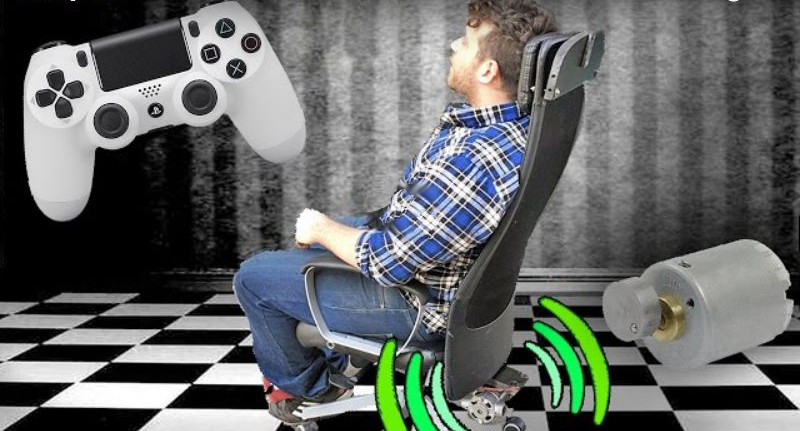
A regular gaming chair is great at doing one job: keeping you from slowly folding into a human pretzel during a long session. But what if your chair could do more than support your back? What if it could rumble when your tires hit gravel, thump when your car slams into a barrier, pulse when an explosion rolls through a battlefield, and make every crash feel less like pixels on a screen and more like a tiny earthquake politely scheduled under your spine?
That is the idea behind a gaming chair that gives full body feeling to collisions. Instead of limiting feedback to a controller, steering wheel, or headset, haptic gaming chairs and haptic seat pads bring vibration and tactile response directly to the body. The result is a more immersive gaming experience, especially in sim racing, flight simulation, virtual reality, and action games where impacts, engine rumble, recoil, road texture, and environmental effects matter.
This technology is not just a flashy gimmick for people who already own three monitors, a racing wheel, and a suspiciously serious pair of driving gloves. It is part of a larger shift in gaming: players want to feel the game, not merely watch it. Haptic feedback, tactile transducers, bass shakers, motion platforms, and smart gaming cushions are turning the humble chair into a physical storytelling device.
What Does “Full Body Feeling” Mean in a Gaming Chair?
When people talk about a gaming chair giving a full body feeling to collisions, they usually mean tactile feedback. The chair does not actually throw you across the room when your virtual car hits a wall, which is good news for your drywall, your pets, and your dignity. Instead, actuators or transducers create controlled vibration through the seat, backrest, or cushion.
The effect can be simple or advanced. A basic DIY setup may use an unbalanced motor, similar in principle to the vibration motor inside an old game controller, only much stronger. A more refined setup may use bass shakers, voice coil actuators, or a multi-zone haptic pad. These systems can respond to audio signals, game telemetry, or direct software integration.
In plain English, the chair translates game events into physical sensations. A crash becomes a thud. A rough road becomes a gritty vibration. Engine RPM becomes a steady mechanical buzz. Tire slip becomes a warning under your seat before your car spins out and you blame “lag,” even though the problem was absolutely the corner you took like a shopping cart with ambition.
How Haptic Gaming Chairs Work
Haptic gaming chairs and seat accessories rely on one core idea: the human body is very good at interpreting vibration. We use vibration cues constantly in the real world. You can feel a car engine through the seat, a train platform trembling before the train arrives, or a subwoofer shaking the room before the bass drops. Haptic gaming equipment uses that same sensory shortcut to make games feel more present.
1. Vibration Motors
Some simple haptic chair projects use vibration motors with offset weights. When the motor spins, the uneven weight creates vibration. This is the same basic idea behind the rumble motors in older controllers, but scaled up for chair-mounted feedback. DIY builders have used this method to make crashes and impacts shake the entire chair.
The advantage is simplicity. The downside is control. A large motor can be powerful, but it may not produce subtle effects. It can also be noisy, uneven, and mechanically stressful if mounted poorly. In other words, it can make your racing game feel exciting, or it can make your apartment sound like a washing machine trying to escape.
2. Bass Shakers and Tactile Transducers
Bass shakers, also called tactile transducers, are popular in sim racing rigs. Unlike regular speakers, they are designed to turn low-frequency signals into vibration rather than airborne sound. Mount one under a seat or racing cockpit, connect it to an amplifier, and it can create powerful physical feedback without needing to blast your speakers.
These devices are especially effective for engine vibration, gear shifts, curbs, road texture, suspension hits, and collisions. With software such as SimHub, many sim racers can map specific game telemetry to specific effects. That means the feedback is not just random rumble. It can be connected to what the virtual car is actually doing.
3. Multi-Zone Haptic Cushions
Modern haptic gaming cushions take the concept further. Instead of one shaker under the seat, they may use multiple actuators placed around the back, lower body, and seat base. This allows directional and layered feedback. For example, a left-side impact can feel different from a rear collision. A heartbeat in a horror game can pulse through the backrest while an explosion hits harder through the lower cushion.
Products such as haptic seat pads and advanced gaming cushions are designed to fit onto existing chairs, which makes them appealing for players who want immersion without replacing their entire setup. Some support native game integration, while others convert audio into tactile effects. Native integration is usually more precise, but audio-based haptics can work across more games.
4. Motion Platforms
A motion platform is the next level up. Instead of only vibrating, it physically moves the seat or cockpit. These systems can simulate acceleration, braking, roll, pitch, and bumps. They are common in serious racing and flight simulation setups, but they cost more, require space, and may be complete overkill unless your gaming room already looks like mission control.
Why Collision Feedback Feels So Immersive
Collisions are dramatic because they interrupt rhythm. In a racing game, you are focused on speed, braking points, tire grip, and corner exits. Then suddenly, bang: the car hits a barrier, clips another vehicle, lands from a jump, or bounces over a curb. On a regular screen, you see the crash. With haptic feedback, your body receives a matching signal.
That physical response helps close the gap between seeing and feeling. Your brain connects the visual event with the tactile cue, making the virtual world feel more believable. This is the same reason force feedback steering wheels are so popular in sim racing. When the wheel fights your hands and the seat shakes under you, the car feels less like software and more like a machine.
Full body collision feedback can also improve awareness. In sim racing, a well-tuned haptic setup may help you notice wheel slip, road texture, engine vibration, or the moment a tire touches a curb. These cues do not magically turn a beginner into a champion, but they can give useful information. At minimum, they make crashing more educational. Painful for your lap time, yes. But educational.
Best Uses for a Haptic Gaming Chair
Sim Racing
Sim racing is the natural home for haptic chairs. Racing games and simulators already contain rich physical information: engine RPM, suspension movement, gear shifts, ABS activation, wheel lock, traction loss, curbs, bumps, and impacts. A haptic chair can turn this data into physical feedback that helps the driver feel connected to the car.
For example, a bass shaker under the seat can produce a deep thump when shifting gears. A second transducer can simulate road rumble. Multiple actuators can separate left and right effects, helping the driver feel which side of the car hits a curb. In a crash, the chair can deliver a sharp jolt that makes the mistake memorable without requiring an insurance claim.
Flight Simulation
Flight sim players can also benefit from haptic seating. Engine vibration, turbulence, landing gear movement, runway bumps, stall warnings, and touchdown can all be represented through tactile feedback. A smooth landing might feel like a gentle pulse, while a rough landing may remind you that gravity remains undefeated.
Virtual Reality
VR already surrounds the eyes and ears. Haptic chairs add another sensory layer by involving the body. In racing VR, the combination can be especially convincing because the player is visually inside the cockpit while the seat responds to motion and impact cues. The more senses involved, the easier it becomes to forget that the “car” is really a desk, a monitor, and a suspicious pile of cables.
Action and Adventure Games
Explosions, weapon recoil, monster footsteps, environmental hazards, and cinematic sequences can become more intense with haptic feedback. However, this depends heavily on how the chair receives information. If the system only converts audio into vibration, loud sounds may trigger strong effects even when the gameplay event is not physically meaningful. Native haptic support tends to feel cleaner and more intentional.
DIY Gaming Chair vs. Commercial Haptic Chair Accessories
The DIY route is popular among makers because the concept is approachable. A chair, a motor or tactile transducer, a power source, mounting hardware, and basic electronics can create a surprisingly powerful effect. The classic maker spirit is simple: “Could I buy this? Sure. Could I bolt something alarming to a chair and learn something? Absolutely.”
A DIY haptic gaming chair can be cheaper and more customizable. You can choose the intensity, mounting position, software, and number of vibration zones. It is also a fun electronics project for people who enjoy tinkering.
Commercial options, however, are usually safer, cleaner, and easier to use. Haptic cushions and dedicated gaming pads are designed to attach to existing chairs, manage heat, distribute vibration, and work with software. Brands in the haptic and sim racing space often focus on reliability, game support, and user-friendly controls. For most players, a commercial haptic pad or bass shaker kit is the more practical path.
Important Setup Tips
Mounting Matters
Where the haptic device is mounted changes everything. A transducer attached firmly to a metal racing frame may feel sharp and strong. The same device attached loosely to a soft office chair may feel mushy or rattly. Good mounting transfers vibration efficiently into the seat while minimizing unwanted noise.
Do Not Overdo the Intensity
More vibration is not always better. If every effect is turned up to maximum, the chair becomes a chaos machine. The best setups use layers. Engine rumble should be present but not exhausting. Road texture should be noticeable but not annoying. Collisions should stand out because they are stronger and sharper than normal driving feedback.
Use Game Telemetry When Possible
Audio-based haptics can be fun, but telemetry-based feedback is usually more accurate. Telemetry allows the software to respond to specific game data such as RPM, suspension travel, wheel slip, gear changes, and impacts. This helps separate meaningful effects from random loud noises.
Think About Noise and Neighbors
A haptic chair may be quieter than a subwoofer, but vibration can travel through floors and walls. If you live in an apartment, consider rubber isolation feet, lower gain settings, and sensible session hours. Your downstairs neighbor may appreciate your passion for racing, but probably not at 1:47 a.m. during a virtual endurance event.
Safety and Comfort Considerations
A gaming chair that gives full body feeling to collisions should be exciting, not punishing. Long sessions with intense vibration may cause fatigue or discomfort. People with back pain, circulation issues, implanted medical devices, pregnancy, or other health concerns should be cautious and consult a medical professional before using strong haptic equipment.
Electrical safety matters too. DIY builders should use proper wiring, rated power supplies, fuses where appropriate, secure mounting, and ventilation for amplifiers or motors. Loose hardware can become noisy or dangerous. Exposed wiring has no place near a moving chair, a metal frame, or a gamer who just spilled an energy drink.
What Makes a Good Haptic Gaming Chair Setup?
A good setup does three things well: it feels convincing, it stays comfortable, and it supports the games you actually play. The most expensive system is not automatically the best. A simple seat shaker tuned properly can feel better than a complicated setup with every effect turned into a thunderstorm.
For sim racing, prioritize telemetry support, strong mounting, and adjustable profiles. For general gaming, look for broad compatibility, comfortable padding, and easy intensity controls. For VR, pay attention to cable management and latency, because nothing ruins immersion like being physically tangled in your own “future of gaming.”
Examples of Collision Feedback in Real Gameplay
Imagine driving a GT car at high speed. The engine vibration hums steadily through the seat. As you brake, the chair gives a subtle pulse. You clip the inside curb, and the right side of the seat chatters. Then you push too hard on exit, lose the rear, and slide into the wall. The impact lands as a short, heavy thud through the back and base of the chair. You instantly know the crash was not just visual. Your body felt the mistake.
In a rally game, gravel may feel rough and uneven, while asphalt feels smoother. Landing after a jump can hit like a compressed bump through the seat. In a flight simulator, touchdown can feel like a firm vibration followed by runway texture. In a sci-fi shooter, an explosion behind the player can roll through the chair like a wave.
These effects work best when they are synchronized. If the vibration arrives late, feels too random, or triggers from every loud sound, immersion breaks. But when the timing is right, the chair becomes part of the game’s feedback loop.
Is a Haptic Gaming Chair Worth It?
For casual players, a haptic gaming chair may be fun but not essential. A good controller, headset, or monitor upgrade may matter more. But for sim racers, flight sim fans, VR players, and immersion enthusiasts, tactile feedback can be one of the most satisfying upgrades available.
The biggest benefit is presence. A haptic chair makes games feel less flat. It adds weight to impacts, texture to surfaces, rhythm to engines, and drama to collisions. It will not replace skill, and it will not stop you from braking too late into Turn 1. But it may help you feel what happened before the wall introduces itself.
Where the Technology Is Going
Gaming haptics are moving beyond simple vibration. Newer systems are becoming more directional, more detailed, and more integrated with game engines. Instead of one big buzz, players can experience layered tactile events: a light pulse, a directional tap, a deep rumble, or a sharp impact. As more games support advanced haptic APIs and telemetry outputs, chairs and cushions may become smarter and more precise.
The long-term dream is full sensory gaming that combines visuals, audio, force feedback, haptic seating, wearable devices, and motion systems. The challenge is making it affordable, comfortable, reliable, and supported by enough games. Nobody wants to buy a futuristic chair that only works beautifully with three titles and a tech demo involving a bouncing cube.
Experience Section: What It Feels Like When a Gaming Chair Brings Collisions to Life
The first thing you notice with a haptic gaming chair is not always the crash. It is the quiet stuff. The low engine vibration under the seat. The small pulse when a gear changes. The scratchy texture of a rough road surface. These details create a baseline that makes the virtual machine feel alive. Without haptics, a racing game can still look fast and sound aggressive. With haptics, it begins to feel mechanical, as if the chair has learned to speak fluent horsepower.
Then comes the first collision. Maybe you miss a braking point and tap the barrier. On a normal setup, the screen shakes, the car slows, and you mutter something noble and sportsmanlike, such as “That was totally the AI’s fault.” With a full body haptic setup, the chair answers immediately. The impact does not need to be violent to be effective. A short, controlled thump through the seat and backrest is enough to make the event feel real. It gives the crash weight.
The best part is how quickly your brain accepts the illusion. After a few laps, the feedback becomes part of how you read the game. You start recognizing the difference between a curb strike and a wall hit. You can feel when the car is unsettled. You notice when the rear tires are losing grip. In rally games, loose surfaces feel more chaotic. In track racing, clean asphalt feels smoother, while rumble strips add a warning buzz that says, “Congratulations, you are using all the track and possibly some of the landscaping.”
In VR, the effect becomes even stronger. Because your eyes already believe you are sitting inside the cockpit, the chair’s feedback gives your body supporting evidence. A bump on the road, a heavy landing, or a side impact can make the virtual space feel closer and more believable. It does not create true physical g-force, but it gives the body a cue that something happened. That cue is often enough to increase immersion dramatically.
There is also a learning curve. At first, many players turn the intensity too high. Everything shakes: engine, road, impacts, menu music, possibly your skeleton. After a while, you realize the magic is in tuning. Lower the constant effects. Keep the impact effects clear. Let the chair whisper during normal driving and shout only when something important happens. That balance turns haptics from a novelty into a useful sensory layer.
Comfort matters too. A chair that shakes aggressively for hours can become tiring. The ideal experience is not “theme park disaster simulator.” It is controlled immersion. The feedback should make the game richer without making your back file a complaint. Good padding, proper mounting, smart software profiles, and reasonable vibration levels make a huge difference.
For many players, the most memorable experience is the moment they turn the system off. Suddenly the game feels flatter. The car still looks good. The engine still sounds good. But something is missing. The chair is no longer communicating. The crashes become visual again instead of physical. That is when you understand why haptic gaming chairs, bass shakers, and tactile feedback systems have become so popular among simulation fans. Once your body gets invited into the game, plain old sitting feels strangely quiet.
Conclusion
A gaming chair that gives full body feeling to collisions is more than a vibrating seat with dramatic ambitions. It is a bridge between digital action and physical sensation. By using vibration motors, tactile transducers, bass shakers, multi-zone haptic cushions, or motion systems, these setups turn crashes, curbs, explosions, and engine feedback into something the player can feel.
For sim racing and VR, the effect can be especially powerful. It adds detail, improves immersion, and makes every mistake harder to ignore. A haptic chair will not make you faster overnight, but it can make the driving experience more informative and far more exciting. It is the difference between watching a collision happen and feeling a convincing little reminder that, yes, the wall was very much there.
Whether you choose a DIY build, a bass shaker kit, or a polished haptic gaming cushion, the key is thoughtful setup. Tune the effects, secure the hardware, manage the noise, and prioritize comfort. Done well, full body haptic feedback can transform an ordinary gaming chair into one of the most immersive parts of your setup.
Note: This article is based on synthesized information from reputable gaming hardware, haptics, sim racing, maker, and technology sources. Direct source links are intentionally omitted for clean web publication.