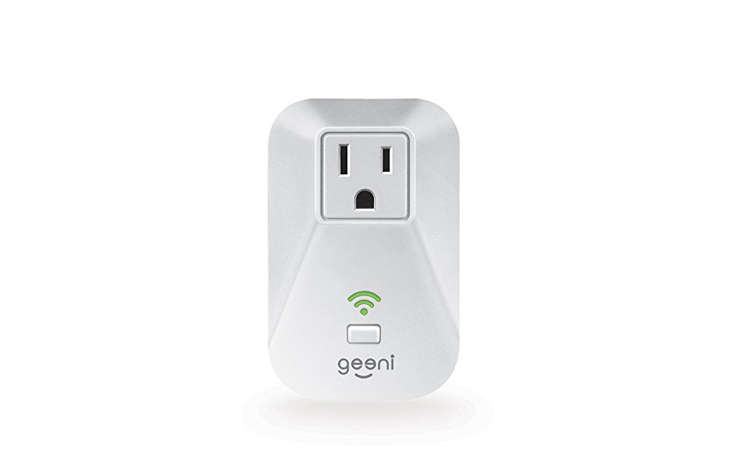
The Energi Smart Plug with Energy Tracking is the kind of small smart-home gadget that quietly raises a big question: “Wait, how much electricity is that thing actually using?” In a world where lamps, fans, chargers, humidifiers, coffee makers, gaming consoles, and mystery cords behind the TV all seem to have their own secret lives, a smart plug with energy monitoring can feel like a tiny detective plugged into your wall.
Often associated with the Geeni Energi Energy Tracking Wi-Fi Smart Plug from Merkury Innovations, this device was designed to give everyday appliances remote control, scheduling, voice-assistant compatibility, and energy-use visibility through the Geeni app. While the original Energi model appears to be discontinued in many retail channels, its feature set still represents what many shoppers want from a modern smart plug with energy monitoring: easy setup, app-based control, useful automation, and a clearer look at household electricity habits.
And yes, it can make you suspicious of your “off” electronics. That’s not paranoia. That’s good energy management wearing slippers.
What Is the Energi Smart Plug with Energy Tracking?
The Energi Smart Plug is a Wi-Fi smart outlet adapter that plugs into a standard wall outlet. You then plug a lamp, fan, small appliance, or other compatible device into the smart plug. Once connected to the Geeni app, the plug can turn the device on or off from your phone, follow a schedule, respond to compatible voice assistants, and monitor energy consumption at the outlet.
In simple terms, it turns ordinary plug-in devices into smart devices. A basic floor lamp becomes an app-controlled lamp. A fan becomes a scheduled fan. A humidifier becomes something you can turn on before you arrive home instead of waiting around in dry-air misery like a houseplant with taxes.
The most interesting feature is energy tracking. Instead of only controlling power, the plug can help you see how much electricity a connected device uses. That is useful because most people do not think in kilowatt-hours while making coffee, watching TV, or charging devices. Energy tracking makes electricity less invisible.
Core Features That Make It Useful
1. App Control from Anywhere
With the Geeni app, users can control supported Geeni smart devices from a smartphone. For a smart plug, that means switching connected devices on or off without walking across the room. Remote control is especially helpful for lamps, seasonal decorations, fans, and small appliances that are safe to automate.
For example, you could turn on a living room lamp before getting home at night. You could switch off a fan after leaving the house. You could also check whether a device is still running instead of performing the classic “Did I leave it on?” mental gymnastics routine in the grocery store parking lot.
2. Energy Usage Monitoring
The headline feature is energy tracking. The Energi Smart Plug is designed to monitor electricity use through the outlet, helping users understand how much power a connected device consumes. That matters because many household electronics draw small amounts of electricity even when they appear to be off. These standby loads are often called phantom loads or energy vampires.
Energy tracking does not magically lower the bill by itself. It gives you information. The savings come when you use that information to change behavior, set smarter schedules, unplug wasteful devices, or replace inefficient appliances. Think of it as a fitness tracker for your outlet. It will not do the push-ups for you, but it will absolutely tell you when the couch has won again.
3. Scheduling and Automation
Smart plugs are especially practical when used with schedules. A lamp can turn on at sunset. A fan can run during the warmest part of the afternoon. Holiday lights can shut off before midnight so the inflatable snowman does not supervise the neighborhood until breakfast.
Scheduling also reduces forgetfulness. If you use a device at the same time every day, automation can make the routine smoother. A scheduled smart plug can help manage convenience and energy use at the same time, as long as the connected device is safe for automated operation.
4. Voice Assistant Compatibility
The Geeni smart-home ecosystem has supported popular voice assistants such as Amazon Alexa and Google Assistant. Once properly linked, a smart plug can usually be controlled with simple voice commands. This is useful when your hands are full, when the lamp switch is hiding behind furniture, or when you have already achieved maximum blanket comfort and refuse to negotiate with gravity.
Good naming matters. “Bedroom Lamp” works better than “Plug 3.” If you connect the plug to Google Home, assigning the device type can make commands more natural. Instead of asking an assistant to turn on “the plug,” you can ask it to turn on the lamp, fan, or light.
5. No Hub Required
One reason Wi-Fi smart plugs became popular is that many do not require a separate hub. A no-hub setup keeps the entry cost low and makes installation friendlier for beginners. The Energi-style Geeni plug connects through a home Wi-Fi network and the Geeni app rather than requiring a dedicated bridge.
For most users, that is a win. The tradeoff is that Wi-Fi smart devices depend on your router, internet connection, app support, and cloud services. That is not unique to Energi; it is common across many Wi-Fi smart-home products.
How Energy Tracking Helps You Save Money
Electricity bills can feel like they were written by a calculator with trust issues. A smart plug with energy tracking helps by breaking usage down at the device level. Instead of seeing only total monthly household consumption, you can test individual items.
Here are practical examples:
- Television setup: Measure the TV, streaming box, soundbar, and game console to see what they draw in active and standby modes.
- Home office: Track a monitor, printer, desk lamp, or speaker system that may sit idle for long hours.
- Bedroom comfort: Monitor a fan, humidifier, air purifier, or white-noise machine to understand nightly energy use.
- Seasonal decor: Schedule holiday lights and measure how much electricity they use over several evenings.
- Kitchen counter devices: Check small appliances with clocks, displays, or standby modes.
The basic calculation is simple: watts multiplied by hours equals watt-hours. Divide by 1,000 to get kilowatt-hours. Multiply kilowatt-hours by your electricity rate to estimate cost. For example, a device using 40 watts for 5 hours consumes 200 watt-hours, or 0.2 kWh. If electricity costs around 18 cents per kWh, that session costs about 3.6 cents. Not dramatic by itself, but repeated across devices and months, the tiny costs begin forming a committee.
The Energi Smart Plug with Energy Tracking is most helpful when used as a measuring tool. You can rotate it around the home for a week at a time: entertainment center first, then office, then bedroom, then seasonal items. After a month, you may know more about your home’s plug loads than most people know about their houseplants.
Best Uses for the Energi Smart Plug
Lamps and Accent Lighting
Lamps are the easiest win. They are low-risk, simple to automate, and ideal for schedules. You can create a lived-in look while traveling, turn lights on before arriving home, or shut them off automatically at bedtime.
Fans and Air Circulation
A plug-in fan can be scheduled for comfort and energy control. For example, you might run a fan during warm afternoon hours and shut it off overnight. Energy tracking can show whether the fan costs pennies per day or more than expected.
Humidifiers and Air Purifiers
Small comfort appliances can be useful candidates if they are safe to control by power interruption. You may be able to run them during specific hours and compare usage between low and high settings.
Entertainment Centers
TVs, speakers, streaming devices, and consoles are classic suspects for standby power. A smart plug can help identify whether the setup uses meaningful electricity while idle. However, be careful with devices that need updates, recordings, or network standby features. Cutting power completely may interrupt those functions.
Holiday Lights
Holiday lights are where smart plugs become heroes wearing tiny capes. Schedules prevent lights from staying on all night, and energy tracking lets you compare older incandescent strings with modern LED decorations.
What Not to Plug Into It
Smart plugs are convenient, but they are not magic wall wizards. Safety comes first. Always check the plug’s label and manual for maximum amperage, wattage, indoor or outdoor rating, and supported load types.
Avoid using a standard indoor smart plug with high-demand appliances that may exceed its rating. Be especially cautious with space heaters, portable air conditioners, large kitchen appliances, power tools, medical equipment, or anything that creates heat and should not be turned on remotely without supervision. If a device could be dangerous when activated unexpectedly, do not automate it casually.
Also avoid using an indoor plug outdoors unless it is specifically rated for outdoor use. Rain, snow, humidity, and electricity are not a charming trio. They are a safety meeting waiting to happen.
Setup Tips for a Smoother Experience
Most Geeni-style smart plugs require a 2.4 GHz Wi-Fi network, which is common for smart-home devices because it offers better range than 5 GHz in many homes. If setup fails, the issue is often the Wi-Fi band, router settings, password entry, or pairing mode.
Try these setup tips:
- Use a stable 2.4 GHz Wi-Fi connection during setup.
- Keep your phone close to the plug and router while pairing.
- Reset the plug if the indicator light is not blinking in the correct mode.
- Name the plug based on the connected device, such as “Desk Lamp” or “Window Fan.”
- Update the app and firmware when available.
- Use strong account passwords and enable extra security features when offered.
For voice control, link the Geeni account to the chosen assistant app and assign the plug to the right room. Good organization prevents the awkward moment when you ask for the bedroom lamp and accidentally turn off the fish tank light.
Energy Tracking vs. Whole-Home Energy Monitoring
A smart plug with energy tracking monitors one outlet at a time. A whole-home energy monitor looks at broader household electrical use. Both are useful, but they solve different problems.
The Energi Smart Plug is best for device-level learning. It answers questions like, “How much does this fan use?” or “Is my entertainment center wasting power overnight?” Whole-home monitoring is better for seeing total patterns, major appliances, solar production, or time-of-use trends.
For most renters and beginners, a smart plug is more approachable. You do not need electrical panel work, professional installation, or a deep conversation with a breaker box. You just plug it in and start learning.
Is the Energi Smart Plug Still Worth Considering?
If you already own the Energi Smart Plug with Energy Tracking, it can still be useful for measuring plug-level electricity use and controlling compatible devices. If you are shopping today, availability may be limited because the original Energi model appears to be an older or discontinued product. In that case, compare it with newer smart plugs that offer energy monitoring, compact designs, stronger security support, Matter compatibility, or better app ecosystems.
That said, the concept remains highly relevant. Energy-tracking smart plugs are still one of the easiest ways to understand household plug loads. Whether the brand is Geeni, Kasa, Eve, Wyze, IKEA, or another smart-home company, the buying checklist is similar: energy monitoring, safe electrical rating, reliable app, voice-assistant support, security updates, good reviews, and a shape that does not block the second outlet.
Buyer’s Checklist for Any Smart Plug with Energy Monitoring
- Energy monitoring: Look for real-time and historical usage data.
- Electrical rating: Confirm amps, watts, voltage, and load type.
- Safety certification: Prefer products with recognized safety marks such as UL or ETL listing.
- Wi-Fi compatibility: Check whether it requires 2.4 GHz Wi-Fi.
- App quality: Read recent app reviews, not just product-box promises.
- Voice assistants: Confirm Alexa, Google Assistant, Apple Home, or Matter support if needed.
- Physical size: Compact plugs are less likely to block neighboring outlets.
- Security practices: Use strong passwords, app updates, and two-factor authentication when available.
Real-World Experience: Living With an Energy-Tracking Smart Plug
Using an energy-tracking smart plug like the Energi Smart Plug changes the way you look at normal household devices. At first, it feels like a convenience gadget. You plug in a lamp, open the app, tap a button, and enjoy the tiny thrill of controlling electricity from your phone. It is not exactly superhero-level power, but it is close enough when you are on the couch.
The energy tracking becomes more interesting after a few days. A lamp is predictable. A phone charger is usually boring. But an entertainment center can be surprisingly revealing. A TV, speaker bar, streaming stick, and game console may use a small but steady amount of standby power. Individually, it is not scary. Together, running every day, the numbers become worth noticing. This is where the smart plug earns its keep: not by shouting, but by politely showing receipts.
One useful approach is to create a “testing week.” Start with the device you suspect uses the most energy. Leave it connected for several normal days, then compare active use with idle time. Next, move the smart plug to another device. After testing five or six items, you can make smarter decisions. Maybe the old fan is inexpensive to run and totally fine. Maybe the decorative light that looked innocent is staying on too long. Maybe the printer has been sitting in standby mode like a tiny office goblin.
The scheduling feature also becomes more valuable with repetition. For example, setting a living room lamp to turn on before sunset makes the home feel more welcoming. Setting it to turn off at bedtime removes one small nightly task. Holiday lights are even better. Instead of relying on memory, the schedule handles the routine. Nobody has to wander outside at 12:30 a.m. in pajamas to unplug a reindeer.
Energy tracking can also settle household debates. If someone says, “That fan is running all the time and costing a fortune,” the plug can provide actual data. Sometimes the answer is surprising. A low-watt fan may cost very little, while an older appliance used for shorter periods may consume far more. Data turns vague worry into practical action.
The biggest lesson is that smart plugs work best when used thoughtfully. They are excellent for lamps, fans, small electronics, and seasonal items. They are not ideal for every appliance, and they should never be used beyond their rated load. Once that safety rule is respected, an energy-tracking plug becomes a simple, affordable way to make the home smarter and a little less wasteful. It is not glamorous, but neither is saving money on electricity. Both are still deeply satisfying.
Conclusion
The Energi Smart Plug with Energy Tracking is a small device with a practical mission: make ordinary plug-in devices easier to control and easier to understand. Its biggest advantage is not just remote on/off control, but visibility. By showing how much electricity a connected device uses, it helps homeowners and renters make smarter choices about schedules, standby power, and everyday energy habits.
Although the original Geeni Energi model may be harder to find today, its feature set remains a strong example of what to look for in a smart plug with energy monitoring. Choose safe, well-rated devices, use them with appropriate appliances, protect your smart-home accounts, and let the data guide your decisions. Your outlets may not become thrilling dinner-party guests, but they will finally start telling you the truth.