The Nintendo Switch is a magical little rectangle that can turn a couch into Hyrule, an airport gate into a race track,
and your “I’ll just buy one game” promise into a laughable work of fiction. The only thing it can’t do?
Pretend 32GB of storage is enough for modern life.
The good news: the Switch makes expanding storage painless. Pop in a microSD card, download more games, and keep your
internal memory from becoming a sad, cramped studio apartment. The tricky part is choosing the right cardbecause the
internet will happily try to sell you “900MB/s ULTRA MEGA PRO GAMER SPEED” when your Switch mostly just wants a
reliable UHS-I card that won’t flake out mid-download.
Quick Compatibility Check (So You Don’t Buy the Wrong Thing)
The Nintendo Switch family supports microSD, microSDHC, and microSDXC cards, and Nintendo recommends UHS-I for better
transfer speeds. If you’re using a microSDXC card (64GB+), the first-time setup may require a system update. In plain
English: yes, the Switch can use big cards, but it may need a quick update before it does.
How Much Storage Do You Actually Need?
The original Nintendo Switch includes 32GB of internal storage (with some reserved for the system), while the Switch
OLED model includes 64GB. Digital games, updates, and DLC can eat that space fastespecially if you like big open-world
adventures, large third-party titles, or you simply enjoy collecting games the way dragons collect treasure.
My practical “pick a size” cheat sheet
- 128GB: Good for mostly physical cartridges + a handful of digital favorites and DLC.
- 256GB: Sweet spot for many players who buy a mix of physical and digital.
- 512GB: Ideal if you’re mostly digital or you rotate through lots of big games.
- 1TB: For “digital-only” libraries, big DLC collections, and anyone who refuses to delete anything.
Speed Ratings Explained (Without the “Tech Soup”)
MicroSD cards come with speed labels that look like they were designed by someone who lost a bet: U1, U3, V30, A1, A2,
and so on. Here’s what actually matters for Switch gaming.
1) UHS-I is the key compatibility target
Nintendo specifically recommends UHS-I. Many cards advertise huge “up to” read speeds, but real-world performance depends
on the device’s limits. The Switch won’t suddenly turn into a PC SSD because you bought an expensive cardso your goal is
reliable, not “racecar for a school zone.”
2) U1 vs U3 (and V30)
UHS Speed Class ratings are minimum sustained write speeds: U1 means at least 10MB/s, and U3 means at least 30MB/s.
Video Speed Class V30 also indicates at least 30MB/s sustained writes. For Switch, U3/V30 can help with faster
downloads and installs, but it won’t transform gameplay performance.
3) A1/A2 can help with responsiveness (sometimes)
Application Performance Class (A1/A2) relates to random read/write performance (useful for “app-like” workloads).
A2 can be faster than A1 on devices that support its features, but if the device doesn’t fully support A2’s tricks,
it may not deliver a dramatic improvement. For Switch, A1 is already solid; A2 is a nice bonus if the price is close.
What Makes a microSD Card “Best” for Nintendo Switch in 2023?
- Trusted brand + genuine card (counterfeits are everywhere)
- UHS-I compatibility
- At least U1 (U3/V30 preferred if the deal is good)
- Capacity that matches your buying style
- Solid warranty and retailer support
The Best Nintendo Switch SD Cards for 2023
Best Overall: SanDisk microSDXC Card Licensed for Nintendo Switch (128GB–1TB)
If you want the “just work” option, the officially licensed SanDisk Nintendo Switch microSDXC cards are hard to beat.
You’re paying a small premium for branding and peace of mind, but you get a card built and marketed specifically for
Switch usageplus widely available capacities that fit most libraries.
- Why it’s great: Reliable, widely compatible, easy to find, and purpose-built positioning for Switch owners.
- Who it’s for: Anyone who wants low drama and high confidence.
- Capacity tip: 256GB or 512GB is a strong middle-ground for most players.
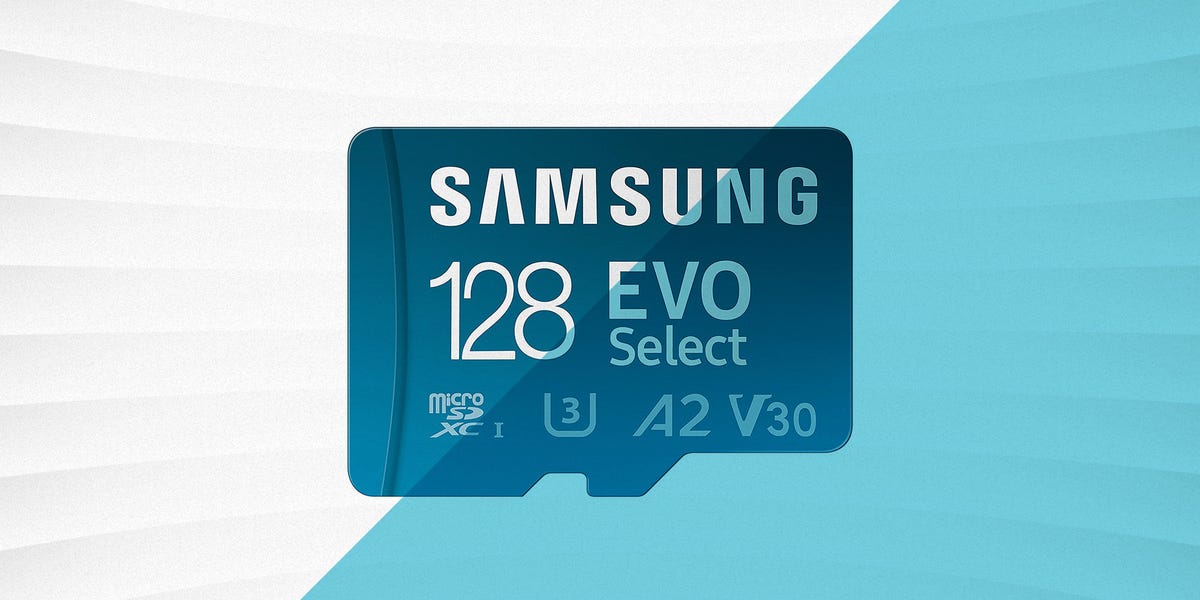
Best Value Workhorse: Samsung EVO Select / EVO Plus (128GB–512GB+)
Samsung’s EVO line has been a go-to for years because it hits the “fast enough + dependable + often on sale” trifecta.
For Switch players, it’s a smart pick when you want strong everyday performance without paying for a fancy costume.
- Why it’s great: Excellent value during sales, good reliability reputation, widely available.
- Who it’s for: Practical shoppers who still want quality.
- Buying tip: Stick to reputable retailers to reduce counterfeit risk.
Best for Performance Nerds (Within Reason): Kingston Canvas Go! Plus
If you like choosing the slightly-better option even when the difference is subtle (we see you), Kingston Canvas Go! Plus
cards benchmark well in testing and can be a great “premium-but-not-crazy” choice. It’s the kind of card you buy when you
want speed headroom for downloads/transfers and a brand known for storage products.
- Why it’s great: Strong tested performance, good brand track record.
- Who it’s for: Players who download lots of games/updates and want snappy transfers.
- Reality check: Don’t overpaySwitch hardware has limits, so chase deals, not bragging rights.
Best Budget Pick (From a Trusted Source): SanDisk Ultra microSDXC
The SanDisk Ultra line is a classic “good enough for most” option. For Switch gaming, it can run titles just fine because
the console isn’t designed to exploit the most extreme microSD speeds anyway. If you buy from a reputable store and the
price is right, it’s a smart way to expand storage without feeling like you’re financing a spaceship.
- Why it’s great: Often affordable, widely available, proven mainstream choice.
- Who it’s for: Casual-to-mid-level digital buyers, or anyone who prefers to spend money on games instead of storage.
Best High-Capacity Option: SanDisk Extreme (1TB)
If you’re the kind of person who sees an eShop sale and says, “Yes, I will adopt all of these games,” then 1TB is your
emotional support storage. SanDisk Extreme models can be very fast on paper and are popular among power users.
On Switch, you’re mainly buying capacity plus qualitynot a miracle.
- Why it’s great: Huge capacity from a reputable brand, strong overall performance profile.
- Who it’s for: Digital-only libraries and long-term “I refuse to uninstall anything” folks.
Do Faster SD Cards Improve Nintendo Switch Load Times?
Sometimes a little, but not always enough to justify paying double. In general, the Switch has practical speed ceilings,
and ultra-fast cards can hit diminishing returns. Where you may notice speed differences most often is:
- Downloading big games/updates (write speed matters)
- Moving data to/from a PC (especially with a good card reader)
- Installing or updating large titles (again, write speed)
For actual gameplay, many titles won’t dramatically change just because the card is rated faster. So aim for a solid,
reputable UHS-I card rather than paying extra for speed your console can’t fully use.
How to Avoid Fake SD Cards (A Survival Skill in 2023)
Counterfeit microSD cards are a real problem, and they’re especially brutal because they often “look” fine until you
fill them upthen you get corrupted downloads, failed installs, or vanishing data. To reduce risk:
- Buy from reputable retailers (brand stores, major electronics retailers, well-known chains).
- Avoid deals that look impossible (1TB for the price of a sandwich is not “lucky,” it’s suspicious).
- Check packaging and serial markings and register/verify when a manufacturer offers tools.
- Test the card on a PC if you’re unsure (capacity verification tools can catch fakes).
How to Insert and Format a microSD Card on Nintendo Switch
Insert the card
- Power off the Switch.
- Open the kickstand to access the microSD slot.
- Insert the microSD card gently until it clicks into place.
Format on the console (recommended if it’s new or acting weird)
- Open System Settings from the HOME Menu.
- Select System, then find Formatting Options.
- Choose Format microSD Card and follow the prompts.
Formatting wipes the card, so back up screenshots/videos first if you care about them. (You probably do. At minimum, your
“accidental” perfect Mario Kart drift deserves preservation.)
2023 Buying Recommendations by Player Type
If you buy mostly physical games
Go 128GB–256GB. You’ll mostly store downloads, updates, DLC, and screenshots/videosso you don’t need to go huge unless
you’re also hoarding digital titles during every sale.
If you buy a mix of physical and digital
256GB–512GB is the sweet spot. It keeps you comfortable through game rotations, DLC drops, and “oops I bought three indies
because they were $1.99” moments.
If you’re digital-only
512GB or 1TB. Your library will grow faster than your optimism about ever finishing your backlog.
FAQ: Nintendo Switch Memory Cards
Is “SD card” the same as “microSD” for Switch?
People say “SD card” casually, but the Switch uses microSD (the tiny one). If you buy a full-size SD card,
it won’t fit without an adapterand the Switch slot doesn’t take adapters.
Will a microSDXC card work on any Switch model?
Yes, microSDXC cards are supported (up to 2TB), but the console may require a system update the first time you use microSDXC.
Should I pay extra for a Nintendo-licensed card?
Not strictly necessary for performance. It’s mainly about peace of mind and easy “known-good” shopping. If a non-licensed
card from a major brand is cheaper, it can be just as effective for Switch use.
Do I need UHS-II?
No. UHS-II cards are typically more expensive and aimed at cameras and professional workflows. The Switch targets UHS-I.
Real-World Experiences: What Using a Switch microSD Card Feels Like (Extra Notes for 2023)
Here’s the part nobody tells you in the spec sheets: buying a microSD card for Switch is less like “upgrading hardware”
and more like “giving your console a bigger closet.” The day-to-day wins are practical, and they show up in small moments
you don’t think about until you’ve lived them.
The first experience most players have is the eShop sale spiral. You start responsiblyone game, maybe two.
Then you see a pile of indie classics discounted to the price of a fancy coffee, and suddenly your internal storage taps
out like it’s running a marathon in flip-flops. With a 256GB or 512GB card installed, the sale spiral becomes far less
stressful. You can grab the games you want while they’re cheap, download them when you’re ready, and stop doing the
uninstall-reinstall tango every weekend.
Another common “aha” moment: updates and DLC. Even if you buy physical cartridges, modern games love to
download patches, language packs, extra tracks, new characters, and events. Many Switch owners discover that the card isn’t
just for full game downloadsit’s for all the invisible extras that keep your games current. When your microSD card is
roomy, those updates feel like background maintenance. When you’re cramped, updates feel like a surprise bill.
There’s also the travel effect. On a trip, your Switch becomes your portable entertainment center, and you
want options: a long RPG, a quick puzzle game, a multiplayer party title, maybe something cozy for winding down. With more
storage, you don’t have to choose. You can keep a “travel rotation” installed without sacrificing your main at-home
library. Players often report that this is the moment the Switch starts feeling truly “pick up and go,” especially when
Wi-Fi isn’t reliable enough to download a 12GB game in a hotel room.
Then there’s the download patience test. A faster-rated card (U3/V30) can make downloads and installs feel
smoother, especially for larger titles or frequent patch cycles. But the emotional truth is this: even with a great card,
the Switch is still the Switch. The biggest quality-of-life improvement is usually not shaving five seconds off a load
screenit’s not having to manage storage every time you want to try something new.
Finally, there’s the “learned wisdom” experience: counterfeit avoidance. Many Switch owners eventually hear
a horror story from a friend (or become the horror story) where a too-good-to-be-true card “works” until it doesn’tthen
downloads fail, data corrupts, or the card suddenly reports a different size. The practical takeaway most people adopt is
simple: buy from reputable sellers, stick with recognizable brands, and treat suspiciously cheap listings like a
Bowser fightapproach with caution and a plan.
If you want the most “set it and forget it” experience in 2023, the best strategy is: choose a reputable UHS-I card, pick
a capacity that matches your buying habits, format it properly on the console, and spend your time playing games instead
of micromanaging storage. That’s the real win.