Note: This article is written in standard American English for web publication and is based on real NASA, museum, archive, and historic preservation information. No external source links are included in the article body.
Preserving historic NASA display technology is a little like trying to keep a moonwalk in a glass jar. You are not just saving screens, buttons, switches, cables, glowing digits, and heavy consoles that look as if they were designed by a very serious toaster factory. You are saving the human drama that flowed through those machines: the countdowns, the telemetry, the alarms, the “Go” calls, the quiet math, and the occasional moment when everyone in the room forgot to breathe.
From Apollo-era Mission Control consoles to the Apollo Guidance Computer’s Display Keyboard, NASA’s display technology helped turn impossible missions into carefully monitored reality. These systems were not decorative. They were the nervous system of spaceflight operations, translating spacecraft data into something engineers, flight directors, and astronauts could understand quickly enough to make life-or-death decisions.
Today, preserving that technology matters for more than nostalgia. It protects engineering history, inspires future innovators, supports museum education, and helps the public understand how space exploration actually worked before touchscreens, cloud dashboards, and laptops thinner than a flight checklist. Historic NASA displays remind us that going to the Moon required not only rockets, but also interfaces humans could trust under pressure.
Why Historic NASA Display Technology Matters
When people imagine NASA history, they often picture rockets, astronauts, spacesuits, and the American flag on the lunar surface. Those images deserve the spotlight, but behind them sat rooms filled with display systems that made spaceflight manageable. Mission Control needed real-time data. Astronauts needed compact interfaces. Engineers needed readable visual cues. Every light, gauge, cathode ray tube, keyboard, and console had a job.
Historic NASA display technology matters because it shows how humans and machines learned to communicate during one of the most ambitious technical eras in history. A spacecraft could generate enormous amounts of data, but raw numbers are useless if no one can interpret them in time. Display systems organized information into patterns, warnings, measurements, and command pathways.
These displays also reveal the design philosophy of their era. Apollo systems were built around reliability, clarity, and redundancy. They did not waste space. They did not assume users could browse a help menu. They had to work in real time, under stress, with limited computing power and zero tolerance for confusion. In that sense, Apollo-era display technology was not primitive. It was focused.
The Apollo Mission Control Room: A Cathedral of Screens and Switches
Few places capture the importance of NASA display preservation better than the Apollo Mission Control Center at Johnson Space Center in Houston. The restored Mission Operations Control Room is famous for its rows of consoles, front display screens, headsets, binders, clocks, and workstations. At first glance, the room may seem frozen in time. In reality, it is a carefully reconstructed historical environment.
The consoles were not lightweight office desks with a few blinking props. They were massive technical workstations filled with communications systems, data access points, controls, and cathode ray tube displays. Flight controllers used these systems to monitor mission events, spacecraft performance, trajectories, environmental systems, communications, and crew safety. Each console represented a position in a larger decision-making network.
The restoration of Apollo Mission Control demonstrates an important principle: preserving display technology is not only about saving individual devices. It is about preserving context. A console by itself is interesting. A console in the correct row, with the right display content, headset, documents, lighting, wall color, carpet, and viewing-room perspective becomes a time machine.
Why Context Is Everything
Imagine finding an old NASA monitor in a warehouse. It might look like a bulky television with an attitude problem. But place it back inside Mission Control, show the kind of data it once displayed, surround it with the right instruments, and suddenly the object speaks. It tells a story about teamwork, engineering judgment, and how information moved through NASA during a mission.
This is why historic preservation teams study photographs, drawings, oral histories, equipment lists, and surviving artifacts. The goal is not to make old technology look shiny and new. The goal is to make it truthful. A scuff, a worn key, a faded label, or a slightly awkward chair can be evidence. In historic technology preservation, perfection is often less valuable than authenticity.
CRT Displays: The Glow Behind the Giant Leap
Cathode ray tube displays, or CRTs, were essential to many mid-20th-century computing and control environments. Before flat panels, LCDs, and modern digital dashboards, CRT screens were the glowing windows into complex systems. They were heavy, power-hungry, and not exactly friendly to small desks, but they could display changing information in real time.
In NASA control rooms, CRT-based displays allowed flight controllers to view mission data and system status. These screens were part of a broader ecosystem that included mainframe computers, communications networks, tracking stations, and specialized software. Preserving them requires understanding both the visible screen and the hidden infrastructure that once fed data into it.
That creates a tricky question for museums: should historic displays be restored to function, simulated with modern equipment, or preserved in a non-operating state? There is no one-size-fits-all answer. Running original electronics can cause wear, heat stress, or failure. Leaving everything dark may protect the artifact but weaken public understanding. Many preservation teams use a careful blend: original hardware is conserved, while modern hidden systems safely recreate the appearance of historic data.
The DSKY: Apollo’s Keyboard Before Keyboards Were Cool
One of the most famous NASA display interfaces is the Apollo Guidance Computer’s Display Keyboard, usually called the DSKY and pronounced “dis-key.” The DSKY was the astronaut’s way of communicating with the onboard Apollo computer. It included a numeric keypad, status lights, and digital readouts. Instead of typing words, astronauts entered numerical commands using a “verb” and “noun” system.
By today’s standards, the DSKY looks wonderfully strange. It is not a touchscreen. It does not have icons. It will not recommend a playlist. Yet it did something far more impressive: it gave astronauts a compact, reliable way to interact with a spacecraft computer during one of humanity’s most demanding missions.
The DSKY is a preservation treasure because it represents a milestone in human-computer interaction. It reminds us that interface design is not about making technology look futuristic. It is about making technology usable. In Apollo, usability meant clarity under pressure. The astronaut needed to know what the computer was doing, what mode it was in, and what data it was returning. The display had to communicate without drama, because spaceflight already supplied plenty of drama on its own.
What Makes NASA Display Technology Hard to Preserve?
Preserving historic NASA display technology is challenging because these artifacts are part machine, part document, part sculpture, and part electrical mystery. A museum can preserve a chair by stabilizing its materials and controlling the environment. A NASA console, however, may include metals, plastics, rubber, glass, wiring, circuit boards, labels, lamps, switches, coatings, and documentation. Each material ages differently.
1. Aging Electronics
Capacitors dry out. Insulation cracks. Connectors corrode. Old solder joints weaken. Components that were common in the 1960s may now be rare or unavailable. Turning on a historic system without proper evaluation can damage it. For that reason, conservators often begin with documentation, inspection, and stabilization before any attempt at operation.
2. Obsolete Media and Data Formats
Many historic display systems depended on data stored or transmitted through obsolete media. Magnetic tapes, punch cards, film, paper plots, and early digital records can be fragile. Even when the media survives, the machines needed to read it may not. Preservation therefore includes migration, digitization, metadata creation, and careful storage.
3. Missing Documentation
A display device without documentation can become a beautiful puzzle with missing pieces. Wiring diagrams, maintenance manuals, photographs, software listings, oral histories, and operator notes help explain what the artifact did and how it was used. When documentation is missing, preservation teams may interview former engineers or compare similar surviving systems.
4. The Temptation to Over-Restore
Old technology often looks tired, and the natural impulse is to make it sparkle. But historic preservation is not the same as home renovation. Replacing every worn surface can erase evidence of use. The goal is not to make Apollo hardware look as if it was delivered yesterday. The goal is to preserve its historical integrity while making it understandable and stable.
Preservation, Restoration, Conservation: What Is the Difference?
The terms are often used casually, but they mean different things. Preservation focuses on protecting an artifact from further deterioration. Conservation involves professional treatment to stabilize or repair materials while respecting original fabric. Restoration aims to return an object or space to a particular historical appearance.
For NASA display technology, these approaches often overlap. A Mission Control console may be conserved so its materials remain stable, restored so it appears as it did during Apollo, and preserved through environmental controls and documentation. The best projects make these decisions deliberately, not because someone found a can of silver spray paint and felt inspired.
How Museums Preserve Historic NASA Displays
Museums and archives use a combination of physical care, research, digital preservation, and interpretation to keep NASA display technology meaningful. The process can include condition assessments, surface cleaning, corrosion control, replacement of unsafe modern additions, environmental monitoring, and the creation of detailed records.
For display technology, one of the most important steps is documenting the artifact before treatment. Conservators photograph every angle, record labels and serial numbers, note damage, and map components. If a part must be removed, repaired, or replaced, the action is recorded. This documentation becomes part of the artifact’s history.
Environmental control is also critical. Heat, humidity, dust, light, and pollutants can accelerate deterioration. Plastics may yellow or become brittle. Rubber can crack. Magnetic media can lose integrity. Paper labels can fade. Proper storage and display conditions help slow these processes.
Digital Preservation: Saving the Signal, Not Just the Screen
Preserving NASA display technology is not only about hardware. The data, software, recordings, and operational procedures matter too. A screen without its data is like a theater with no script. Digital preservation helps capture the information that once animated these displays.
This may involve digitizing video footage, preserving mission audio, scanning manuals, archiving software, and creating metadata that explains file formats, dates, creators, and technical context. Digital preservation is not a one-time “scan it and forget it” project. Files must be monitored, backed up, migrated, and described so future researchers can still use them.
For NASA history, digital preservation also supports public access. A visitor may never touch an Apollo console, but they can explore digitized images, mission transcripts, 3D models, and reconstructed display sequences. This expands access while reducing physical stress on fragile artifacts.
Ethical Questions in Preserving NASA Display Technology
Preservation is full of judgment calls. Should a console be powered on for demonstrations if doing so may shorten its life? Should missing parts be replaced with modern reproductions? Should a display show the exact data from Apollo 11, Apollo 13, or a generic mission simulation? Should restoration include personal objects such as coffee mugs, binders, and notes?
Good preservation answers these questions with evidence and transparency. If a component is original, say so. If a display is simulated, explain it. If a missing object is a reproduction based on photographs, document that choice. Visitors do not need museums to pretend. They need museums to tell the truth well.
Lessons Modern Designers Can Learn from NASA’s Historic Displays
Historic NASA display technology still has lessons for modern interface designers. First, clarity beats decoration. Apollo-era systems were not trying to win a design trend award. They were trying to keep crews alive and missions on track. Every visual element had to serve a purpose.
Second, interfaces must respect human stress. In Mission Control, displays were read by people making decisions quickly. In spacecraft, astronauts used interfaces while managing risk, fatigue, and limited time. Modern dashboards, apps, and control systems can learn from that discipline.
Third, redundancy matters. Critical systems should not depend on a single fragile pathway. Historic NASA technology often layered displays, communications, procedures, and human expertise. The system worked because the people and machines supported each other.
Why Public Access Matters
Preserved NASA display technology belongs in the public imagination. When visitors see Mission Control consoles, DSKY units, spacecraft panels, or restored display rooms, they can understand space history in a more physical way. The technology becomes real. The Moon landing becomes less like mythology and more like workbrilliant, disciplined, nerve-racking work.
Public access also encourages future careers. A student who sees a historic console may become curious about engineering, software, history, conservation, or museum studies. That is one of the quiet powers of preservation: it turns old objects into new questions.
Experiences Related to Preserving Historic NASA Display Technology
Working with historic NASA display technology, even as a researcher, writer, visitor, or preservation enthusiast, creates a different kind of respect for the machines behind space exploration. The first experience many people have is visual surprise. Apollo-era consoles are larger, heavier, and more physical than modern screens. They do not feel like consumer electronics. They feel like furniture, machinery, and command infrastructure all at once.
One memorable experience is standing near a restored control room and realizing that the technology was designed for teamwork, not personal convenience. Modern devices are often built for one user looking down at one screen. Mission Control displays were built for a room full of specialists who had to share awareness. Information moved across consoles, front screens, voice loops, paper documents, and human judgment. The room itself was part of the interface.
Another experience is noticing the small details. A headset on a console may look ordinary until you imagine the flight controller wearing it during a critical mission phase. A paper checklist may seem plain until you understand that procedures were a form of technology too. A glowing display may seem simple until you remember that the data came through a huge network of tracking, computing, and communication systems. The magic is not in one object. It is in the connection between objects.
Preservation also teaches patience. Historic electronics do not always cooperate. A switch may be frozen. A label may be peeling. A display may be too fragile to power. A cable may have no obvious match. The work rewards careful observation more than dramatic repair. In that sense, preserving NASA display technology feels like detective work with a soldering iron nearbybut ideally not used until the evidence says it is safe.
There is also an emotional experience. These displays were used by people who carried enormous responsibility. Flight controllers watched numbers that represented oxygen, fuel, velocity, temperature, position, and time. Astronauts trusted compact interfaces while traveling farther from Earth than anyone had before. Preserving these displays is a way of preserving trust: trust in engineering, trust in training, trust in teams, and trust in clear information.
For educators, historic NASA displays are excellent teaching tools because they make abstract ideas concrete. Instead of saying “human-computer interaction matters,” you can point to the DSKY. Instead of saying “systems engineering is complex,” you can point to Mission Control. Instead of saying “digital preservation is urgent,” you can explain how old tapes, formats, and hardware can become unreadable if no one acts in time.
For visitors, the experience can be surprisingly personal. The technology may be old, but the questions feel current. How do we design systems people can trust? How do we preserve digital culture before it disappears? How do we honor innovation without turning it into a frozen monument? How do we keep history accessible without damaging the very objects we want to share?
Perhaps the most valuable experience is humility. Historic NASA display technology proves that world-changing achievements often depend on practical tools: readable screens, reliable keyboards, labeled switches, organized rooms, and people trained to use them. The hardware may look vintage, but the lesson is timeless. Great exploration depends on great communication.
Conclusion: Keeping the Glow Alive
Preserving historic NASA display technology is not simply about saving old screens. It is about protecting the interfaces that helped humans make sense of spaceflight. The consoles, CRTs, DSKY units, control panels, mission recordings, manuals, and digital records all form part of a larger story about courage guided by information.
As technology changes faster than ever, NASA’s historic displays remind us that today’s cutting-edge systems can become tomorrow’s fragile artifacts. If we want future generations to understand how exploration worked, we must preserve not only the rockets that launched, but also the displays that helped bring them home.
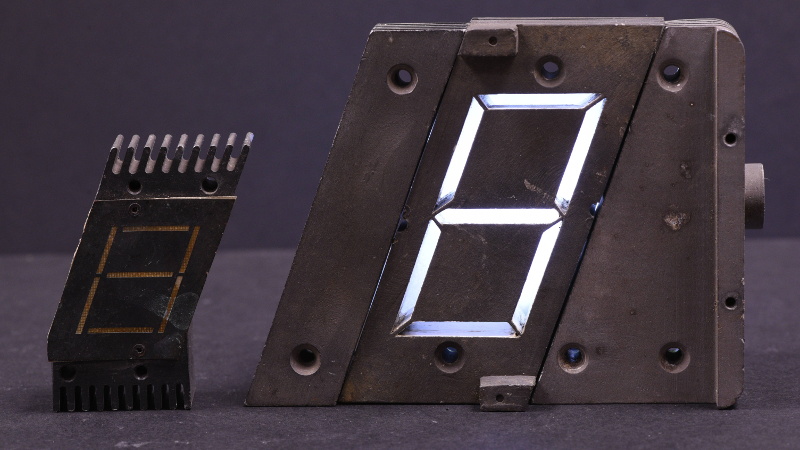
In the end, preservation keeps the glow alivenot just the glow of a CRT screen or a seven-segment display, but the glow of human curiosity, disciplined engineering, and the stubborn belief that a room full of people, machines, and good data can reach the Moon.