Editorial note: This article is written for web publication and synthesizes current maker documentation, official ESP32 resources, IoT dashboard platforms, e-paper display projects, and real-world ESP32 dashboard examples without copying source text.
Why an ESP32 Dashboard Makes So Much Sense
The modern internet is overflowing with information, which sounds useful until your phone starts acting like a tiny glass rectangle full of panic. Weather alerts, calendar reminders, smart home notifications, website analytics, server uptime, energy usage, air quality, GitHub activity, package tracking, and “your fridge door has been open for twelve seconds” warnings all compete for attention. An ESP32 dashboard offers a calmer option: a small, affordable, always-on display that shows the information you actually care about.
The ESP32 is a popular microcontroller family known for built-in Wi-Fi and Bluetooth connectivity, low cost, low power consumption, and strong support from maker communities. When paired with an e-paper display, LCD, OLED, or touchscreen, it becomes more than a development board. It becomes a personal information station. Instead of unlocking your phone and accidentally losing twenty minutes to notifications, you can glance at a small screen on your desk, kitchen counter, hallway wall, workbench, or nightstand.
The idea behind an ESP32 dashboard is beautifully simple: collect data from useful sources, process it with lightweight code, and display it in a clean format. The result may look modest, but it can be surprisingly powerful. A tiny dashboard can show the time, local weather, room temperature, humidity, calendar events, smart home status, network alerts, stock watchlists, server health, or even website traffic. It is like a personal assistant, except it does not ask for a subscription upgrade every time you blink.
The Project That Inspired the Buzz
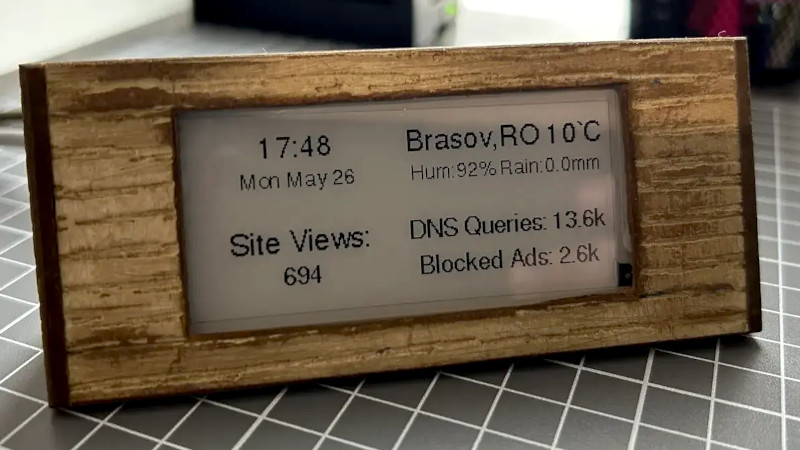
The phrase “ESP32 Dashboard Is A Great Way To Stay Informed” became especially interesting because of maker projects that combine an ESP32 board with an e-paper display and MicroPython. In one well-known example, developer Max Pflaum built a minimalist ESP32 dashboard that shows useful widgets such as time, weather, website views, and Pi-hole statistics. The hardware is not wildly complicated: an ESP32, a display, a case, and a power source. The magic lives in the software structure.
That is an important lesson for anyone building an ESP32 information dashboard. The board itself is only the foundation. The real value comes from deciding what information deserves a permanent spot on the screen. A good dashboard is not a miniature version of your phone. It should not vomit every notification into your face like a caffeinated office printer. It should quietly answer the questions you ask every day: Is it going to rain? Do I have a meeting soon? Is the server still alive? Did the smart thermostat behave? Did the plant need water yesterday, or is it still judging me silently?
What Is an ESP32 Dashboard?
An ESP32 dashboard is a custom display system built around an ESP32 microcontroller. It pulls information from sensors, APIs, cloud services, local smart home systems, or network devices and presents that information visually. Depending on your build, it may run on Arduino code, MicroPython, ESPHome, CircuitPython, or the Espressif IoT Development Framework.
Common ESP32 Dashboard Components
Most ESP32 dashboard projects include a few basic pieces. First, there is the ESP32 board, such as an ESP32 DevKit, ESP32-WROOM module, ESP32-S3 board, or a board with an integrated display. Second, there is the screen. E-paper displays are excellent for low-power dashboards because they hold an image without constant refreshing. OLED screens are bright and compact. TFT LCDs are colorful and responsive. Touchscreens are useful when you want controls, menus, or smart home buttons.
Third, the dashboard needs data. That data might come from OpenWeather, Home Assistant, Pi-hole, Adafruit IO, ThingsBoard, Blynk, MQTT feeds, Google Calendar, a local server, or direct sensors connected to the ESP32. Finally, the project needs software logic to fetch, parse, format, and display the information.
Why E-Paper Displays Are Perfect for Glanceable Information
E-paper has become a favorite display technology for ESP32 dashboards because it looks clean, consumes very little power between updates, and remains readable in bright rooms. If you want a dashboard that updates every few minutes or every hour, an e-paper display can be a fantastic choice. It is not ideal for fast animations, video, or flashy interfaces, but that is part of its charm. It encourages restraint.
A weather dashboard does not need to dance. A calendar reminder does not need to explode in neon. A low-battery icon does not need dramatic entrance music. E-paper works best when the information is stable, readable, and useful at a glance. For home and office dashboards, that is exactly the point.
Useful Things You Can Show on an ESP32 Dashboard
1. Weather and Forecasts
Weather is the classic ESP32 dashboard use case because it is useful every single day. A dashboard can display current temperature, high and low forecast, humidity, wind speed, rain probability, UV index, and severe weather alerts. For a front-door dashboard, this is perfect. Before leaving, you can see whether you need an umbrella, jacket, sunglasses, or emotional preparation for another humid afternoon.
2. Calendar Events
A small screen showing the next appointment can save you from calendar ambushes. Many people build dashboards that display upcoming meetings, school schedules, family reminders, or work tasks. This is especially useful in a home office where one glance can tell you whether you have time for coffee or whether your next video call starts in three minutes and your hair is currently doing experimental architecture.
3. Smart Home Status
With Home Assistant and ESPHome, an ESP32 dashboard can become a local smart home display. It can show room temperature, humidity, door status, lights, energy use, air quality, washing machine state, or whether the garage door is open. Because ESPHome supports many sensors, displays, and components, it is a natural fit for people who want a customizable dashboard without writing every line of firmware from scratch.
4. Network and Server Monitoring
For developers, homelab fans, and small business owners, an ESP32 dashboard can monitor uptime, server load, network health, DNS blocking statistics, or router status. A small display beside your workstation can quietly report whether your NAS is online, whether your website is reachable, or whether your Pi-hole blocked a suspicious number of requests. It is like a tiny sysadmin with no chair, no complaints, and no coffee budget.
5. Personal Productivity Metrics
An ESP32 dashboard can also show personal metrics: focus sessions completed, daily writing progress, GitHub commits, website visitors, sales notifications, unread support tickets, or task counts. The key is to show only what helps you act. A dashboard that shows twenty metrics may look impressive, but a dashboard that shows three meaningful numbers is usually more useful.
Software Options for Building an ESP32 Dashboard
MicroPython
MicroPython is popular because it makes the ESP32 feel approachable. Instead of writing firmware in C or C++, you can use Python-style code to connect to Wi-Fi, call APIs, parse JSON, and draw text or graphics. For dashboard projects with widgets, MicroPython is especially attractive because it supports rapid experimentation. You can write a clock widget, test it, then add weather, then add another panel without turning the project into a spaghetti monster with antenna pins.
Arduino IDE
The Arduino ecosystem remains one of the easiest entry points for ESP32 projects. There are libraries for Wi-Fi, HTTP requests, MQTT, displays, sensors, JSON parsing, and power management. If you want a web server dashboard hosted directly on the ESP32, Arduino examples are everywhere. The ESP32 can serve a local web page that displays sensor values or offers buttons to control LEDs, relays, fans, pumps, or other safe low-voltage components.
ESPHome
ESPHome is excellent for smart home dashboards because it uses YAML configuration and integrates beautifully with Home Assistant. It supports many sensors and displays, local control, and over-the-air updates. For users who want a dashboard that pulls smart home entities into a small display, ESPHome can reduce the amount of custom code needed. It is not magic, but compared with manually debugging every sensor library, it can feel suspiciously close.
Cloud IoT Platforms
Platforms such as Adafruit IO, ThingsBoard, and Blynk make it easier to send device data to dashboards and manage connected projects. Adafruit IO supports feeds and dashboards for visualizing incoming data. ThingsBoard offers customizable dashboards for device telemetry and control. Blynk focuses on low-code IoT apps and device management. These services are helpful when your dashboard needs remote access, historical data, mobile views, or multiple devices reporting to one place.
Local Dashboard vs. Cloud Dashboard
One of the first design decisions is whether your ESP32 dashboard should depend on cloud services or run mostly on your local network. A local dashboard can be faster, more private, and more reliable when the internet goes out. For example, an ESP32 display connected to Home Assistant can still show indoor temperature, door status, or local sensor data even when external APIs are unavailable.
A cloud-connected dashboard, however, is useful when you need data from remote sources. Weather APIs, website analytics, email counts, remote server health, or mobile notifications often require internet access. Many builders use a hybrid approach: local data for smart home status and cloud APIs for weather, time sync, or outside services.
Design Principles for a Great ESP32 Information Display
Keep It Glanceable
The best ESP32 dashboard is readable in two seconds. Use large text, simple icons, and strong layout hierarchy. Put the most important information in the biggest area. If users need to squint, decode, scroll, or spiritually negotiate with a 2.9-inch display, the design has failed.
Use Widgets Wisely
A widget-based layout is powerful because it lets you divide the screen into zones. One zone can show time, another can show weather, another can show calendar events, and another can show a status metric. This approach also makes the code easier to maintain. Instead of rewriting the whole dashboard, you can update one widget at a time.
Refresh Only When Needed
Not every piece of data needs constant updates. Weather may update every 15 to 60 minutes. A calendar widget may update every few minutes. Room temperature may update more often. E-paper displays especially benefit from thoughtful refresh timing because frequent refreshes can increase power use and create unnecessary flashing.
Plan for Failure
APIs fail. Wi-Fi drops. Tokens expire. JSON changes. Servers get moody. A good ESP32 dashboard should handle failure gracefully. Instead of freezing forever, it can show the last successful update time, display a small offline indicator, retry after a delay, or fall back to cached data. This tiny detail makes a DIY project feel much more polished.
Security and Privacy Matter
An ESP32 dashboard may look harmless, but it can still handle sensitive information. API keys, Wi-Fi credentials, smart home tokens, and personal calendar data should be protected. Avoid hardcoding secrets in public repositories. Use private configuration files where possible. If the device connects to a cloud platform, enable secure connections and understand what data is leaving your network.
For home dashboards, privacy also means choosing what appears on the screen. A front-door display showing weather is fine. A front-door display showing private meeting titles, security alerts, or personal messages may not be ideal when guests, delivery drivers, or extremely curious relatives can see it.
Real-World ESP32 Dashboard Examples
A kitchen dashboard might show the time, today’s weather, family calendar, grocery reminder, and air quality. A home office dashboard might show upcoming meetings, website uptime, GitHub commits, and focus timer status. A workshop dashboard might show indoor temperature, humidity, power usage, 3D printer progress, and ventilation status. A plant-care dashboard might show soil moisture, light level, room humidity, and watering reminders.
The flexibility of the ESP32 is what makes these dashboards so appealing. The same microcontroller can support a weather screen, a smart home control panel, an environmental monitor, or a tiny web server. You are not buying a finished gadget with someone else’s priorities baked in. You are building a small information appliance that fits your life.
Common Mistakes to Avoid
Trying to Show Everything
The fastest way to ruin a dashboard is to treat it like a dumping ground for every available data source. More information is not always better. A small display should be selective. Choose the few metrics that change decisions: take an umbrella, join a meeting, open a window, water a plant, check a server, or leave earlier.
Ignoring Power Requirements
If the dashboard is plugged in, power is simple. If it runs on batteries, every design choice matters. Wi-Fi usage, display type, refresh interval, deep sleep settings, and sensor polling all affect battery life. E-paper plus deep sleep can make sense for low-frequency updates. A bright color touchscreen with constant Wi-Fi activity may need a wall adapter unless you enjoy charging things more than using them.
Using Tiny Text
Microcontroller displays are small. Respect the pixels. A dashboard should not look like someone tried to squeeze an airline boarding pass onto a postage stamp. Use fewer words, bigger numbers, simple symbols, and clean spacing.
Why ESP32 Dashboards Are Great for Learning
An ESP32 dashboard is not just useful; it is an excellent learning project. It teaches networking, APIs, JSON parsing, display libraries, sensor integration, power management, error handling, and user interface design. Unlike a blinking LED project, a dashboard gives you something you may actually keep using. That matters. Projects are easier to finish when the final result solves a real problem instead of simply proving that electricity remains undefeated.
Beginners can start with a basic weather display or local web server. Intermediate builders can add multiple widgets, MQTT feeds, or Home Assistant integration. Advanced users can create modular dashboards, custom fonts, partial e-paper refreshes, offline caching, encrypted API calls, and remote configuration. The project grows with your skill level.
Experience Section: Lessons From Building and Using an ESP32 Dashboard
The most useful lesson from building an ESP32 dashboard is that the project becomes better when you stop thinking like a programmer and start thinking like a tired human standing near the door with keys in one hand. What does that person need to know right now? Weather, time, next appointment, and one important status alert are usually more valuable than a screen full of tiny numbers.
In practical use, the best dashboard location is often more important than the code. A desk dashboard is great for work metrics, timers, and server status. A hallway dashboard is better for weather, transit, calendar reminders, and door status. A kitchen dashboard works well for family schedules, indoor climate, and grocery reminders. The device should live where decisions happen. Otherwise, it becomes another clever gadget sitting in a drawer next to mystery cables and the adapter nobody remembers buying.
Another experience-based tip: start with one widget and make it reliable before adding more. A clock synced by NTP is a good first step. Then add weather. Then add a calendar or sensor. Each new feature should have a clear purpose. When something breaks, a simple system is easier to debug. If you build eight widgets at once and the screen goes blank, congratulations, you have invented electronic hide-and-seek.
Refresh timing also matters more than beginners expect. At first, it is tempting to update everything constantly because real-time data feels impressive. But many dashboard values do not need real-time updates. Weather every 30 minutes is usually fine. Calendar data every five minutes may be enough. Indoor temperature can update more often, but even then, a few seconds of delay rarely matters. Smarter refresh timing improves battery life, reduces API calls, and makes the project feel calmer.
Layout deserves patience. On small displays, white space is not wasted space; it is what makes the dashboard readable. Big numbers, short labels, and consistent alignment beat fancy graphics most of the time. Icons are helpful when they reduce reading effort, but too many icons can turn the interface into a treasure map designed by a raccoon. Keep the screen clean.
One of the most satisfying things about an ESP32 dashboard is that it quietly changes habits. You check the weather without opening your phone. You notice a room getting too humid before it becomes uncomfortable. You see an upcoming meeting before the panic reminder appears. You spot a network issue early. The dashboard does not demand attention; it earns attention by being useful.
For long-term reliability, build in small status indicators. Show the last update time. Add a Wi-Fi icon or offline label. Display cached data when an API fails. Use simple error messages instead of letting the screen freeze. These details make the difference between a fun weekend prototype and a device that feels like it belongs in your daily routine.
The final experience is emotional but real: building your own dashboard makes information feel personal again. Instead of accepting whatever a phone, app, or platform wants to push at you, you decide what deserves space. The ESP32 is small, affordable, and humble, but it gives you control. In a world where every app is shouting, a quiet little screen that tells you exactly what you need is oddly refreshing.
Conclusion
An ESP32 dashboard is a great way to stay informed because it combines useful data, low-cost hardware, flexible software, and a calmer user experience. Whether you build it with MicroPython, Arduino, ESPHome, MQTT, or a cloud IoT platform, the goal is the same: turn scattered information into a simple, glanceable display.
The best ESP32 dashboards are not the busiest ones. They are the ones that answer real questions at the right moment. Weather by the door. Calendar on the desk. Server status in the workshop. Smart home data in the hallway. With thoughtful design, an ESP32 and a small screen can become one of the most practical gadgets in your home or office. It will not replace your phone, but that is exactly the point. It gives you the information without the distraction circus. And honestly, the circus already has enough clowns.