Note: This article discusses embedded Linux camera hacking from an ethical, educational, and defensive security perspective. Only test devices you own or systems you are explicitly authorized to examine. The goal is understanding, hardening, and learningnot turning the neighbor’s porch camera into your personal wildlife documentary channel.
Introduction: When a Security Camera Becomes a Tiny Linux Computer
A modern IP camera looks simple from the outside: a lens, a plastic shell, maybe a blinking LED that says, “I am definitely doing something important.” But inside, many of these devices are not simple cameras at all. They are small Linux computers with processors, flash storage, bootloaders, file systems, networking services, web interfaces, update mechanisms, and a surprising number of secrets tucked into places nobody thought consumers would ever look.
The title Camera Hack Peels Back Layers Of Embedded Linux captures exactly what makes hardware security research so fascinating. A camera hack is rarely just about the camera. It is about opening a black box and discovering a layered system: hardware buses, SPI flash chips, firmware images, bootloaders like U-Boot, Linux kernels, BusyBox userlands, configuration files, startup scripts, encrypted update packages, and sometimes passwords that should have been retired before flip phones went out of style.
One widely discussed example involved research into a Foscam C1 security camera. Instead of attacking it only through the web interface, the researcher approached it like a digital archaeologist with a soldering iron: remove or access the flash storage, dump the firmware, inspect the partitions, and peel back the layers until the embedded Linux system became readable. That approach is not just clever; it is a reminder that IoT security begins long before a device connects to Wi-Fi.
What “Embedded Linux” Means Inside a Camera
Embedded Linux is Linux tailored for a dedicated device. Unlike a laptop or server, an embedded system has a focused job: stream video, detect motion, record events, expose a web interface, communicate with a mobile app, and survive in a dusty corner without asking for emotional support.
Inside many IP cameras, the operating system is built from familiar components, but trimmed for size and cost. There is usually a system-on-chip, RAM, flash memory, networking hardware, and camera sensor hardware. The software stack typically starts with boot ROM code inside the chip, hands control to a bootloader, loads a Linux kernel, mounts a root filesystem, and launches services that make the camera useful.
That root filesystem often includes BusyBox, a compact package that combines many common Unix utilities into a single executable. BusyBox is beloved in embedded Linux because it gives developers a practical command-line environment without filling limited flash storage with full desktop utilities. In other words, it is the Swiss Army knife of tiny Linux systemsminus the corkscrew, plus a lot more shell scripts.
Build systems such as the Yocto Project help manufacturers create custom Linux-based systems for different hardware architectures. That flexibility is powerful. It also means that every manufacturer makes choices about kernel versions, packages, update design, credential storage, network exposure, logging, and security hardening. Some choices are excellent. Some are “ship it Friday afternoon and hope nobody owns a logic analyzer.”
The First Layer: The Plastic Shell and the Hardware Clues
Before firmware analysis begins, researchers often start with the physical device. A camera teardown can reveal printed circuit board markings, chip part numbers, unused pads, test headers, and storage components. These clues help identify the device architecture and possible access points.
Common interfaces include UART, JTAG, SPI, and I2C. UART may expose boot logs or a console. JTAG may support debugging. SPI is often connected to flash memory that stores firmware. I2C may connect sensors and peripherals. A few small pads on a circuit board can tell a long story, especially when a manufacturer left factory test connections exposed under the case.
Physical access is a major security boundary. OWASP’s IoT guidance includes lack of physical hardening among common IoT risks because attackers who can touch a device may gain information that helps later remote attacks. That does not mean every home camera needs a bank vault enclosure. It does mean designers should assume curious people will open the case, because curious people absolutely will open the case. Some of them will even label the screws.
The Second Layer: Flash Memory and Firmware Extraction
Firmware is the device’s personality in binary form. It contains the code and configuration that make the hardware behave like a camera instead of an expensive paperweight. Researchers may obtain firmware from a vendor update file, from a support download page, or directly from the device’s memory.
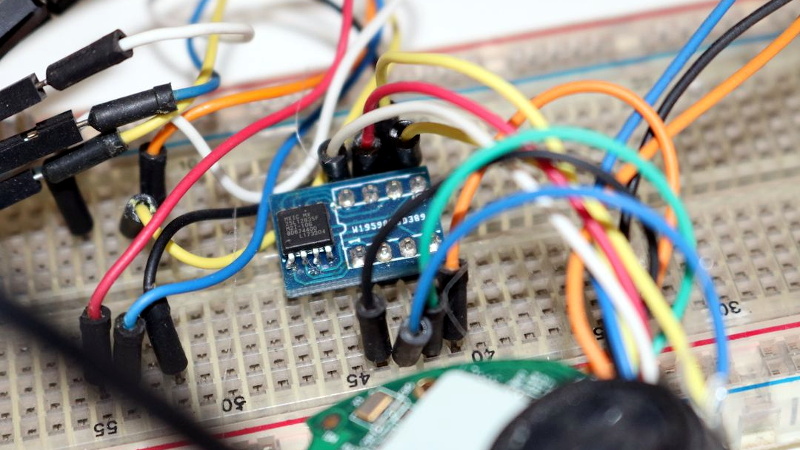
In the Foscam-style research pattern, the interesting move is dumping the flash chip. Many cameras store firmware in SPI NOR flash. Once a dump is obtained, the raw binary image can be inspected to identify partitions, file systems, bootloader regions, compressed data, kernel images, and configuration blocks.
Security researchers often use tools such as Binwalk to identify and extract embedded files from firmware images. Binwalk is useful because firmware images are rarely neat folders. They are more like a lasagna made of boot headers, compressed kernels, SquashFS partitions, vendor metadata, and mystery sauce. The tool can scan for known signatures, locate embedded files, and help identify compression or encryption patterns through entropy analysis.
The Third Layer: Bootloaders, Kernels, and the Startup Story
After firmware extraction, the boot process becomes easier to understand. A typical embedded Linux startup sequence moves from immutable chip code to a bootloader and then into the operating system kernel. U-Boot is a common open-source bootloader used across many architectures, including ARM, MIPS, PowerPC, RISC-V, and x86. Its job is to initialize hardware and boot the operating system kernel.
For defenders, the bootloader is important because it can reveal how the device starts, where partitions live, what kernel command-line arguments are used, whether a recovery mode exists, and whether the system enforces secure boot. If secure boot is absent or incomplete, modified firmware may be easier to load. If update validation is weak, attackers may attempt to install malicious firmware. If rollback protection is missing, a device may be forced back to an older vulnerable version.
This is where camera hacking becomes less like movie hacking and more like reading a very cranky recipe. The ingredients are kernel images, device trees, root filesystems, init scripts, mount points, daemons, and environment variables. The meal is served cold, in hexadecimal.
The Fourth Layer: Root Filesystems and the BusyBox Neighborhood
Once the root filesystem is extracted, the device becomes much less mysterious. Researchers can inspect startup scripts, service configurations, web interface files, cron jobs, password files, certificate locations, wireless settings, and vendor-specific binaries. This is often where the practical security story emerges.
Embedded systems frequently use read-only compressed file systems such as SquashFS for core software, sometimes combined with writable partitions for settings. That design saves space and makes the base image harder to accidentally damage. However, it can also hide outdated software components that remain unchanged for years.
BusyBox-based systems are efficient, but efficiency does not automatically mean security. If the firmware includes old libraries, insecure scripts, exposed services, hardcoded credentials, weak permissions, or unencrypted sensitive data, the small size of the system becomes irrelevant. A tiny vulnerability can still wear big boots.
Why Camera Firmware Often Contains Security Surprises
IP cameras are attractive targets because they combine video, networking, storage, cloud integration, mobile apps, and web administration. That is a lot of attack surface for a device that customers usually install once and forget. Many cameras are also white-label products, meaning the same internal hardware or firmware may appear under different brand names. When one weak design spreads across multiple labels, the problem scales quickly.
The 2016 Mirai botnet made this painfully clear. Internet-connected cameras and DVRs were among the devices abused in large-scale distributed denial-of-service attacks. The lesson was not merely “change your password,” although yes, please do that. The deeper lesson was that IoT supply chains, default credentials, exposed services, and neglected firmware updates can turn ordinary devices into internet weather systems.
Common problems include weak or hardcoded passwords, insecure network services, outdated open-source components, poor update mechanisms, insufficient privacy protection, insecure data transfer, and lack of device management. These are not abstract checklist items. In a camera, they can mean unauthorized viewing, botnet recruitment, lateral movement inside a business network, or exposure of private footage.
Camera Hacking as Defensive Reverse Engineering
Ethical camera hacking is a form of defensive reverse engineering. The purpose is to understand how a device works so weaknesses can be fixed, responsibly disclosed, or mitigated. That mindset matters. There is a big difference between inspecting your own lab camera and probing someone else’s live security system. One is research. The other is a great way to meet lawyers.
A safe research workflow focuses on owned hardware, isolated networks, and non-destructive analysis. Researchers document chip markings, capture boot logs, inspect firmware images, compare versions, identify outdated packages, review configuration files, and look for insecure design patterns. If a vulnerability is found in a product still sold or supported, responsible disclosure gives the manufacturer time to respond before public details are released.
For organizations, defensive firmware analysis can answer practical questions: What software components are inside this device? Are there known vulnerable versions? Does the device support secure updates? Are credentials unique per device? Does it expose unnecessary services? Can it be managed at fleet scale? Does it continue receiving patches after purchase, or does it become a tiny forgotten Linux museum exhibit?
How Manufacturers Can Build Safer Embedded Linux Cameras
The best IoT security starts before launch. Secure-by-design thinking means manufacturers should remove universal default passwords, require unique credentials or secure enrollment, validate firmware updates, protect private keys, minimize exposed services, use encrypted transport, maintain an update policy, and provide a vulnerability disclosure process.
Modern device makers should also track software bills of materials. An SBOM helps identify which open-source components and versions are present in firmware. That matters because embedded products often ship with reused libraries, and those libraries age. When a vulnerability appears in a common component, manufacturers need to know which products are affected without performing a panic archaeology expedition through old build folders.
Secure boot and signed updates are especially important. Secure boot helps ensure the device runs trusted code. Signed updates help ensure firmware comes from the legitimate vendor and has not been altered. Anti-rollback protections prevent attackers from installing an old vulnerable firmware version. These controls are not magic shields, but they raise the cost of tampering significantly.
Network design also matters. Cameras should not expose administrative services to the public internet by default. Businesses should segment camera networks away from critical systems. Home users should update firmware, change default passwords, disable unnecessary cloud or remote access features, and replace devices that no longer receive security updates. A camera should watch the driveway, not become the driveway into your network.
What This Teaches About Embedded Linux Security
The beauty of a camera firmware teardown is that it makes invisible systems visible. It shows that “smart” devices are not magic. They are computers with constraints. They have storage, services, packages, keys, scripts, and mistakes. Once you understand the layers, security becomes less mysterious and more manageable.
Embedded Linux itself is not the villain. Linux powers everything from routers and cameras to industrial systems and vehicles because it is flexible, mature, and supported by a massive ecosystem. The real issue is how products are configured, maintained, updated, and supported after they leave the factory.
A camera hack that peels back embedded Linux layers gives engineers a map. It reveals where secrets live, how updates work, which components are reused, how the boot chain behaves, and where assumptions break. It also reminds buyers that cheap connected devices may carry hidden costs if security support is weak.
Real-World Experience: Lessons From Peeling Back the Layers
Anyone who has spent time examining embedded Linux devices knows the experience is part science, part detective work, and part arguing with tiny connectors that seem designed by a committee of angry ants. The first lesson is patience. Hardware rarely gives up its secrets politely. A pad that looks like UART may be nothing. A header that seems promising may be disabled. A firmware image may unpack cleanly, or it may stare back like a brick wall wearing compression.
The second lesson is that documentation is uneven. Some chips have excellent public datasheets. Others have marketing brochures that basically say, “This processor processes things.” Researchers often build understanding by combining chip labels, boot logs, FCC photos, open-source code, vendor update files, and community notes. That process can feel slow, but every clue matters.
The third lesson is that firmware tells the truth more often than product pages do. A brochure may promise “military-grade security,” a phrase that usually means someone in marketing found a thesaurus. Firmware reveals whether update packages are signed, whether passwords are unique, whether old libraries remain inside, whether services run as root, and whether sensitive data is stored carelessly.
The fourth lesson is that embedded Linux rewards curiosity. Looking through init scripts can show how video services start. Inspecting configuration files can reveal how Wi-Fi, cloud pairing, logging, and user accounts are handled. Reviewing web interface files can uncover assumptions about authentication and input handling. Even when no dramatic vulnerability appears, the device becomes understandable.
The fifth lesson is that security is a lifecycle, not a sticker. A camera may be reasonably secure at launch and risky three years later if it stops receiving updates. A vendor may ship a solid kernel but bundle outdated third-party components. A device may support strong passwords but expose too many services. Security is not one heroic feature; it is a chain of boring, necessary details. Boring details, unfortunately, are where attackers love to shop.
The sixth lesson is that network context changes risk. A camera isolated on a segmented VLAN behind a firewall is a different animal from the same camera exposed directly to the internet. The firmware may be identical, but the blast radius is not. This is why businesses should treat cameras as managed IT assets, not decorations with Ethernet cables.
The seventh lesson is humility. Reverse engineering embedded devices teaches that systems are messy. Engineers face cost limits, deadlines, chip shortages, legacy code, certification pressure, and customer demands. The goal of security research should not be smugness. It should be better products, clearer risks, and safer deployments.
Finally, camera firmware analysis is a fantastic learning path because it connects hardware, Linux, networking, cryptography, web security, and operations. One device can teach bootloaders, file systems, UART, firmware extraction, service hardening, update design, and responsible disclosure. That is a lot of education from a plastic eyeball on a swivel mount.
Conclusion: The Camera Is Only the Beginning
Camera Hack Peels Back Layers Of Embedded Linux is more than a catchy headline. It is a compact explanation of how IoT security research works. A camera is not just a lens and a stream; it is a layered embedded Linux system. When researchers peel those layers back, they expose the design decisions that determine whether a device is trustworthy, maintainable, and resilient.
For makers, the takeaway is simple: build with secure defaults, signed updates, component tracking, strong authentication, and long-term support. For users and businesses, treat IP cameras as computers on your network, because that is exactly what they are. Update them, segment them, monitor them, and retire them when support ends.
The tiny Linux penguin inside your camera is not the problem. The problem is forgetting that it is there.