Some people see an expensive pair of smart glasses and think, “Nice gadget.” A maker sees the same thing and thinks, “I can probably build that with a Raspberry Pi, a 3D printer, a small display, some questionable wiring, and enough caffeine to worry a cardiologist.” That is the charming spirit behind the Hackaday Prize entry commonly known as Pi-Driven Google Glass, or more specifically, Ricardo Ferro’s Raspberry Pi Zero Prism.
This project sits at the intersection of wearable computing, open-source hardware, heads-up displays, Raspberry Pi experimentation, and that classic maker urge to avoid buying a polished commercial product by spending 70 hours building a wonderfully strange homemade version. It is not simply a clone of Google Glass. It is a DIY smart glasses concept built around a Raspberry Pi Zero, a prism display system, a Pi NoIR camera, 3D-printed parts, tactile controls, and the dream of putting useful information right in front of your eye.
And yes, it looks exactly like the kind of project that would make airport security pause for a full three seconds before asking, “Sir, what is attached to your face?”
What Is the Pi-Driven Google Glass Project?
The Pi-Driven Google Glass project is a homemade wearable computer inspired by Google Glass but built with accessible maker hardware. The core idea is simple: mount a tiny computer and display system on a pair of glasses so the wearer can see digital information without looking down at a phone, laptop, or screen. In practice, of course, “simple” means optical alignment, weight distribution, power management, software setup, camera integration, and the eternal question of where to hide all the wires.
Ricardo Ferro’s Raspberry Pi Zero Prism was submitted in the orbit of the 2017 Hackaday Prize, a competition that encouraged builders to create meaningful open hardware projects. The project was described as an upgraded version of an earlier Raspberry Pi Zero Smart Glass concept, designed to support image recognition, facial recognition, OCR recognition, and internet browsing through a wearable prism display.
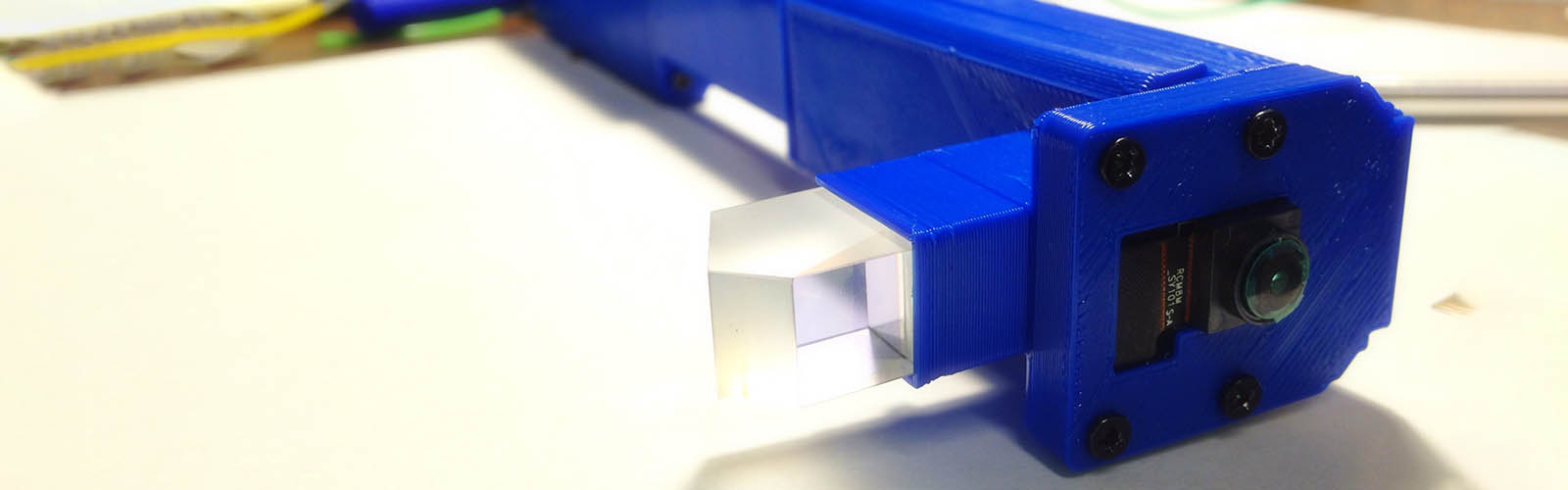
The project’s hardware included a Raspberry Pi Zero, a Pi NoIR camera or Pi Camera V2, a 3D-printed headset frame, soft tactile buttons, wiring, and a prism-based display module. Instead of relying on a standard monitor, the system routes visual output into a small optical module that reflects information into the user’s field of view. In other words, it turns a tiny Linux computer into something you can wear on your head. Fashion week may not call, but Hackaday readers definitely will.
Why Build DIY Smart Glasses Instead of Buying Them?
Commercial smart glasses have always had a complicated relationship with the public. Google Glass was futuristic, memorable, and deeply polarizing. It packed a head-mounted display, camera, microphone, wireless connectivity, and bone-conduction audio into a lightweight frame. It also raised questions about price, privacy, social awkwardness, and whether people were ready to have a camera pointed at them during casual conversations.
The maker version of smart glasses approaches the problem differently. Instead of asking, “How do we turn this into a polished consumer device?” it asks, “What can we learn by building one ourselves?” A DIY wearable Raspberry Pi project is less about replacing a finished product and more about understanding the pieces: optics, embedded Linux, camera input, user interface design, power constraints, and human-computer interaction.
That is where the Pi-Driven Google Glass idea becomes especially interesting. It takes a concept associated with a major technology company and reimagines it through open hardware. The result may be bulkier, stranger, and less elegant than commercial eyewear, but it offers something commercial hardware rarely does: full tinkering freedom. You can modify the files, change the code, redesign the mount, swap components, and learn why engineers get very quiet when someone says, “Let’s just make it wearable.”
Key Hardware Behind the Raspberry Pi Zero Prism
Raspberry Pi Zero: The Tiny Brain
The Raspberry Pi Zero is a natural choice for DIY wearable computing because it is small, inexpensive, and capable of running a full Linux-based operating system. The Raspberry Pi Zero W added wireless LAN and Bluetooth, which made it even more useful for portable and connected projects. Its compact form factor helps reduce bulk, while the GPIO header, camera connector, and video output options make it flexible for custom builds.
For smart glasses, the Pi’s job is to act as the central computer. It can run scripts, handle camera input, connect to networks, display a user interface, and communicate with peripherals. That makes it far more capable than a simple microcontroller, though also more power-hungry. The Pi Zero is not magic; it still needs a battery, cooling awareness, boot time, and carefully managed expectations. But for a small wearable Linux computer, it is hard to ignore.
Pi NoIR Camera: Seeing Beyond Ordinary Light
The Pi NoIR camera is another important part of the concept. Unlike a standard camera module, a NoIR camera does not include an infrared filter, allowing it to detect infrared light. In maker projects, this can be useful for night vision, low-light experiments, plant monitoring, science projects, and computer vision prototypes.
In the Raspberry Pi Zero Prism concept, the camera was connected to ideas such as facial recognition and OCR recognition. OCR, or optical character recognition, could allow the glasses to read text from the environment and display information to the wearer. That might sound like science fiction, but it is exactly the kind of experiment that makes wearable computing exciting: a device that does not merely show notifications, but helps interpret the world around you.
Prism Display: The Tiny Window in Your Vision
The display is where the project becomes properly “Google Glass-like.” Instead of mounting a full screen directly in front of the user’s eye, a prism system reflects a small display into the wearer’s field of view. This keeps the real world visible while layering digital information nearby. The effect is similar in spirit to a heads-up display, like the kind pilots or drivers use to see information without looking away from the road.
Optics are also where the build becomes tricky. A screen can be electrically perfect and still look terrible if the lens, focal distance, prism angle, or eye position is wrong. The Raspberry Pi Zero Prism logs mention refinements to lenses, prism placement, display privacy, and frame geometry. That is a valuable reminder: in smart glasses, the “screen” is not just an electronic part. It is an optical system sitting millimeters from a human eye. Tiny mistakes become big headaches, sometimes literally.
3D-Printed Frame: Where Engineering Meets Face Furniture
The 3D-printed structure holds the project together physically. In a wearable device, the enclosure is not decoration. It determines comfort, balance, durability, cable routing, heat management, and whether the whole thing feels like a useful tool or a lopsided science-fair satellite dish.
Ferro’s project included STL files and design revisions, showing the importance of iteration. The frame evolved with changes to the front piece, button bridge, prism holder, cover design, and PCB layout. That is classic hardware development: print, test, notice the part digs into your temple, redesign, print again, repeat until your printer begs for retirement.
What Makes This Hackaday Prize Entry Stand Out?
The Pi-Driven Google Glass project stands out because it treats wearable computing as an open playground rather than a sealed product category. Many smart glasses discussions focus on sleek industrial design, app ecosystems, or whether consumers will accept cameras on faces. This project focuses on the building blocks: how to display information, capture images, run recognition software, and make the hardware wearable using affordable components.
It also reflects the larger Hackaday Prize philosophy: build something, document it, share it, and push hardware beyond the obvious. The 2017 Hackaday Prize emphasized projects with potential social value, including assistive technology, useful connected devices, and bold hardware concepts. Pi Zero Prism proposed uses such as real-time recognition and information display. Even when some ideas raise important ethical questions, the project still opens a useful discussion about what wearable vision systems can do and where their boundaries should be.
Potential Uses for Pi-Driven Smart Glasses
Hands-Free Information Display
A wearable Raspberry Pi display could show simple notifications, system status, navigation prompts, timers, checklists, or sensor readings. For mechanics, makers, cyclists, warehouse workers, field researchers, or repair technicians, hands-free information can be genuinely useful. Imagine looking at a machine and seeing a checklist, wiring diagram, or diagnostic message without holding a phone in one hand and a screwdriver in the other.
OCR and Reading Assistance
OCR recognition is one of the most promising ideas for DIY smart glasses. A camera captures text, software processes it, and the display presents the result. With the right software, a wearable device could help read labels, signs, menus, instructions, or small printed text. For accessibility-focused projects, this kind of hands-free reading support can be more than a novelty.
Computer Vision Experiments
Computer vision is another obvious playground. The glasses could identify objects, detect shapes, scan QR codes, recognize colors, or assist with navigation. Modern edge AI tools have made vision experiments more accessible than they were when many early Pi smart glasses projects were created. A newer version of this build could use updated camera modules, lighter boards, and optimized machine learning models to perform tasks that once required far more hardware.
Language Translation and Audio Pairing
The project logs also mention interest in Bluetooth headset integration and real-time language translation. That idea remains compelling. A wearable display paired with a microphone could listen to speech, translate it, and show text near the wearer’s eye. The technical challenge is not tiny, but the concept is powerful: subtitles for real life, minus the popcorn.
The Big Challenges: Power, Comfort, Heat, and Privacy
Every wearable project eventually runs into the same four villains: power, comfort, heat, and privacy. The Raspberry Pi may be small, but running Linux, camera input, wireless connectivity, and a display requires energy. Batteries add weight. Weight affects comfort. Heat affects both electronics and skin. And cameras attached to faces make everyone nearby suddenly remember they value privacy.
Comfort is especially difficult. A desktop project can be ugly and still useful. A wearable project must survive the ruthless judgment of your nose, ears, neck, and social circle. Even small changes in balance can make glasses uncomfortable after a few minutes. That is why commercial smart glasses obsess over weight distribution and why DIY versions often look like they are auditioning for a cyberpunk garage band.
Privacy is the issue that cannot be solved with a better bracket. Any wearable camera system needs visible indicators, consent-aware use, responsible software choices, and careful consideration of where it is used. Facial recognition, in particular, is sensitive. A DIY project can explore the technical idea, but real-world deployment requires legal, ethical, and social caution. A smart device should make the user more capable, not make everyone else feel like they have accidentally entered a surveillance demo.
How This Project Compares With Google Glass
Google Glass was a polished wearable platform with a compact display, camera, wireless connectivity, storage, voice controls, and a lightweight frame. It was designed as a product. The Pi-Driven Google Glass concept is designed as a maker project. That difference matters.
Google Glass prioritized miniaturization and user experience. Raspberry Pi Zero Prism prioritized openness, affordability, experimentation, and modifiability. Google Glass asked users to enter an ecosystem. Pi Prism invited builders to open the files, inspect the parts, and improve the idea. One is a consumer-tech moonshot; the other is a soldering-iron adventure with a prism attached.
The DIY version will not beat a commercial product in elegance. But it wins in transparency. You can see how it works. You can change it. You can break it, fix it, and learn from the smokeideally metaphorical smoke, but hardware is hardware.
Why Makers Still Love Raspberry Pi Wearables
Raspberry Pi wearables remain popular because they make advanced concepts approachable. A Pi can run Python, connect to cameras, host web interfaces, drive displays, and communicate wirelessly. For students, hobbyists, and independent developers, that combination lowers the barrier to experimentation.
The Pi-Driven Google Glass project shows how a small single-board computer can become a platform for augmented reality experiments. It does not need to be perfect to be valuable. In fact, the imperfect parts are often the best teachers. Cable clutter teaches enclosure design. Battery limits teach power budgeting. Lag teaches software optimization. A misaligned prism teaches optics faster than any diagram on a whiteboard.
Experience Notes: What Building a Pi-Driven Google Glass Teaches You
Building or studying a project like Pi-Driven Google Glass is a crash course in the difference between “it works on the bench” and “it works on a human head.” On a table, everything is peaceful. The Raspberry Pi boots. The camera captures. The display lights up. The buttons click. You feel brilliant. Then you mount it to glasses and discover gravity has joined the project as an unpaid critic.
The first lesson is weight. A few grams on a circuit board do not sound like much until they are hanging off one side of your face. A battery that feels tiny in your hand can feel like a brick when it is strapped near your temple. Good wearable design is not only about making parts small; it is about placing them intelligently. A balanced ugly prototype is often more usable than a sleek-looking one that slowly rotates your glasses toward the floor.
The second lesson is cable management. On a normal Raspberry Pi project, extra wire is merely messy. On smart glasses, extra wire is a personal attack. Wires snag, tug, block hinges, brush against skin, and make the device look more fragile than it may actually be. This explains why Ferro’s project moved toward PCB ideas and thinner layouts. A custom PCB can reduce bulk, improve reliability, and make the build feel less like a wearable spaghetti incident.
The third lesson is display readability. A display that looks bright indoors may vanish outdoors. A prism that looks aligned for one person may sit awkwardly for another. Eye relief, focal distance, screen brightness, and viewing angle all matter. When the project logs mention lens changes, prism placement, and screen privacy, they are pointing to a reality every smart glasses builder meets: optics are not decorative. They are the entire user experience.
The fourth lesson is input. Buttons are reliable, but they must be placed where the user can reach them without poking themselves in the eyebrow. Voice control sounds futuristic, but microphones, noise, latency, and software support can complicate the dream. Bluetooth accessories can help, but pairing audio hardware with Linux on a tiny wearable system may involve enough troubleshooting to make you briefly consider communicating with the device by carrier pigeon.
The fifth lesson is software restraint. When you first imagine smart glasses, you may want facial recognition, translation, object detection, maps, messages, weather, video, email, and maybe a tiny dashboard that tells you whether your coffee is emotionally available. In reality, a wearable display works best when it shows small, timely, glanceable information. The more cluttered the interface becomes, the less useful it is. Good smart glasses software should behave like a helpful whisper, not a PowerPoint presentation taped to your retina.
The sixth lesson is ethics. The technical thrill of wearable cameras must be balanced with respect for people nearby. A visible camera, especially one paired with recognition software, changes social dynamics. Builders should think about consent, signage, data storage, and whether certain features should remain experiments rather than everyday tools. Responsible innovation is not less fun; it is what keeps fun projects from becoming creepy ones.
The final lesson is that rough prototypes matter. The Pi-Driven Google Glass project is valuable not because it looks like a store-ready product, but because it exposes the guts of wearable computing. It shows the problems clearly. It invites improvement. It proves that smart glasses are not magic; they are displays, cameras, processors, power systems, enclosures, software, and choices. Once you see that, the future of wearable computing feels less like something handed down by tech giants and more like something builders can shape themselves.
Conclusion: A Small Pi, a Prism, and a Big Maker Idea
The Hackaday Prize Entry: Pi-Driven Google Glass is a wonderful example of maker culture at its best. It takes a famous commercial idea, strips it down to understandable parts, and rebuilds it as an open, customizable wearable computer. With a Raspberry Pi Zero, Pi NoIR camera, 3D-printed frame, prism display, tactile controls, and plenty of experimentation, Raspberry Pi Zero Prism shows how far curiosity can go when paired with practical hardware skills.
It is not the lightest smart glasses concept. It is not the most elegant. It is certainly not the device you wear to a formal dinner unless the dress code says “business casual cyborg.” But it is educational, ambitious, and deeply creative. More importantly, it reminds us that innovation does not only happen in corporate labs. Sometimes it happens on a workbench, surrounded by jumper wires, half-finished prints, and a maker muttering, “Okay, one more revision.”