“`
Someone favorited your TikTok video. Somewhere out there, a person saw your masterpiecemaybe your dog sneezing, your skincare tip, your “I swear this pasta changed my life” recipeand decided, “Yes. I need to keep this forever.” Naturally, your next question is: Can I see who favorited my TikTok video?
The answer is: sometimes, yesbut with limits. TikTok can show favorite-related activity through your Inbox notifications, especially under the Likes and Favorites activity filter. However, TikTok does not always provide a perfect, searchable, video-by-video list of everyone who saved a specific post. App version, region, privacy settings, notification history, and account type can affect what you see.
This guide walks you through the easiest steps to check who favorited your TikTok video, how to view favorite counts, what to do if the option is missing, and how creators can use favorites as a smart content signal. Because on TikTok, a favorite is not just a tiny bookmark iconit is a digital sticky note that says, “I want to come back to this.”
What Does “Favorited” Mean on TikTok?
On TikTok, users can tap the bookmark-shaped Favorites button to save a video, sound, effect, place, product, hashtag, comment, or other item for later. For videos, favoriting is different from liking. A like is quick applause. A favorite is closer to putting the video in a private folder labeled “Do not lose this gem.”
People favorite TikTok videos for many reasons. They may want to try a recipe, remember a workout, rewatch a funny clip, save a travel tip, collect outfit ideas, or quietly admire your editing skills without leaving a comment. Favorites often show deeper intent than casual likes because the viewer is planning to revisit the content.
Can You See Who Favorited Your TikTok Video?
Yes, TikTok may show you users who added your videos to Favorites through your activity notifications. The most common path is:
- Open the TikTok app.
- Tap Inbox at the bottom of the screen.
- Tap Activities.
- Tap All activity.
- Select Likes and Favorites.
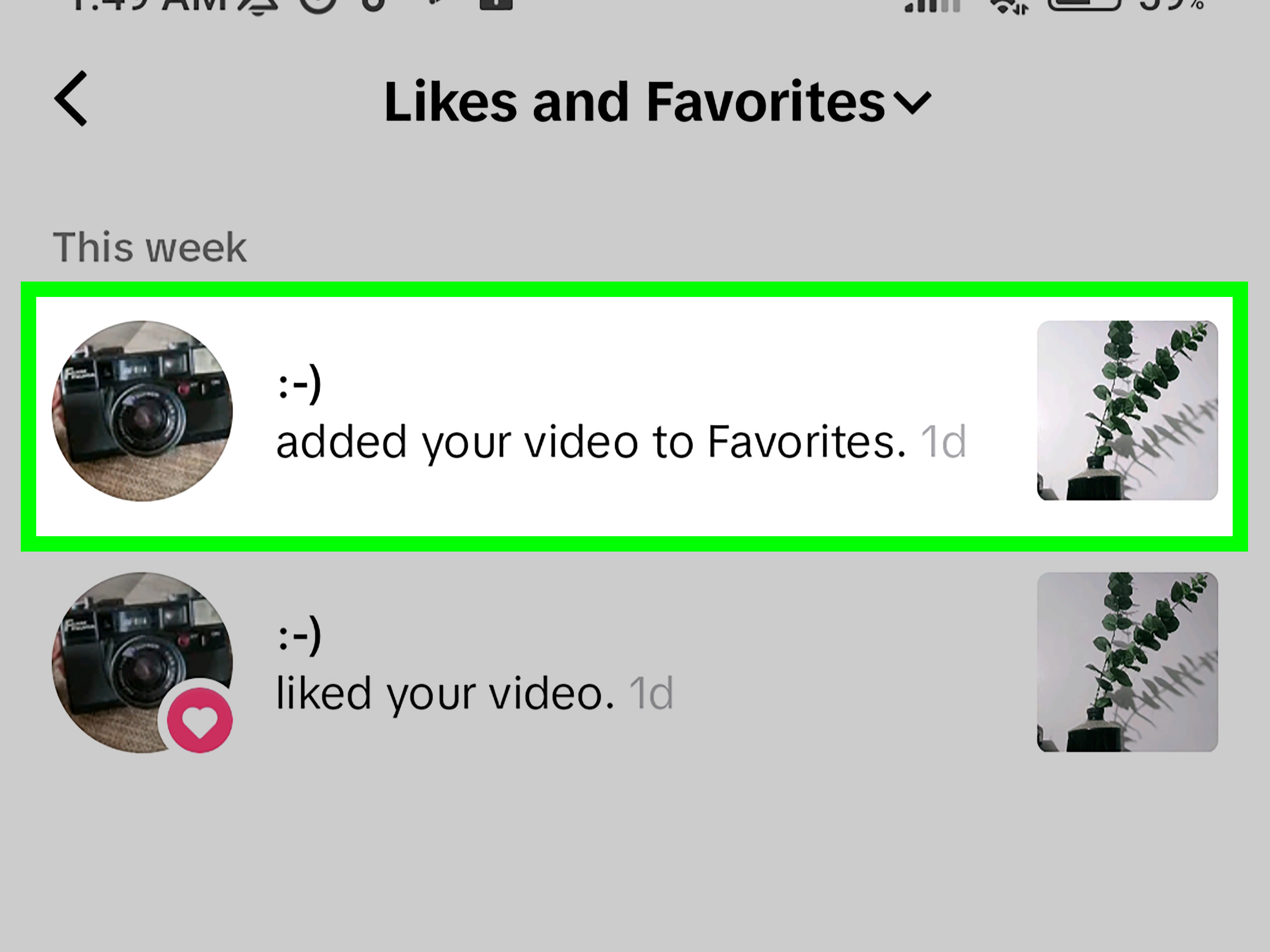
- Look for notifications saying someone added your video to Favorites.
This is the easiest way to see favorite activity. However, there is a practical catch: TikTok’s activity feed may mix likes and favorites together, and older notifications may disappear or become harder to find as new activity comes in. If your video suddenly gets a thousand saves, congratulationsalso, enjoy scrolling like you are searching for a lost sock in a laundry avalanche.
How to See Who Favorited Your TikTok Video: Easy Steps
Step 1: Open TikTok and Go to Your Inbox
Start by opening the TikTok app on your iPhone or Android device. At the bottom of the screen, tap Inbox. This area collects interactions such as likes, comments, mentions, follows, and favorite-related activity.
If you are using TikTok on desktop, the available options may be more limited. For checking who favorited your video, the mobile app is usually the best place to start.
Step 2: Tap Activities
Inside the Inbox, look for Activities. Depending on your app version, you may see an activity section, a notification bell, or a similar label. TikTok often tests interface changes, so do not panic if your screen does not look exactly like someone else’s tutorial.
If you do not see Activities immediately, check whether your TikTok app needs an update. Sometimes the feature is there, but hiding behind a new layout like it is auditioning for a spy movie.
Step 3: Choose All Activity
Once you are in the activity area, tap All activity. This opens a filter menu where TikTok sorts different kinds of engagement. You may see options such as comments, mentions and tags, followers, likes, and favorites.
For this task, you want the filter that includes favorite actions.
Step 4: Select Likes and Favorites
Tap Likes and Favorites. This view can show users who liked or favorited your videos. Look for wording such as “added your video to Favorites.” That notification is the golden breadcrumb.
From here, you may be able to tap the user’s profile, see which video the activity refers to, or open the related post. The exact behavior can vary by app version, but the activity message usually gives you the best clue.
Step 5: Match the Notification to the Video
If you post often, matching a favorite notification to the right video can take a little detective work. TikTok may show a thumbnail or text preview of the video. If the notification says a user favorited a specific post, tap it to confirm.
For creators with multiple viral videos, this step matters. A favorite on a tutorial means “useful.” A favorite on a comedy skit means “rewatchable.” A favorite on a product review means “possible buyer later.” Same button, different meaning.
How to Check Favorite Counts on a TikTok Video
Seeing who favorited your TikTok video is one thing. Seeing how many people favorited it is another. TikTok often makes engagement counts easier to find than user names.
Check the Video Itself
Open your TikTok profile, tap the video, and look near the engagement icons. Depending on your layout, you may see counts for likes, comments, shares, and favorites. The bookmark icon usually represents favorites or saves.
If the number is high, your video has strong “save for later” value. This is especially common for:
- How-to tutorials
- Recipes
- Fitness routines
- Travel itineraries
- Shopping lists
- Study tips
- Beauty routines
- Templates, scripts, and checklists
Use TikTok Analytics or TikTok Studio
If you are serious about content growth, open your creator tools or TikTok Studio. TikTok analytics can show performance data such as views, likes, comments, shares, followers, and post-level insights. Not every account sees the same analytics layout, but the tool is useful for understanding how your content performs beyond the public numbers.
Analytics may not always show a complete list of individual users who favorited a specific video. Think of analytics as your scoreboard, not your guest book. It tells you what happened at scale, even when it does not introduce every person in the crowd.
Why Can’t I See Who Favorited My TikTok?
If you followed the steps and still cannot see favorite activity, do not assume your account is broken. TikTok features can vary. Here are the most common reasons the option may not appear.
Your App Is Out of Date
Open the App Store or Google Play Store and check for TikTok updates. Social apps change constantly. An outdated version can cause missing buttons, older notification layouts, or features that behave differently from current guides.
No One Has Favorited the Video Yet
This one hurts, but it is possible. If your video has likes and comments but no favorite notifications, it may simply not have been saved yet. That does not mean the video failed. Some content is entertaining in the moment but not necessarily something people need to revisit.
The Notification Is Too Old
Activity feeds are not designed to be permanent archives. If the favorite happened weeks or months ago, it may be difficult to find, especially if your account receives frequent engagement.
The Feature Is Not Available in Your Region or Account
TikTok tests features by region, device, account age, and account type. Some users see options earlier than others. Two creators can sit side by side, open the same app, and see slightly different menus. It is annoying, yes, but also very TikTok.
Privacy or Safety Settings May Limit Visibility
TikTok balances creator feedback with viewer privacy. Some saving behavior may remain private or may only appear as limited activity. Also, if a user favorites and then quickly removes your video from Favorites, the notification behavior may not always be predictable.
Does TikTok Notify Creators When You Favorite a Video?
TikTok may show creators favorite-related activity in their notifications. That means when you add someone’s video to Favorites, the creator may be able to see that action, especially if it appears in their Likes and Favorites activity feed.
However, this does not mean every favorite is displayed forever or that creators always get a dramatic alert with confetti and a marching band. Visibility can vary. If privacy is important to you as a viewer, remember that social platforms can expose some interactions even when your saved collection itself remains private.
Are Your TikTok Favorites Private?
Generally, your Favorites folder is private to you. Other users usually cannot open your profile and browse all the videos you have saved. That is good news for anyone whose Favorites folder contains one productivity video, three soup recipes, twelve dog clips, and a suspicious number of “how to flirt without being weird” tutorials.
Still, creators may see when you favorite their content through activity notifications. The folder is private; the action may not always be invisible.
Favorites vs. Likes vs. Shares: What Matters Most?
Likes, favorites, comments, and shares all signal engagement, but they do not mean the same thing.
Likes Show Quick Approval
A like usually means the viewer enjoyed the video. It is fast, low-effort, and common. Likes are helpful, but they do not always prove the viewer plans to return.
Favorites Show Future Intent
A favorite often means “I want this later.” That is powerful. A saved recipe, checklist, template, or tutorial has longer life than a quick laugh. For creators, high favorites can show that your content has practical value.
Comments Show Conversation
Comments tell you what people think, ask, misunderstand, love, or argue about. If favorites are quiet appreciation, comments are the group chat.
Shares Show Social Value
A share means someone thought the video was worth sending to another person. Shares can expand reach quickly, especially when viewers send videos to friends, group chats, or other platforms.
How to Get More Favorites on TikTok
If you want more people to favorite your videos, make your content useful, repeatable, or emotionally rewatchable. People save videos they believe they will need again.
Create Save-Worthy Content
Ask yourself: “Would someone need this later?” If the answer is yes, you have a strong favorite-friendly idea. Examples include:
- “3 poses for better photos”
- “Save this grocery list for high-protein meals”
- “The exact email template I use with clients”
- “A 10-minute beginner workout”
- “Five things to do before visiting New York”
Use a Clear Call to Action
Sometimes viewers need a friendly nudge. Try phrases like:
- “Save this for later.”
- “Favorite this before your next grocery run.”
- “Bookmark this checklist.”
- “You’ll want this when you start editing.”
Do not overdo it. If every video screams “SAVE THIS!” like a panicked airport announcement, viewers may tune it out. Use the call to action when the content genuinely deserves saving.
Make the First Three Seconds Clear
TikTok users scroll fast. Your opening should tell viewers exactly why the video matters. Instead of “Hey guys, so today I was thinking,” try “Save this 5-step packing list for your next beach trip.” Clear beats cute when attention is on the line.
Format Videos for Rewatching
Use on-screen text, numbered steps, captions, and clean pacing. If the information is useful but impossible to follow, viewers may leave instead of saving. A good favorite-worthy video feels organized, not like a squirrel presenting a PowerPoint during a thunderstorm.
What to Do After Someone Favorites Your TikTok
When you notice favorite activity, do not just smile and move on. Use it as feedback.
Look for Patterns
Which videos get favorited most? Are they tutorials, lists, personal stories, product reviews, recipes, or templates? Make a simple note of your top saved posts. Patterns are your content compass.
Turn High-Favorite Videos Into a Series
If one video gets a lot of favorites, make a follow-up. For example, if “5 budget dinner ideas” gets saved often, try “5 budget lunches,” “5 freezer meals,” or “5 lazy dinners that still look like you tried.”
Reply to Comments With More Value
People who favorite videos often have questions. Check the comments. If viewers ask for a template, part two, product link, recipe card, or step-by-step breakdown, that is your next content idea waving a tiny neon flag.
Common Mistakes When Checking TikTok Favorites
Confusing Favorites With Downloads
Favoriting a video saves it inside TikTok. Downloading saves it to a device, if the creator allows downloads. These are not the same. You may be able to manage download permissions in privacy settings, but that does not stop people from favoriting the video inside TikTok.
Expecting a Full Viewer List
TikTok does not normally show a complete list of everyone who watched a video. Favorites, likes, and comments can give clues about engaged viewers, but they do not reveal every person who saw your content.
Ignoring the Favorite Count
Many creators obsess over views and likes while ignoring saves. That is a missed opportunity. A video with moderate views but high favorites may be more valuable than a video with many passive views and little meaningful action.
Experience-Based Tips From Real TikTok Use
After working with TikTok-style content strategies, one thing becomes obvious: favorites are quiet but powerful. They do not always create the instant dopamine rush of comments, and they are less flashy than shares, but they reveal what viewers consider useful enough to keep. That makes them especially important for creators in education, food, beauty, fitness, finance, travel, DIY, parenting, and productivity niches.
For example, a creator might post two videos in the same week. One video is a funny trend that gets 40,000 views and plenty of likes. The other is a simple checklist called “Save this before your first apartment tour,” and it gets only 12,000 views but far more favorites. Which video is more valuable? It depends on the goal. If the creator wants reach, the trend looks better. If the creator wants trust, returning viewers, affiliate clicks, newsletter signups, or long-term authority, the checklist may be the real winner.
Favorites also help reveal audience intent. When people save a video, they are often saying, “This solves a future problem for me.” That is why practical videos tend to perform well in saves. A cleaning hack, resume tip, hotel recommendation, packing list, or budget meal plan has a longer shelf life than a reaction clip. Even funny content can earn favorites when it is highly rewatchable, relatable, or perfect to send later.
A helpful habit is to check favorite activity once or twice a week instead of obsessing over it every ten minutes. Daily checking can make you overreact to small changes. Weekly checking gives you a clearer pattern. Create a simple note with three columns: video topic, favorite count or favorite activity, and possible follow-up idea. Over time, this becomes a mini content research system powered by your actual audience instead of guesses.
Another experience-based lesson: do not beg for favorites on every post. Viewers can smell desperation through a phone screen. Instead, earn the save by making the video genuinely useful, then add a light reminder. “Save this for later” works best when the viewer immediately understands why. A vague lifestyle montage with “save this” may feel random. A step-by-step guide with “save this before your next job interview” feels helpful.
Finally, do not treat favorites as a popularity contest. Treat them as clues. If viewers save your video, study what made it save-worthy. Was it the topic? The hook? The structure? The checklist format? The caption? The on-screen text? The more you understand why people favorite your content, the easier it becomes to create videos that people do not just watchthey keep.
Conclusion
To see who favorited your video on TikTok, start with Inbox > Activities > All activity > Likes and Favorites. Look for notifications showing that someone added your video to Favorites. If you cannot find a complete list, remember that TikTok’s activity feed and analytics are limited. You may see favorite activity, counts, or trends, but not always a perfect per-video roster of every user who saved your post.
For creators, favorites are more than a vanity metric. They show that your video has lasting value. A like says, “Nice.” A favorite says, “I’m coming back.” That is the kind of signal worth studying, repeating, and building into your TikTok strategy.
Note: TikTok updates its app layout, labels, analytics, and privacy behavior often. If your screen looks different, update the app, check TikTok Studio or Creator Tools, and use the closest available activity filter for likes and favorites.