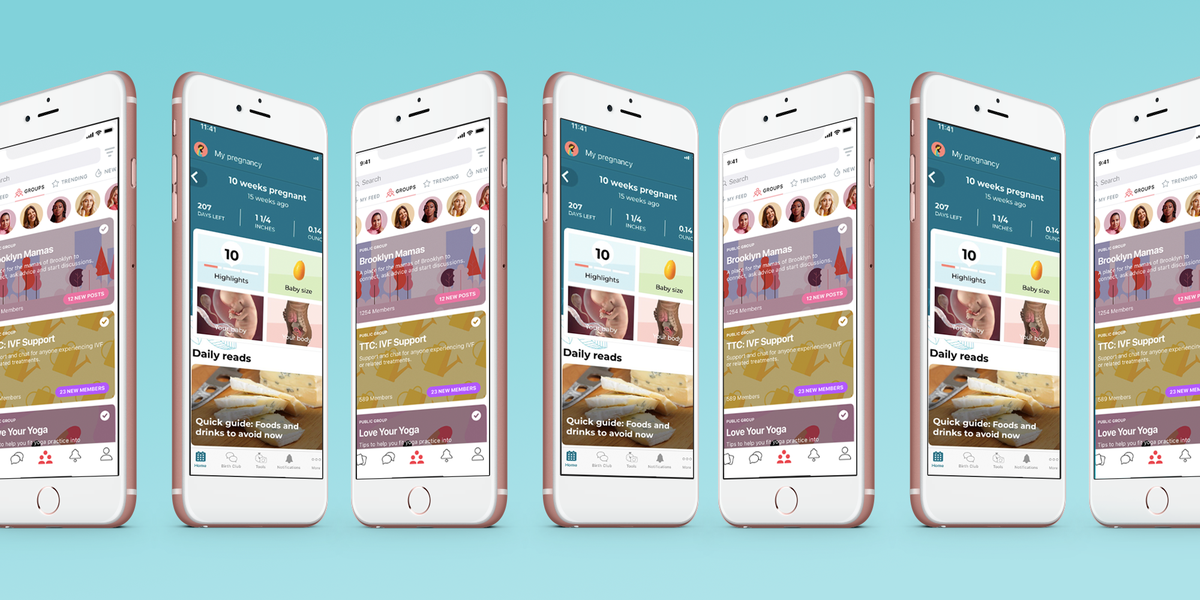
Pregnancy can turn an otherwise reasonable person into a full-time investigator. One minute you are wondering whether the baby is the size of a blueberry, and the next you are searching for the precise difference between a flutter, a kick, and what might simply be lunch.
That is where a good pregnancy tracker app can help. The best pregnancy apps organize weekly fetal-development updates, due-date information, symptoms, appointments, weight changes, kick counts, contractions, registry tasks, and the approximately 700 questions that appear in your brain at 2:13 a.m.
This roundup looks back at 18 of the best pregnancy tracker apps available in 2021. Most offered a useful free version, while others included optional subscriptions or affordable upgrades. Because apps, pricing, and ownership can change, check the current listing and privacy policy before entering health information or purchasing a plan.
Most importantly, a pregnancy app is an organizer and educational companionnot a substitute for prenatal care. Contact your obstetrician, midwife, hospital, or emergency service whenever you are concerned about symptoms, contractions, bleeding, fluid leakage, severe pain, reduced fetal movement, or another urgent change.
What Makes a Pregnancy Tracker App Worth Downloading?
During our comparison, the most useful apps shared a few practical qualities. They were easy to navigate, personalized information by gestational week, explained fetal and maternal changes in plain English, and included tools people would actually use rather than decorative buttons destined to gather digital dust.
Useful features may include a due-date calculator, pregnancy calendar, symptom journal, appointment reminders, weight tracker, kick counter, contraction timer, hospital-bag checklist, birth-plan organizer, partner access, community groups, and postpartum support.
Credibility also matters. Research has found considerable variation in the quality and accuracy of pregnancy apps, so look for clearly named medical reviewers, recent updates, transparent references, sensible privacy controls, and language that encourages users to contact healthcare professionals when appropriate.
18 Best Pregnancy Tracker Apps of 2021
1. What to Expect Pregnancy & Baby Tracker
Best for: A complete week-by-week pregnancy guide
The What to Expect app brought the familiar pregnancy-guide brand to a personalized mobile format. After entering a due date, users received weekly development updates, daily tips, baby-size comparisons, symptom information, videos, community groups, and organizational tools.
It was particularly useful for first-time parents who wanted plenty of explanations in one place. Features included symptom and weight logging, kick counting, a contraction counter, pregnancy journaling, registry support, and information reviewed by the company’s medical board. The free experience was substantial, although users who disliked advertisements might have found the interface busy.
2. BabyCenter Pregnancy Tracker
Best for: Pregnancy tools and an active birth-month community
BabyCenter combined a pregnancy calendar with articles, fetal-development videos, checklists, a bump-photo diary, birth clubs, and practical tools for later pregnancy. Its community groups allowed parents with similar due dates to compare experienceshelpful when used for emotional support rather than crowdsourced diagnosis.
The app also offered a kick tracker, contraction timer, birth-plan worksheet, hospital-bag guidance, baby-name ideas, and postpartum tracking. It was one of the strongest free choices for someone who wanted a pregnancy tracker that could continue into the baby’s first year.
3. Ovia Pregnancy & Baby Tracker
Best for: Detailed symptom and wellness tracking
Ovia was an appealing option for data-minded users. In addition to fetal-development updates and due-date countdowns, the 2021 version allowed users to record symptoms, moods, sleep, nutrition, medications, appointments, weight, and other health details.
The app also made baby-size comparisons more playful with themes beyond the traditional fruit bowl. Ovia’s customizable tracking was useful for spotting patterns and creating notes to discuss at prenatal appointments. Since 2021, the legacy pregnancy app has been consolidated into a broader Ovia reproductive-health app, so current users may see a different interface and product structure.
4. Pregnancy+
Best for: Beautiful fetal-development visuals
Pregnancy+ earned attention for its polished, interactive images showing fetal development throughout pregnancy. The visual experience made abstract weekly descriptions feel more tangible, especially during early pregnancy when there may not yet be much happening on the outside.
Beyond the graphics, users could follow daily and weekly information, record appointments, monitor weight, create lists, count kicks, and time contractions. The app was free to download, with certain tools and content offered through in-app purchases. Its partner-sharing features also made it easy for relatives or a co-parent to follow the pregnancy without repeatedly asking, “What week are we now?”
5. The Bump
Best for: Pregnancy planning and registry organization
The Bump blended weekly pregnancy tracking with planning tools. Users received baby-size comparisons, development updates, articles, interactive visual content, appointment questions, checklists, and access to registry features.
Its clean presentation made it friendly for first-time parents who wanted useful information without building a spreadsheet named “Operation Baby Arrival.” The Bump was also a good choice for people already using The Knot family of planning services and who liked keeping pregnancy information, product research, and registry tasks connected.
6. Sprout Pregnancy
Best for: A visual pregnancy journal
Sprout Pregnancy stood out for lifelike, interactive 3D fetal models and an attractive timeline. It paired the visuals with daily and weekly updates, a weight tracker, symptom notes, appointment organization, a kick counter, and a contraction timer.
One of its most memorable features was the pregnancy journal. Users could collect notes and photographs throughout the pregnancy and turn them into a keepsake afterward. Sprout was available as a free download with optional purchases, making it suitable for users who wanted to explore the basic tools before paying.
7. Glow Nurture
Best for: Tracking symptoms and connecting with a community
Glow Nurture offered daily pregnancy information alongside extensive health logging. Users could track symptoms, appointments, medications, weight, emotional changes, and other personal observations. Apple Health integration was another attraction for people already recording wellness data on an iPhone.
The app also included community discussions and partner-friendly features. Its depth could be helpful for someone who enjoys recording details, although people seeking a minimal “tell me the baby’s size and let me return to my snack” experience might prefer a simpler app.
8. WebMD Pregnancy
Best for: Health-focused pregnancy reading
WebMD Pregnancy was a notable content-first option in 2021. It provided medically oriented weekly information, questions to consider at appointments, checklists, a bump-photo feature, and support for twin pregnancies.
Its strongest appeal was the familiar WebMD health-information ecosystem rather than elaborate social or journaling features. The dedicated pregnancy app may not be available in every current app store, so anyone reading this historical list today should check WebMD’s current mobile tools and website instead of assuming the 2021 product is unchanged.
9. Flo
Best for: Moving from cycle tracking into pregnancy mode
Flo was widely known as a period and ovulation tracker, but it also provided a pregnancy mode. That made it convenient for users who had already recorded cycles or fertility information and wanted to continue in the same ecosystem after receiving a positive pregnancy test.
Pregnancy features included stage-based information, symptom education, and personalized content. A free version was available, while more extensive insights generally required a subscription. Users should review its current privacy controls carefully because reproductive-health information is especially sensitive.
10. Pregnancy App by Amila
Best for: Straightforward, no-fuss tracking
Pregnancy App by Amila was refreshingly direct. It offered a pregnancy calendar, current gestational week, due-date calculation, weekly information, weight tracking, kick counting, and a contraction counter.
There were fewer lifestyle extras than in some larger platforms, which could be an advantage. Not everyone wants a pregnancy app to become a social network, shopping mall, life coach, and amateur fruit catalog. For someone who primarily wanted practical tools and a clean interface, Amila was a strong free choice.
11. Full Term Contraction Timer
Best for: Timing labor contractions
Full Term focused on one late-pregnancy job and handled it well. A user tapped one button when a contraction began and again when it ended; the app calculated duration, frequency, and trends.
It also allowed users to edit entries, record intensity, add notes, review graphs, track water breaking, and use a kick counter. A dedicated contraction app can be easier to operate during labor than an all-in-one pregnancy app with the timer hiding behind six menus and an article about nursery wallpaper. Follow the labor instructions provided by your own healthcare team rather than relying solely on an app alert.
12. Count the Kicks
Best for: Recording third-trimester movement patterns
Count the Kicks was developed as a focused fetal-movement tracking tool. It helped users time movement-counting sessions, record strength, review patterns, set reminders, and share information with a healthcare professional.
The app was free and intentionally simple. Its purpose was not to declare whether a baby was healthy; it was to help a parent become familiar with the baby’s normal movement pattern and recognize meaningful changes. Instructions about when and how to monitor movement should always come from the user’s own obstetric clinician or midwife.
13. Baby2Body
Best for: Pregnancy fitness, nutrition, and wellness
Baby2Body approached pregnancy tracking through a wellness lens. Along with development updates, it offered workouts, pelvic-floor exercises, breathing sessions, nutrition information, and postpartum recovery content.
The app was useful for people who wanted structured movement ideas that changed with pregnancy stage. Some content required a paid membership, so it was worth testing the free material before subscribing. Exercise during pregnancy should be adapted to individual health, previous activity, symptoms, and guidance from a qualified prenatal healthcare professional.
14. Expectful
Best for: Meditation and emotional well-being
Expectful was less concerned with counting fruit-sized milestones and more interested in helping users slow down. It offered guided meditations for fertility, pregnancy, birth preparation, sleep, postpartum recovery, and early parenthood.
For someone experiencing ordinary stress, uncertainty, or difficulty sleeping, the structured audio sessions could complementnot replaceprofessional mental-health support. The app typically used a subscription model, although trials or limited free content were sometimes available. It was most valuable when paired with a separate tracker that handled appointments and physical symptoms.
15. Peanut
Best for: Finding pregnancy and motherhood support
Peanut functioned more like a friendship and community app than a traditional medical tracker. It connected users based on pregnancy stage, location, interests, and parenting experiences through profiles, groups, conversations, and live discussions.
Pregnancy can feel isolating, particularly when friends are in different life stages or in-person gatherings are limited. Peanut helped users build a support network, and its basic service was free. As with any online community, personal stories may be emotionally helpful but should never be treated as individualized medical advice.
16. Preglife
Best for: Week-by-week education for parents and partners
Preglife provided a pregnancy calendar, fetal-development updates, size comparisons, checklists, articles, podcasts, a contraction timer, childbirth information, and a dedicated partner section.
The partner content was particularly useful because it encouraged shared preparation instead of treating the nonpregnant partner as a mildly confused passenger. Preglife could also continue into postpartum and early child development, reducing the need to switch apps immediately after delivery.
17. HiMommy
Best for: Friendly daily pregnancy messages
HiMommy delivered short daily updates written in a warm, approachable style. It covered baby development, body changes, practical preparation, appointments, and other pregnancy topics without requiring users to read a miniature textbook every morning.
A pregnancy diary made it possible to save memories and bump updates, while the related HiDaddy experience could involve a partner. HiMommy worked well for users who preferred small daily pieces of information rather than one long weekly article.
18. Babylist
Best for: Combining a pregnancy tracker with registry planning
Babylist was primarily known as a universal baby-registry service, but it also included weekly pregnancy information, planning checklists, product guides, baby-name inspiration, and preparation resources.
The universal registry allowed users to add products from different stores and compare purchasing options. That made Babylist useful when pregnancy tracking began to overlap with the practical question, “What equipment does a seven-pound person actually need?” The app was free, although its shopping emphasis may not appeal to users who want a purely medical or journal-style tracker.
How to Choose the Best Pregnancy App for You
There is no universal winner because pregnancy apps serve different personalities and needs. A visual learner may love Pregnancy+ or Sprout. Someone who tracks every symptom may prefer Ovia or Glow Nurture. A community-focused user may enjoy BabyCenter or Peanut, while a minimalist may be happiest with Amila.
Start by choosing one primary pregnancy tracker. Then add one specialized tool only when it solves a genuine need, such as Count the Kicks for movement tracking, Full Term for contractions, Expectful for meditation, or Babylist for registry planning.
Before creating an account, examine the privacy policy and app-store data-disclosure section. Check whether information is used for advertising, whether an account can be deleted, whether data can be exported, and whether sharing with a partner exposes anything you intended to keep private.
Also consider how an app makes you feel. Weekly updates should inform and support you, not send you into a search spiral every time your experience differs from a generic description. Pregnancy varies considerably, and an estimated due date is exactly thatan estimate, not a restaurant reservation your baby has promised to honor.
Real-World Experience: What Using Pregnancy Tracker Apps Is Actually Like
The most realistic way to use pregnancy apps is not to expect one download to manage your entire pregnancy perfectly. In practice, many parents test several apps during the first trimester, keep two favorites, and gradually use different tools as their needs change.
Early in pregnancy, weekly development updates tend to be the star attraction. Opening an app and learning that the embryo has reached a new milestone can make the pregnancy feel more concrete, especially before the first ultrasound or visible bump. Baby-size comparisons are entertaining, although comparing a developing baby with a lentil, game controller, French pastry, or obscure tropical fruit is not medically essential. It is simply one of pregnancy technology’s most committed traditions.
The downside is information overload. Download four trackers and you may receive four notifications every morning, each confidently describing a slightly different symptom or produce item. One app says the baby is the size of a peach, another says a lemon, and suddenly you are standing in the grocery aisle conducting an unauthorized study of comparative fruit volume.
A better approach is to select one app for educational updates and use a second only for a specific function. For example, a first-time parent might use BabyCenter for weekly information and community support, then add Full Term near the due date. Someone who enjoys detailed records might use Ovia throughout pregnancy and Count the Kicks later if their healthcare professional recommends movement counting.
During prenatal appointments, a symptom log can be genuinely useful. Instead of saying, “I felt strange on Tuesdayor possibly Thursday,” you can review the date, duration, and circumstances. Notes about nausea, headaches, sleep, medication questions, or recurring discomfort can help you remember what to ask. The app does not interpret the symptoms, but it keeps pregnancy brain from hiding your carefully prepared questions until five minutes after you leave the clinic.
Community features can be both comforting and chaotic. Reading that other people are tired, worried, excited, constipated, or mysteriously furious at the smell of toast can make pregnancy feel less lonely. However, forums can also amplify anxiety. One dramatic post may send dozens of readers searching for a complication they do not have. Use communities for companionship and practical ideas, then take health concerns to a licensed professional who knows your history.
In the third trimester, utility often becomes more important than cute graphics. Checklists, kick counters, hospital-bag lists, appointment reminders, and contraction timers begin earning their space on the home screen. This is also when simplicity matters most. A contraction timer should open quickly, display large controls, and work without requiring a password reset while someone is breathing through a contraction.
After delivery, many all-in-one apps switch into newborn mode. That transition can be helpful because feeding, diaper, pumping, sleep, and milestone tools are suddenly more relevant than weekly fetal comparisons. Still, there is no requirement to continue using the same platform. Export any journal entries or photographs you want to keep, review stored personal data, and delete accounts that no longer serve you.
The best overall experience comes from treating a pregnancy tracker as a well-organized assistant. It can remind, record, explain, and occasionally compare your baby with a vegetable. It cannot examine you, diagnose a complication, replace prenatal appointments, or know when your instincts are telling you something has changed. Use the convenience, enjoy the fun parts, protect your privacy, and keep your healthcare team at the center of important decisions.
Final Thoughts
The best pregnancy tracker apps of 2021 made an enormous amount of information easier to understand. What to Expect, BabyCenter, Ovia, Pregnancy+, The Bump, and Sprout were strong all-around choices, while specialized apps such as Full Term, Count the Kicks, Expectful, Peanut, and Babylist filled more specific needs.
Begin with the free version, avoid paying for duplicate features, and keep only the apps that reduce confusion rather than creating more of it. A useful pregnancy app should help you feel organized, connected, and preparedwithout convincing you that you need eight daily notifications to remember you are pregnant.
Note: This article is a historical roundup of pregnancy apps associated with 2021. App names, features, pricing, ownership, platform compatibility, medical-review processes, and availability may have changed. Review the latest app-store listing and privacy policy before downloading. Pregnancy apps provide general information and tracking tools; they do not replace care from a qualified healthcare professional.