Note: This article is written for web publishing in standard American English and synthesizes real information from Prusa documentation, 3D-printing reviews, firmware notes, repair guides, and maker-community troubleshooting discussions.
The Prusa i3 MK3S is one of those 3D printers that people talk about like an old pickup truck that somehow also knows calculus. It is not the newest machine in the Prusa family anymore, and it no longer has the “fresh out of the launch video” sparkle. Yet it remains famous for a very good reason: it works. More specifically, it works because Prusa did not treat sensors as decorative electronics sprinkled on the frame like parsley on a diner plate. The MK3S used sensors to make 3D printing less dramatic, less fragile, and less dependent on the user staring nervously at the first layer like it owes them money.
But the MK3S story is also a trade-off story. The title “A Tale of Two Sensors” points to one of the most interesting debates in the Prusa i3 timeline: the move from the original MK3 optical filament sensor to the MK3S opto-mechanical IR filament sensor. One sensor was clever enough to detect filament movement. The other was simpler, more reliable, and better suited to real-world filament chaos. Add the PINDA bed-leveling probe into the conversation, and you get a printer that shows how sensor design is never just about what is technically possible. It is about what survives dust, translucent plastic, impatient hands, and the occasional spool that behaves like a caffeinated garden hose.
Why the Prusa i3 MK3S Became a Sensor Story
When the Original Prusa i3 MK3 arrived, it was widely praised for being unusually smart for a consumer desktop FDM printer. It included features such as power-loss recovery, fan monitoring, Trinamic stepper drivers with crash detection, a removable magnetic spring-steel print sheet, and an inductive bed-leveling probe. For many users, this was the moment when a desktop printer stopped feeling like a science-fair contraption and started feeling like a serious tool.
The MK3S, released as a refinement of the MK3, did not reinvent the entire platform. Instead, it focused on practical improvements: a reworked extruder, better serviceability, improved filament detection, and a design that played more nicely with the Multi Material Upgrade ecosystem. That may sound modest, but in 3D printing, modest mechanical changes can be the difference between a printer that runs all weekend and a printer that ruins your Saturday with one sad spaghetti sculpture.
Sensor One: The Original MK3 Optical Filament Sensor
The first major character in this tale is the original optical filament sensor used on the Prusa i3 MK3. It was ambitious. Rather than merely asking, “Is filament present?” it tried to answer a smarter question: “Is the filament actually moving?” That distinction matters. A basic runout sensor can pause the printer when the spool is empty, but it may not notice a jam, a tangle, or a stripped section of filament that stops feeding while plastic is still physically present.
The MK3 optical system used an encoder-like approach similar in spirit to the sensor technology found in a computer mouse. In theory, this allowed the printer to detect inserted filament and monitor movement through the extruder. On paper, this was brilliant. In practice, 3D printing filament is not always polite. It comes in translucent, glossy, dark, glitter-filled, flexible, abrasive, and mystery-bargain varieties. Some materials reflect light strangely. Others absorb it. A sensor that behaves perfectly with one spool may become suspiciously confused by another.
The original sensor’s movement-detection capability was exciting because it aimed to catch failures earlier. A clogged nozzle or tangled spool could be detected before hours of air-printing ruined a part. But the same sophistication that made the sensor powerful also made it more sensitive to edge cases. For many users, especially those printing with odd colors or transparent filament, reliability mattered more than theoretical intelligence. A sensor that sometimes cries wolf is still a wolf problem, just with more beeping.
Sensor Two: The MK3S Opto-Mechanical IR Filament Sensor
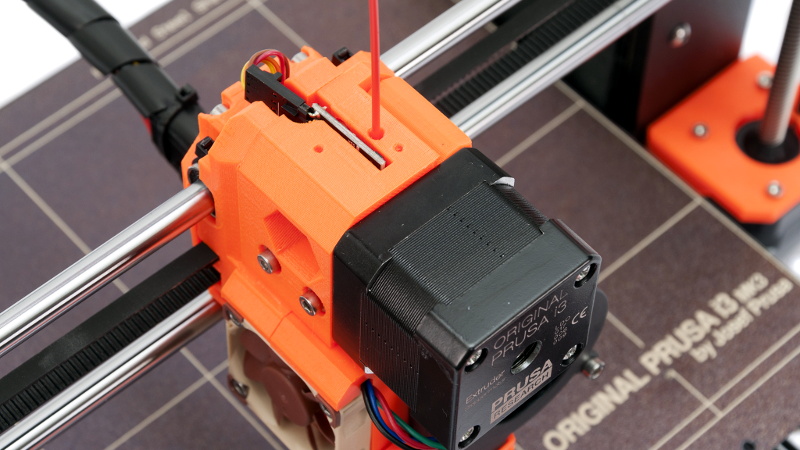
The MK3S introduced a new approach: an IR filament sensor triggered by a mechanical movement inside the extruder. This design still uses an optical sensor, but the filament no longer needs to be visually interpreted in the same direct way. Instead, filament physically moves a small mechanical element, and the sensor reads that mechanical state. Think of it as hiring a tiny bouncer to stand between the filament and the electronics. The filament does not need to look right; it just needs to push the mechanism.
This change made the sensor more robust for the two jobs most everyday users needed: filament autoload and filament runout detection. When filament is inserted and the hotend is ready, the printer can begin loading automatically. When filament runs out during a print, the printer can pause, move the carriage away, and guide the user through unloading the remaining material and inserting a new spool. That is not flashy, but it is deeply useful. It turns a failed print into a brief interruption instead of a small domestic tragedy.
The trade-off is clear: the MK3S sensor no longer detects filament movement or clogs in the same way the original MK3 optical sensor attempted to do. It is less clever in one narrow sense, but more dependable in the messy world where real users print silk PLA, matte PLA, PETG, flexible TPU, and whatever unlabeled sample came free in a box three years ago.
The Real Lesson: Smarter Is Not Always Better
The change from the MK3 optical sensor to the MK3S IR filament sensor is a classic engineering lesson. A feature can be technically superior and still be less successful if it is too sensitive to real-world variation. The original movement-detecting sensor promised more information. The MK3S sensor offered more confidence. In a production printer, confidence often wins.
For hobbyists who love tinkering, the MK3 sensor’s ability to detect filament motion was fascinating. For users who wanted to press print and go make coffee, the MK3S approach was more comforting. The MK3S essentially says, “I will reliably tell you when filament is present or gone.” It does not pretend to diagnose every extrusion problem. That honesty is useful. It lets users troubleshoot clogs, heat creep, worn drive gears, and bad filament with the right expectations.
Do Not Forget the PINDA Sensor
Although the “two sensors” discussion usually centers on the filament sensor debate, the Prusa i3 MK3S also owes much of its reputation to the PINDA probe. PINDA stands for Prusa INDuction Autoleveling sensor. It detects the print bed and helps the printer build a virtual map of the surface before printing. This is the magic behind mesh bed leveling, one of the reasons Prusa owners talk about first layers with slightly less panic than other 3D-printing tribes.
On MK3S printers, the PINDA V2 probe handles bed sensing. On the later MK3S+, Prusa moved to the SuperPINDA probe, which is designed to be more temperature-independent and consistent. The practical goal is simple: create a reliable first layer even when the bed is not mathematically perfect. Because no bed is perfect. Some are just better at hiding their crimes.
Mesh bed leveling can probe a 3×3 grid by default or a denser 7×7 grid for more detailed compensation. Users can also increase the number of measurements per point, commonly choosing three or five readings for better averaging. On 7×7 leveling, magnet compensation can help avoid misleading readings near the magnets under the steel sheet. This matters because the first layer is where many prints succeed, fail, or begin writing their resignation letter.
How the MK3S Uses Sensors in Everyday Printing
In daily use, the MK3S sensor system works best when each sensor is understood as part of a larger workflow. The filament sensor helps with loading, runout protection, and print recovery. The PINDA probe helps with bed leveling and first-layer consistency. Stepper-driver feedback can help detect crashes or skipped steps. Fan monitoring can warn about cooling problems. Power Panic can help the printer recover after a power interruption. None of these features makes the printer invincible, but together they reduce the number of ways a print can quietly fail.
This is why the MK3S became a favorite in schools, maker spaces, small businesses, and home workshops. It is not just that it prints well. It fails more politely. When something goes wrong, the printer often provides a clue rather than leaving the user to interpret a pile of PLA noodles like a detective at a crime scene.
Common MK3S Filament Sensor Problems
The MK3S IR filament sensor is more reliable than the older optical movement sensor, but it is not immune to problems. A common issue is incorrect sensor state: the printer may read filament as present when none is loaded, or absent when filament is inserted. Causes can include a misaligned lever, debris in the mechanism, incorrect assembly after maintenance, a cable connection problem, outdated or incorrect firmware, or sensor hardware that does not match the firmware’s expectations.
For troubleshooting, users commonly check the LCD sensor readout, verify the filament sensor setting, inspect the small mechanical parts in the extruder, confirm that the ball or lever moves freely, and make sure the cable is seated correctly on the electronics board. After upgrades, especially from MK3 to MK3S or when adding an MMU system, mechanical calibration becomes especially important. The sensor is simple in concept, but tiny alignment errors can make it act like it has developed opinions.
Common PINDA and First-Layer Problems
PINDA-related issues usually show up as first-layer trouble. The nozzle may print too high, causing poor adhesion, or too low, causing scraping, rough extrusion, or a first layer that looks like it was ironed by a raccoon. Before blaming the probe, users should check for nozzle debris, a clean steel sheet, correct sheet profile, stable bed temperature, and a properly calibrated Live Z value.
The MK3S allows users to fine-tune first-layer height through Live Z adjustment. This setting is crucial because the probe detects the bed, but the printer still needs to know the exact relationship between the nozzle tip and the sensed surface. Changing sheets can require different profiles because a smooth PEI sheet, textured sheet, and satin sheet may have different effective surface heights. The sensor gives the printer a map; Live Z tells it how close to drive.
MK3S Versus MK3S+: What Changed?
The MK3S+ is not a completely different printer. It is an evolutionary update. The biggest sensor-related change is the SuperPINDA probe, which improves bed-leveling consistency by reducing temperature-related influence. The MK3S+ also includes mechanical refinements such as revised printed parts and bearing clips. For many MK3S owners, upgrading depends on how well their current machine behaves. If the printer produces reliable first layers and the filament sensor works properly, the upgrade may feel more like a tune-up than a revolution.
However, for print farms, schools, or users who value consistency over tinkering, small improvements matter. A printer that saves five minutes of fiddling per job becomes a very different machine after hundreds of jobs. Reliability compounds.
Why This Sensor Tale Still Matters
The Prusa i3 MK3S remains relevant because it shows the difference between feature count and feature maturity. Many printers now advertise auto leveling, filament detection, power recovery, input shaping, cameras, Wi-Fi, cloud dashboards, and more. Those features are useful only when implemented well. A flaky sensor can be worse than no sensor because it adds uncertainty. The MK3S story reminds us that a good 3D printer is not the one with the longest feature list. It is the one whose features help when plastic, heat, motion, and gravity start negotiating behind your back.
The move from the MK3 optical filament sensor to the MK3S IR filament sensor was not a retreat from innovation. It was a refinement of priorities. Prusa learned that users needed dependable runout detection more than experimental jam detection. The PINDA and later SuperPINDA bed probes show the same mindset: reduce friction, improve repeatability, and let the user focus on the part rather than the ritual.
Practical Tips for MK3S Owners
Keep the Filament Path Clean
Dust, filament shavings, and tiny bits of ground plastic can interfere with the extruder and sensor mechanism. During routine maintenance, open the extruder area carefully and inspect the filament path. A clean path helps both feeding and sensing.
Check Sensor Readings Before a Long Print
Before starting a long job, use the printer’s menu to verify that the filament sensor changes state when filament is inserted and removed. This takes less than a minute and can save a twelve-hour print from becoming modern art.
Use the Right Firmware
Sensor behavior depends on firmware support. After upgrades or repairs, confirm that the firmware matches the printer version and sensor revision. Wrong firmware can produce confusing symptoms that look mechanical but are actually configuration-related.
Respect Live Z Calibration
Mesh bed leveling is powerful, but Live Z still matters. Revisit first-layer calibration after changing nozzles, build sheets, probes, or major extruder parts. The perfect first layer is not luck; it is a negotiated peace treaty between the nozzle and the bed.
Experience Notes: Living With the MK3S Sensor Personality
The MK3S feels different from cheaper printers because it does not demand constant emotional supervision. With many budget machines, the first ten minutes of a print can feel like defusing a bomb made of hot plastic. You watch the skirt. You watch the brim. You wonder whether that corner is lifting. You lean closer, as if your face contains calibration powers. The MK3S does not eliminate that ritual entirely, but it reduces the drama. The PINDA probe does its little pre-print dance, the bed mesh is measured, and the printer begins with a sense of routine rather than suspense.
The filament sensor experience is similarly practical. Autoload feels small until you get used to it. Then going back to a printer without it feels oddly primitive, like using a TV with no remote. Insert filament, let the machine grab it, confirm the extrusion color, and continue. When runout happens, the pause-and-reload process is forgiving enough that a nearly empty spool no longer feels like a ticking time bomb.
Still, the MK3S teaches humility. The IR filament sensor is reliable, but it is not magic. If the small mechanical parts are dirty, misaligned, or assembled incorrectly, the printer may report the wrong state. The lesson is simple: sensors do not replace maintenance. They reward it. A clean extruder, properly tensioned idler, good cable routing, and updated firmware make the sensor system feel invisible. Neglect those basics, and the printer starts sending cryptic little hints through the LCD like a passive-aggressive roommate.
The first-layer process is another area where experience matters. New users often assume mesh bed leveling means they never need to think about Z height again. Then they switch from a smooth sheet to a textured sheet and discover that physics did not sign that agreement. Sheet profiles exist for a reason. Once each sheet has its own calibrated Live Z value, the printer becomes much easier to trust. PETG on textured steel, PLA on smooth PEI, and functional parts on satin surfaces each become predictable rather than experimental.
One of the best habits is to treat sensor checks as part of the printing ritual, not as emergency medicine. Before a critical print, confirm the filament sensor state. Look at the nozzle for plastic blobs before probing. Clean the sheet with appropriate alcohol. Check that the steel sheet is seated against the rear stops. These little actions sound boring, but boring is exactly what you want from a production machine. Excitement belongs in the model design, not in the question of whether the first layer will attach.
The lasting impression of the MK3S is that it is not perfect, but it is thoughtfully imperfect. Its sensors are not there to impress a spec sheet. They are there to remove common headaches. The original MK3 sensor tried to be brilliant. The MK3S sensor tried to be dependable. For most users, dependable wins the print farm, the classroom, the garage bench, and the midnight job that absolutely must be done before morning.
Conclusion
The Prusa i3 MK3S is a reminder that good engineering is often about choosing the right compromise. The original MK3 optical filament sensor was bold because it attempted to detect filament movement, not just filament presence. The MK3S IR filament sensor stepped back from that ambition but gained day-to-day reliability for autoload and runout detection. Meanwhile, the PINDA probe quietly handled one of the most important jobs in FDM printing: helping the first layer land where it should.
That is the real tale of two sensors. One represents the dream of smarter failure detection. The other represents the wisdom of robust, practical sensing. Together, they explain why the MK3S earned such a strong reputation among hobbyists, educators, print farms, and practical makers. It is not flawless, and it does not pretend to be. But when maintained properly, it turns 3D printing from a nervous ritual into a repeatable process. In this hobby, that is not just convenient. That is beautiful.