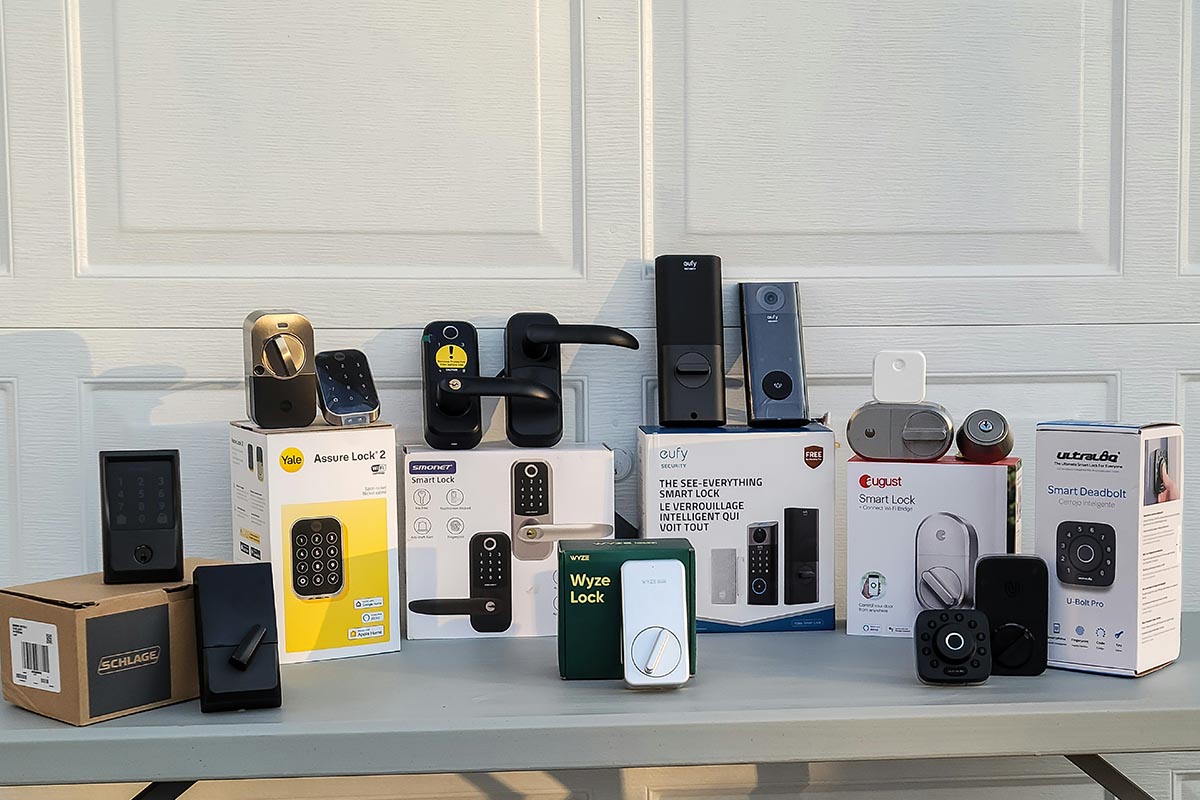
House keys have a remarkable talent for vanishing when your hands are full, the rain is falling sideways, and the grocery bag containing the eggs is beginning to make suspicious noises. A reliable smart lock solves that tiny domestic crisis by letting you enter with a code, fingerprint, phone, smartwatch, or even a carefully recognized approach.
However, the best smart lock is not simply the model with the longest feature list. It must lock consistently, survive outdoor conditions, manage guest access without drama, and continue working when the internet decides to take an unscheduled vacation.
This guide combines current manufacturer specifications with findings from established publications that conduct hands-on smart-lock testing. We compared installation, physical construction, unlocking speed, app quality, smart-home compatibility, battery management, backup access, and everyday usability. The recommendations focus on models designed for common residential doors in the United States and available as of July 2026.
The Best Smart Locks at a Glance
- Best overall: Schlage Encode Plus
- Best for flexible configurations: Yale Assure Lock 2
- Best budget retrofit: Yale Approach Lock
- Best Matter retrofit: Aqara Smart Lock U200
- Best hands-free lock for Apple users: Aqara Smart Lock U400
- Best facial-recognition lock: Lockly Visage Zeno Series
- Best lock with a video doorbell: Eufy Video Smart Lock E330
How the Smart Locks Were Evaluated
A connected deadbolt must handle more than a laboratory demonstration. Real front doors swell in humid weather, shift as houses settle, get slammed by children, and occasionally receive instructions from relatives who believe Bluetooth is a dental condition.
The most important evaluation factors were:
- Ease of installation and calibration
- Keypad, fingerprint, facial-recognition, and mobile-entry performance
- Guest codes, access schedules, and activity history
- Apple Home, Alexa, Google Home, SmartThings, Matter, and Thread support
- Remote control requirements, including hubs and Wi-Fi bridges
- Battery type, low-power warnings, and emergency access
- Weather resistance, physical strength, and backup key availability
Physical certification deserves special attention. The Builders Hardware Manufacturers Association is accredited by ANSI to develop performance standards for locks and other builders’ hardware. Products listed through its certification program are tested by independent laboratories for criteria such as security, durability, and finish quality. A grade does not make a door invincible, but it is more meaningful than a product description claiming a lock is “fortress inspired.”
The Best Smart Locks for the Home
1. Schlage Encode Plus Best Smart Lock Overall
Best for: Homeowners who want mature hardware, built-in Wi-Fi, a dependable keypad, and excellent Apple integration.
The Schlage Encode Plus earns the top recommendation by getting the important things right without turning the front door into a technology exhibition. It provides touchscreen codes, app control, a physical backup key, remote management through built-in Wi-Fi, and Apple Home Key access using a compatible iPhone or Apple Watch.
Unlike locks that need a separate Wi-Fi bridge, the Encode Plus connects directly to the home network. Schlage supports as many as 100 access codes, allowing owners to create separate credentials for family members, cleaners, contractors, dog walkers, and guests. Individual codes can be removed without changing everyone else’s access.
The deadbolt uses four AA batteries and includes a conventional key cylinder. That combination is reassuring because no one wants to discover that a misplaced phone, drained watch, and dead lock battery have formed an alliance.
The main disadvantages are size, price, and power consumption. Its interior assembly is bulkier than minimalist locks, and direct Wi-Fi can use batteries faster than low-power Thread. Nevertheless, independent reviewers continue to praise the Encode Plus for its balance of physical security, dependable operation, guest management, and broad unlocking options.
2. Yale Assure Lock 2 Best for Flexible Configurations
Best for: Buyers who want multiple designs, optional fingerprint access, door sensing, or ecosystem-specific connectivity.
The Yale Assure Lock 2 is actually a family of related products. Depending on the version, buyers can choose keyed or key-free construction, physical buttons or a touchscreen, Bluetooth or Wi-Fi connectivity, Apple Home Key, fingerprint recognition, and alternative smart-home modules.
This flexibility is valuable, although shoppers should study the exact model before ordering. Two Assure Lock 2 packages may look nearly identical while supporting different connectivity standards. Buying by product name alone can produce the smart-home equivalent of ordering decaf by accident.
Yale’s DoorSense technology is one of the strongest reasons to choose this model. A conventional smart lock can report that its bolt is extended without knowing whether the door is actually closed. DoorSense helps the system distinguish a secured entrance from a door standing open with the bolt confidently pointing into empty space.
The Yale app supports shared access codes, entry history, auto-locking, and remote control on Wi-Fi-equipped versions. The Assure Lock 2 Touch adds fingerprint access, while the Plus line offers Apple Home Key on compatible configurations.
Installation requires precise alignment, and the number of available versions can be confusing. Once the correct model is selected, the Assure Lock 2 offers one of the best combinations of appearance, functionality, and smart-home flexibility.
3. Yale Approach Lock Best Budget Retrofit Smart Lock
Best for: Renters, first-time buyers, and homeowners who want to keep their existing exterior lock and key.
The Yale Approach upgrades only the interior thumb turn of a compatible single-cylinder deadbolt. The outside of the door remains largely unchanged, and the original physical key continues to work. This makes the installation reversible and far more landlord-friendly than replacing the entire deadbolt.
Hands-on testing has found the installation process straightforward, with short instructional videos inside the app. One reviewer completed the physical setup in approximately 10 minutes. The lock can provide app control and location-based auto-unlocking, while bundles or accessories can add a keypad, fingerprint entry, door-position sensing, and remote Wi-Fi access.
The base lock frequently costs less than premium full-replacement models. However, adding the Wi-Fi bridge, keypad, and sensor can significantly increase the final price. The exterior keypad also needs a reasonably flat surface for adhesive or screw mounting.
The Yale Approach is not the neatest all-in-one package, but it is an excellent way to gain smart access without changing the exterior hardware or surrendering the familiar key already used by the household.
4. Aqara Smart Lock U200 Best Matter Retrofit With Fingerprint Access
Best for: Smart-home enthusiasts who want a retrofit lock with fingerprints, PIN codes, Apple Home Key, and Matter over Thread.
The Aqara U200 preserves the existing exterior cylinder while adding an interior motor and a separate wireless keypad. That keypad includes a fingerprint reader and supports PIN codes, NFC, and Apple Home Key. The original physical key remains usable from outside.
The lock’s Matter-over-Thread support is particularly attractive for households using multiple smart-home platforms. Matter is an open standard intended to let certified devices communicate with participating ecosystems through a common protocol. Thread provides low-power mesh networking but requires a compatible Matter controller and Thread border router.
Basic functions can therefore work with platforms such as Apple Home, Alexa, Google Home, and SmartThings, although advanced settings may still require Aqara’s app or compatible hub. Matter improves interoperability; it does not magically place every fingerprint setting and access log inside every third-party application.
The U200 delivers an impressive collection of entry methods without replacing the visible deadbolt. Its downside is complexity. Pairing the lock, keypad, Matter controller, Thread network, and optional Aqara hub can feel more technical than installing a conventional Wi-Fi deadbolt. It is a superb enthusiast pick, but less suitable for someone whose router remains named “NETGEAR42” because changing it seems dangerous.
5. Aqara Smart Lock U400 Best Hands-Free Lock for Apple Homes
Best for: Apple households that want the lock to open automatically when an authorized user deliberately approaches.
The Aqara U400 moves beyond tapping a phone or watch against the keypad. Its ultra-wideband technology can estimate distance and direction more precisely than older Bluetooth geofencing systems, allowing compatible Apple devices to trigger hands-free Home Key entry.
Recent hands-on testing found the system fast and considerably more reliable than conventional location-based auto-unlock. Directional awareness is important because a lock should recognize that someone is approaching the front doornot walking past it inside the living room wearing pajamas and carrying cereal.
The U400 also supports fingerprints, PIN codes, NFC, Bluetooth, Matter over Thread, a mechanical key, and a rechargeable battery. Aqara specifies support for multiple fingerprints and dozens of PIN credentials, making it practical for families rather than merely impressive during demonstrations.
It is more expensive and bulkier than mature keypad locks, and its most exciting hands-free capability currently favors compatible Apple hardware. Mixed-platform households should verify which entry methods work for Android users before purchasing. For committed Apple households, however, the U400 offers one of the most convincing examples of truly passive smart entry.
6. Lockly Visage Zeno Series Best Facial-Recognition Smart Lock
Best for: Families, short-term rentals, and users who want several biometric and code-based entry methods.
The Lockly Visage Zeno Series uses infrared-assisted facial recognition to identify enrolled users as they approach. It also offers a fingerprint reader, PIN codes, app access, Apple Home Key, voice-assistant compatibility, and a physical key cylinder.
Facial recognition is particularly useful when someone is carrying groceries, luggage, a sleeping child, or the collection of cardboard boxes that appeared after one innocent online order. Reviewers have found the hands-free feature genuinely convenient rather than merely decorative.
Lockly’s PIN Genie keypad rearranges displayed numbers, helping reduce the usefulness of watching someone enter a code. The lock can recognize numerous fingerprints and user codes, while its rechargeable battery and exterior emergency power connection provide practical recovery options.
This is a visibly technological lock with a large exterior assembly, and enrolling faces requires more work than assigning a PIN. It is also expensive. Buyers should choose it because hands-free biometric access solves a daily problem, not because their entrance needs to resemble a spaceship.
7. Eufy Video Smart Lock E330 Best Smart Lock With a Video Doorbell
Best for: Homes that want a fingerprint lock, entry camera, and 2K video doorbell combined in one exterior device.
The Eufy Video Smart Lock E330 combines three products: a motorized deadbolt, a fingerprint keypad, and a 2K video doorbell. Users can enter with a fingerprint, PIN code, mobile app, voice command, or physical key.
Current testing has praised the speed of its fingerprint reader, app performance, camera clarity, and relatively straightforward installation. Combining the camera and lock can also solve a practical space problem when a narrow door frame cannot comfortably accommodate a separate keypad and video doorbell.
The E330 is particularly appealing to households already using Eufy security equipment. It consolidates front-door activity inside one app and avoids purchasing two separate premium devices.
There are compromises. Video recording and motion detection increase battery usage, and the doorbell button may be less obvious to visitors than a conventional illuminated button. Combining several devices also creates a single point of failure. Homeowners seeking the best possible camera and best possible lock may prefer separate products, but those seeking a clean all-in-one installation will find the E330 difficult to beat.
How to Choose the Right Smart Door Lock
Check the Door Before Comparing Apps
Most smart deadbolts sold in the United States fit standard single-cylinder doors, but compatibility can be affected by door thickness, bore-hole diameter, backset, trim clearance, storm doors, and multipoint locking systems. Measure everything before ordering.
Test the existing deadbolt with the door open and closed. The bolt should move smoothly without pulling, lifting, or leaning against the door. A human hand may compensate for poor alignment by twisting harder. A battery-powered motor will complain, report a jam, and consume batteries at a speed usually associated with children’s toys.
Decide Between Full Replacement and Retrofit
A full-replacement smart lock changes both the exterior and interior hardware. It usually provides an integrated keypad, fingerprint reader, or touch sensor. A retrofit lock replaces only the interior thumb turn and preserves the existing exterior cylinder.
Full replacements provide a cleaner all-in-one appearance. Retrofits are better for renters, owners of matching keyed doors, and anyone who wants the entrance to retain its traditional appearance.
Match Connectivity to the Household
Built-in Wi-Fi provides convenient remote access without a bridge but generally uses more battery power. Bluetooth is efficient but normally has limited range. Thread is designed for responsive, low-power mesh communication, although it requires compatible smart-home infrastructure.
Apple users may prioritize Home Key, while mixed-device households may benefit from Matter support. Always examine the exact model rather than assuming every version in a product family supports the same platforms.
Insist on Multiple Entry Methods
A resilient lock should provide at least three access paths: a fast everyday method, a shareable guest method, and an emergency backup. A fingerprint or phone may be ideal for residents, PIN codes work well for visitors, and a mechanical key or external power port provides insurance against drained batteries.
Look for Useful Guest-Code Controls
The best smart locks support temporary, recurring, and one-time codes. A housekeeper may need access every Tuesday morning, while a repair technician needs a code that expires after one afternoon. Individual credentials also make activity histories useful because the owner can identify who unlocked the door.
Smart Lock Security Tips
- Use a unique password for the lock account.
- Enable multifactor authentication when available.
- Install firmware and app updates promptly.
- Create separate codes instead of sharing one permanent household PIN.
- Delete temporary credentials when a visitor or contractor no longer needs access.
- Avoid remote voice unlocking unless a secure spoken PIN is required.
- Reinforce the strike plate and inspect the door frame.
- Keep spare batteries and a tested backup key in an accessible location.
Real-World Experience: What Living With a Smart Lock Actually Feels Like
The biggest benefit of a smart lock rarely arrives as one dramatic “welcome to the future” moment. Instead, convenience appears through small events: giving a neighbor a temporary code, letting a child enter without carrying a key, or confirming from bed that the door was locked after everyone came home.
Long-term testing reports consistently show that installation success begins with the existing door. A manual lock can tolerate slight rubbing because a person instinctively pulls the door inward or twists the key harder. A motor is less imaginative. If the bolt cannot move freely, adjust the hinge, strike plate, weather stripping, or alignment before attaching the new lock. Otherwise, expect jam notifications, noisy operation, and disappointing battery life.
Keypads remain the most universally useful unlocking method. Fingerprints are faster, Home Key feels wonderfully polished, and facial recognition is convenient when both hands are occupied. However, a PIN works for children, guests, cleaners, contractors, and relatives using almost any phoneor no phone at all.
The best arrangement gives every regular user a separate code. Temporary visitors receive credentials that work only during appropriate hours. This makes the access log meaningful and prevents the family PIN from spreading through the neighborhood like a recipe for banana bread.
Fingerprint readers perform best when they sit where the hand naturally reaches. A well-positioned sensor can feel instantaneous. An awkward sensor may require rotating the wrist or touching it repeatedly. Wet fingers, gloves, cold weather, dirt, and some skin conditions can reduce recognition accuracy, which is why every biometric lock should retain a dependable keypad or key backup.
Location-based auto-unlock needs realistic expectations. Traditional Bluetooth and geofencing systems sometimes hesitate because phones limit background activity or location accuracy changes. Ultra-wideband models such as the Aqara U400 and Schlage Sense Pro can make better decisions about distance and direction, producing more reliable hands-free entry with compatible devices. Even so, tapping a watch or using a fingerprint is already fast enough for many households.
Battery life depends on much more than the estimate printed on the package. Door alignment, Wi-Fi strength, daily traffic, outdoor temperature, motor resistance, camera activity, and notification settings all affect consumption. Treat the first battery cycle as a practical baseline. Enable low-power notifications and replace or recharge the battery before the warning becomes an emergency porch project.
Remote unlocking is useful, but creating a temporary code is often safer and easier. A scheduled code produces an audit trail and works without requiring the homeowner to watch an app spin while a visitor waits outside. Recurring service providers should receive access only on the days and during the hours they are expected.
Every member of the household should practice using the lock before relying on it. Test the keypad with children and older relatives. Demonstrate the emergency power port. Label the backup key. Confirm which functions remain available during an internet outage. A smart lock should reduce household friction, not create a technical-support department beside the coat rack.
The most satisfying smart-lock experience is ultimately rather boring. The door opens quickly, locks when expected, records useful activity, and does not demand attention. That may not sound futuristic, but reliable convenience is far more valuable than a spectacular feature that works only when the weather, phone, network, and planets are correctly aligned.
Final Verdict
The Schlage Encode Plus is the best smart lock for most U.S. homes because it combines dependable hardware, built-in Wi-Fi, keypad entry, remote code management, a physical key, and Apple Home Key. The Yale Assure Lock 2 is better for buyers who want more styles and connectivity choices, while the Yale Approach is the practical budget retrofit.
Smart-home enthusiasts should consider the Aqara U200 for Matter over Thread, fingerprints, and retrofit installation. Apple households seeking genuinely hands-free access should examine the Aqara U400. The Lockly Visage leads for facial recognition, while the Eufy E330 is the strongest all-in-one choice for buyers who want a lock and video doorbell in the same device.
Whatever model you select, verify door compatibility, correct alignment problems, preserve a backup entry method, and create individual access credentials. The smartest lock in the world is still attached to a very ordinary piece of wood.
SEO Metadata
Note: Product prices, availability, firmware features, and smart-home compatibility can change. Verify the exact model, required hub or bridge, door dimensions, weather rating, and supported ecosystem before purchasing.