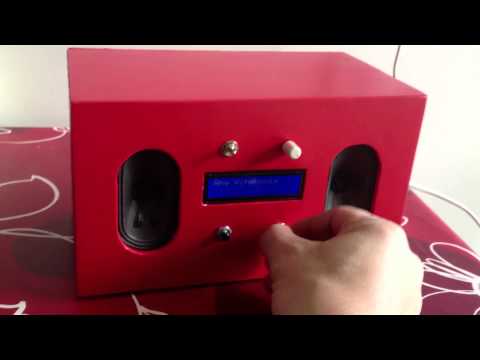
There are two kinds of people in the home-audio world: those who buy a shiny wireless speaker, tap “pair,” and go my, “Yes, obviously this should become a tiny music appliance with a name that sounds like a dessert.” SqueezeBerry belongs proudly to the second group.
At its heart, SqueezeBerry is a Raspberry Pi powered Squeezebox-style appliance: a compact network music player inspired by Logitech’s beloved Squeezebox ecosystem. It takes the old-school joy of local music libraries, internet radio, multiroom playback, and hands-on tinkering, then squeezes it into a small, affordable, customizable box. Pun absolutely intended. Apologies will not be issued.
The original SqueezeBerry concept appeared during the golden age of Raspberry Pi experimentation, when makers were discovering that the little single-board computer could become almost anything: a media center, retro console, home server, weather station, or, in this case, a very capable audio streamer. Today, the same idea is even more practical thanks to mature software such as Lyrion Music Server, formerly Logitech Media Server, Squeezelite, and piCorePlayer.
What Is SqueezeBerry?
SqueezeBerry is best understood as a DIY Squeezebox appliance built around a Raspberry Pi. Instead of relying on discontinued Squeezebox hardware, the project uses open-source software and inexpensive hardware to create a network audio player that behaves much like a classic Squeezebox client.
The “Squeezebox” part refers to the famous family of network music players originally developed by Slim Devices and later sold by Logitech. These devices became cult favorites because they could stream local music libraries, internet radio, and online music services around the home with impressive flexibility. Even after the original hardware line faded from store shelves, the community kept the ecosystem alive through server software, plugins, emulators, and Raspberry Pi builds.
The “Berry” part, naturally, comes from Raspberry Pi. A Raspberry Pi is small, quiet, power-efficient, and inexpensive compared with a full desktop computer. Add the right software, connect it to speakers or a stereo amplifier, and suddenly it stops being a bare circuit board and starts behaving like a polished little appliance. A tiny appliance, yes, but one with surprisingly big musical ambitions.
Why Build a Raspberry Pi Squeezebox Appliance?
The biggest reason is control. Modern smart speakers are convenient, but they often keep users inside tightly managed ecosystems. A Raspberry Pi Squeezebox appliance gives you more ownership over your music setup. You can stream your own FLAC collection, organize albums the way you like, choose your preferred audio output, add plugins, and avoid turning your listening room into a subscription negotiation chamber.
Another major benefit is longevity. Many original Squeezebox owners still love the platform, but aging hardware can fail. Displays fade, power supplies complain, buttons get moody, and Wi-Fi modules develop the personality of a sleepy raccoon. With a Raspberry Pi, replacement parts are easier to find, software can be updated, and the system can be adapted as your needs change.
A third advantage is price-to-performance. A Raspberry Pi combined with a decent USB DAC or audio HAT can produce excellent sound for the money. You can keep the build simple with analog output for casual listening, or go more serious with an I2S DAC HAT, external DAC, or digital output into an existing hi-fi system.
The Software Stack Behind SqueezeBerry
Lyrion Music Server: The Brain of the Operation
Lyrion Music Server, previously known as Logitech Media Server, is the software that manages the music library, playlists, players, streaming sources, and multiroom playback. Think of it as the friendly librarian who also happens to be a DJ, network engineer, and part-time wizard.
It can run on a computer, NAS, server, or Raspberry Pi. Once installed, it scans your music library, serves audio streams, and communicates with Squeezebox-compatible players. For a SqueezeBerry setup, Lyrion Music Server can run on the same Raspberry Pi as the player or on another device in the house. Running both server and player on one Pi creates a neat standalone appliance. Running the server separately is better for larger libraries or multiroom systems.
Squeezelite: The Lightweight Player
Squeezelite is a small headless Squeezebox emulator. “Headless” means it does not need a monitor, keyboard, or full desktop interface. It simply runs in the background, receives audio from the server, and sends sound to the selected output device.
This is exactly what makes it perfect for a Raspberry Pi audio appliance. Squeezelite is light, efficient, and happy to live inside a small device that spends its day doing one thing well: playing music without demanding applause.
piCorePlayer: The Easy Button for Raspberry Pi Audio
piCorePlayer is one of the most practical ways to build a Raspberry Pi Squeezebox-style device. It bundles a lightweight operating system, Squeezelite, and optional Lyrion Music Server support into a Raspberry Pi-focused package. It can be used as a simple network player, a server, or both.
For beginners, piCorePlayer removes much of the Linux wrestling match. Instead of manually installing packages, editing service files, and wondering why the audio output has chosen silence as a lifestyle, users can flash the image, boot the Pi, open a web interface, and configure the device from a browser.
Hardware Options for a SqueezeBerry Build
The Raspberry Pi Board
A SqueezeBerry appliance does not require the most powerful Raspberry Pi available. Audio streaming is not the same as editing 8K video or training an artificial intelligence model to identify your cat’s emotional state. Older Raspberry Pi models can work well as players, especially when using piCorePlayer. For server duties, especially with a large music library, a newer Raspberry Pi with more RAM and faster storage is more comfortable.
A Raspberry Pi 3, Raspberry Pi 4, or Raspberry Pi 5 can all make sense depending on the build. A Pi Zero 2 W can be charming for tiny player-only projects. A Pi 4 or Pi 5 is better suited when the same box will also host Lyrion Music Server, scan a big library, manage plugins, or serve multiple players.
Audio Output Choices
The simplest option is the built-in audio output, where available. It is fine for testing and casual use, but most builders eventually upgrade. The three common upgrade paths are USB DAC, I2S DAC HAT, and digital output board.
A USB DAC is flexible and easy. Plug it into the Raspberry Pi, select it as the output, and connect it to powered speakers, headphones, or an amplifier. An I2S DAC HAT mounts directly on the Raspberry Pi’s GPIO header and keeps the build tidy. Raspberry Pi audio boards, including DAC-style HATs, can provide high-resolution output and make the appliance feel more like a purpose-built music streamer.
For hi-fi systems that already have a capable DAC, a digital output board can send the signal over coaxial or optical connections. This approach lets the Raspberry Pi handle streaming while your existing audio gear handles conversion.
Storage and Network
For a player-only SqueezeBerry, a basic microSD card is enough. For a server build, consider better storage. A USB SSD is more reliable and faster than a cheap microSD card, especially when scanning a large music library. Nobody wants their music server to gasp dramatically every time it sees a folder full of album art.
Ethernet is recommended when possible. Wi-Fi can work, especially for a single player, but wired networking is more stable for multiroom playback and high-resolution libraries. If your house has thick walls, mysterious dead zones, or a router that behaves like it is powered by candlelight, Ethernet is your friend.
How SqueezeBerry Works in Real Life
A typical SqueezeBerry setup has three main roles: the server, the player, and the controller. The server stores or indexes the music. The player receives and outputs the audio. The controller is what you use to choose music, adjust volume, and manage playback.
The controller can be a web browser, smartphone app, tablet, or touchscreen interface. This flexibility is one reason the Squeezebox ecosystem remains attractive. You are not forced to control the system only from one official app. If one interface does not fit your style, another probably will.
For example, a simple living room setup might use a Raspberry Pi running piCorePlayer, connected to a USB DAC and stereo amplifier. Lyrion Music Server runs on the same Pi and reads music from a USB SSD. You control playback from your phone. In the kitchen, another Raspberry Pi runs as a second Squeezelite player. Both rooms can play different music, or they can synchronize for whole-home audio. Congratulations: your house now has a soundtrack, and it did not require a corporate ecosystem blood oath.
Step-by-Step Conceptual Build Plan
1. Choose the Role of the Device
Decide whether your SqueezeBerry will be a player only, a server only, or an all-in-one appliance. Player-only builds are simpler and can use lower-powered hardware. All-in-one builds are cleaner because everything lives in one box, but they benefit from a stronger Pi and better storage.
2. Pick the Audio Output
For quick testing, use the easiest available output. For long-term listening, choose a USB DAC, audio HAT, or digital output board. This decision affects the case, cables, and configuration, so it is better to make it early rather than after you have lovingly assembled the device and discovered the lid no longer fits.
3. Install the Software
piCorePlayer is the most appliance-like option for many users. Flash it to a microSD card, boot the Raspberry Pi, find it on the network, and configure it through the web interface. Enable Squeezelite for player mode and install or connect to Lyrion Music Server as needed.
4. Add Your Music Library
Your library can live on a USB drive, network share, NAS, or another computer. Lyrion Music Server scans the library and organizes it by artist, album, genre, playlist, and metadata. Clean tags make a huge difference. A messy library will still play, but it may file your carefully curated jazz collection under “Unknown Artist,” which is how computers express passive aggression.
5. Test, Tune, and Enjoy
After the first boot, test basic playback before obsessing over details. Confirm the player appears in the server interface, choose the correct audio output, play a familiar track, and verify volume control. Once the system works, you can refine buffer settings, resampling options, startup behavior, case airflow, and touchscreen controls.
Performance and Sound Quality
Sound quality in a SqueezeBerry build depends less on the Raspberry Pi itself and more on the audio output, power stability, network reliability, and source files. A well-configured Raspberry Pi feeding a good DAC can sound clean, detailed, and far more expensive than the parts list suggests.
Lossless files such as FLAC or ALAC are ideal for local libraries, but the system can also handle common compressed formats. Internet radio and streaming-service integrations depend on available plugins and service support. The beauty of the platform is that it can be humble or fancy. It can power a garage radio, a kitchen speaker, or a serious listening room where people say things like “soundstage” while holding coffee with both hands.
Common Problems and Practical Fixes
The first common issue is no sound. Usually, the wrong output device is selected. Check whether Squeezelite is pointed at HDMI, analog, USB, or the DAC HAT. The second issue is network discovery. Make sure the player and server are on the same network, especially during setup. The third issue is poor library organization. Clean metadata before blaming the server. Album tags matter more than most people want to admit.
Power can also cause strange behavior. Use a reliable Raspberry Pi power supply. Random reboots, clicks, dropouts, or disappearing devices may not be mystical audio gremlins; they may simply be undervoltage. Gremlins remain possible, but start with the power supply.
Who Should Build SqueezeBerry?
SqueezeBerry is ideal for music lovers who enjoy ownership, customization, and a little tinkering. It is especially appealing if you already have a local music collection, old Squeezebox devices, a home server, or a desire to build multiroom audio without locking yourself into a single commercial platform.
It is not the best choice for someone who wants zero configuration. A smart speaker will be easier. But easy is not always the same as satisfying. Building a SqueezeBerry appliance gives you a device that feels personal. You chose the board, the case, the DAC, the software, and the way it fits into your home. That matters.
Experiences From Building and Using a SqueezeBerry-Style Appliance
The first experience many builders have with a SqueezeBerry-style project is surprise. The Raspberry Pi looks too small to become a serious audio component. It arrives as a bare board, not a glamorous hi-fi device with brushed aluminum and marketing copy about “sonic purity.” Then it boots, appears on the network, connects to the server, and plays music. Suddenly the little board earns its place on the shelf.
The second experience is the joy of repurposing. Many people have old speakers, unused amplifiers, forgotten USB DACs, or a retired stereo receiver sitting around. SqueezeBerry gives that gear a job again. A pair of bookshelf speakers in a spare room can become a networked listening zone. An old amplifier in the garage can stream internet radio. A bedroom system can wake up with a favorite playlist instead of a phone speaker coughing out alarm tones like a tiny robot in distress.
There is also a learning curve, but it is a rewarding one. You learn how network players communicate with a server, why stable power matters, how audio outputs are selected, and why music metadata deserves respect. The project quietly teaches practical computing skills without feeling like homework. One minute you are configuring Squeezelite; the next you are explaining to someone at dinner why FLAC files, wired Ethernet, and a decent DAC make sense. This may or may not improve your social life, but it will improve your audio setup.
Another memorable part is the first successful multiroom test. Hearing the same track play in two rooms at once feels oddly magical. It is not new technology, of course, but building it yourself changes the feeling. When commercial speakers synchronize, it is expected. When your homemade Raspberry Pi boxes do it, it feels like you convinced a group of tiny computers to join a band.
Case design becomes its own adventure. Some builders prefer a clean commercial Raspberry Pi case. Others go full maker mode with wood, acrylic, 3D-printed enclosures, old radio shells, or repurposed electronics cases. A touchscreen can make the appliance feel more like a classic Squeezebox Touch. A headless build can disappear behind an amplifier and be controlled entirely by phone. Both approaches are valid. One says “minimalist.” The other says “I own a label maker and I am not afraid to use it.”
The best long-term experience is reliability. Once configured, a SqueezeBerry appliance can become boring in the best possible way. It boots, connects, plays, and waits patiently. It does not need constant attention. It does not interrupt a playlist to promote a premium family plan. It simply serves the music. In an era when many gadgets feel temporary, sealed, and dependent on distant servers, that kind of dependable local control feels refreshing.
Perhaps the most satisfying part is that SqueezeBerry keeps an excellent idea alive. The Squeezebox ecosystem was ahead of its time: networked audio, local libraries, internet radio, multiroom control, and flexible software. A Raspberry Pi powered appliance carries that spirit forward. It is not just nostalgia. It is a practical reminder that good technology can outlive its original hardware when the community cares enough to keep it playing.
Conclusion
SqueezeBerry is more than a cute project name. It represents a smart, affordable, and deeply customizable way to build a Raspberry Pi powered Squeezebox appliance for modern home audio. With Lyrion Music Server managing the library, Squeezelite handling playback, and piCorePlayer simplifying installation, the project is approachable for beginners yet flexible enough for serious hobbyists.
Whether you want to revive the spirit of a classic Squeezebox, build a multiroom music system, or create a compact streamer for your favorite amplifier, SqueezeBerry offers a satisfying path. It proves that great audio projects do not always need glossy packaging. Sometimes they need a Raspberry Pi, a good DAC, open-source software, and just enough curiosity to click “play.”
Note: This article is written as original web-ready content based on real Raspberry Pi, Squeezebox, Lyrion Music Server, Squeezelite, and piCorePlayer information, with no source-link blocks or unnecessary citation placeholders inserted into the HTML.