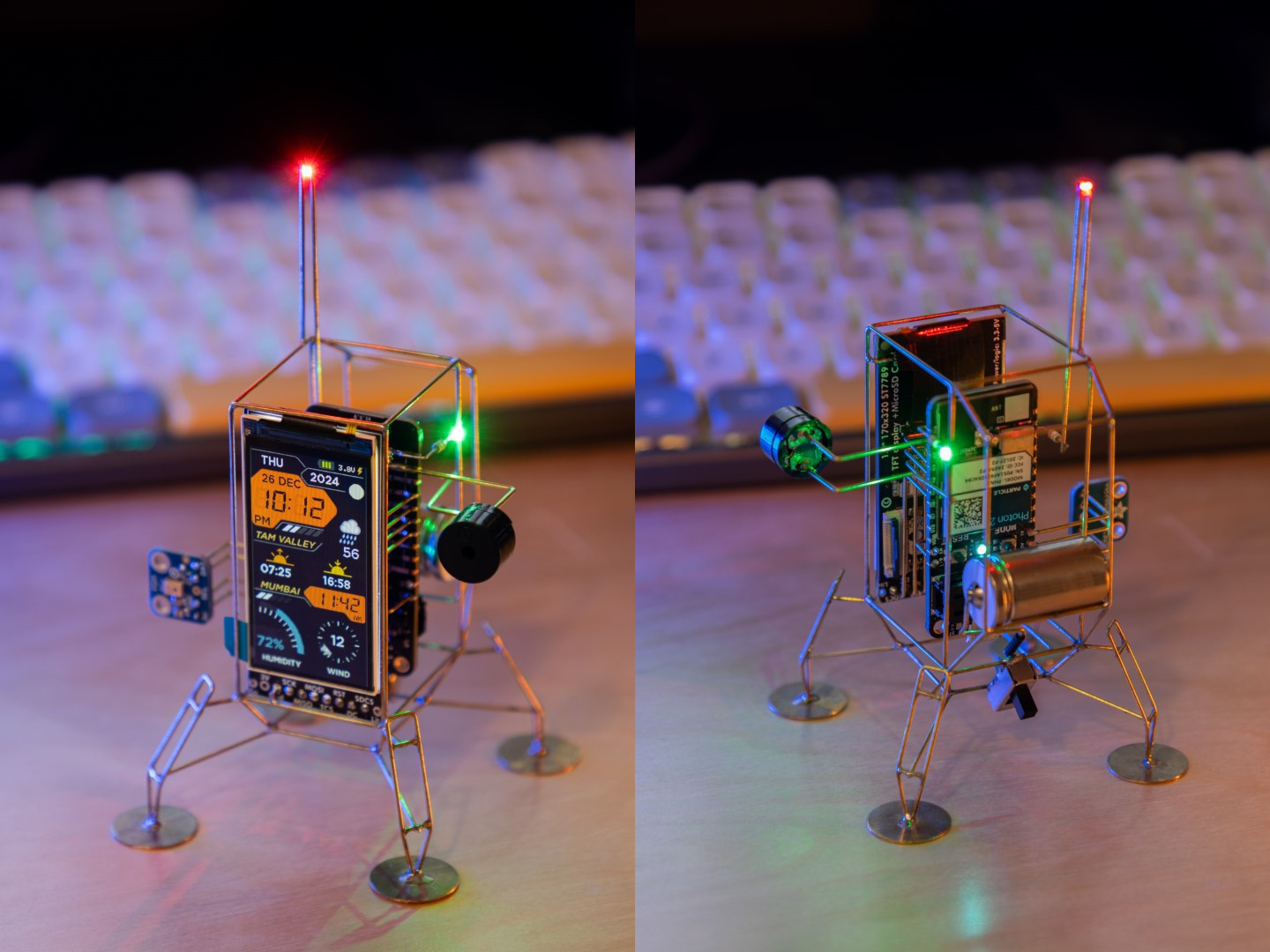
Some weather displays tell you it is raining. Others make you feel as if a tiny spacecraft just landed on your desk to deliver an urgent forecast from Mission Control. Landing Soon: This Beautiful Weather Display belongs firmly in the second category.
Inspired by the maker-world excitement around Mohit Bhoite’s Photon 2 Lander, this weather display is not just another screen showing temperature, clouds, and wind. It is a small piece of functional electronic art: part weather station, part circuit sculpture, part retro-futuristic desk companion. It brings together brass-wire construction, a compact color display, Wi-Fi-connected weather data, and the kind of craftsmanship that makes ordinary gadgets look like they showed up to dinner wearing sweatpants.
In a world full of plastic rectangles, a beautiful weather display reminds us that technology can be useful and charming at the same time. It can answer practical questionsShould I carry an umbrella? Is sunset soon? How windy is it outside?while also giving your workspace a little personality. And frankly, most desks could use a tiny lander that knows the humidity.
What Is This Beautiful Weather Display?
The phrase refers to a striking maker project: a lander-shaped circuit sculpture that retrieves weather information and presents it on a small vertical display. Instead of hiding the electronics inside a box, the project celebrates them. Wires become structure. Components become visual details. The display becomes a miniature command console.
At the heart of the design is a modern Wi-Fi microcontroller, the Particle Photon 2, paired with a compact color TFT display. The device can fetch weather forecasts, sunrise and sunset times, wind conditions, humidity, moon phases, and other environmental details depending on the build version and connected APIs. The result is a weather dashboard that feels handcrafted rather than mass-produced.
That difference matters. Plenty of apps can show you today’s forecast. Your phone already does that. Your smartwatch probably does too. Your refrigerator may be thinking about it. But a dedicated weather display changes the relationship. It becomes a calm, glanceable object in the room, always ready with useful context without demanding that you unlock a device and accidentally spend 20 minutes watching raccoon videos.
Why the Lander Design Works So Well
The lander shape is more than decorative. It makes the display feel like a tiny mission instrument, which is exactly the right mood for weather data. Forecasting has always had a little space-age magic to it: satellites, radar, sensors, atmospheric models, and enormous data systems working together so you can decide whether to wear suede shoes. The lander form captures that feeling in a physical object.
It Turns Data Into a Moment
A normal weather widget is easy to ignore. This design invites attention. The raised frame, visible rods, landing pads, glowing screen, and carefully arranged components all make the act of checking the weather feel intentional. You glance over, read the temperature, notice the wind, and maybe admire the build for a second. It is small, but it adds delight to a routine task.
It Makes the Circuit Part of the Story
Most consumer electronics hide their complexity behind smooth shells. Circuit sculpture takes the opposite approach. It shows the structure, the connections, and the careful geometry. In this kind of project, the wiring is not an embarrassing secret. It is the architecture.
That visible construction gives the weather display a handmade quality. You can see the logic of the object. It is not pretending to be magic; it is proudly being engineering. There is something refreshing about that.
The Technology Behind the Display
A beautiful weather display needs more than good looks. It needs a reliable way to gather data, process it, and show it clearly. The Photon 2 Lander concept uses a combination of connected hardware, display technology, and weather APIs to make that happen.
Particle Photon 2: The Connected Brain
The Particle Photon 2 is a Wi-Fi development board designed for Internet of Things projects. It supports 2.4 GHz and 5 GHz Wi-Fi, Bluetooth Low Energy, and enough memory for more advanced connected applications. For a weather display, that combination is ideal. The device can connect to the internet, request updated weather information, parse the response, and refresh the screen.
This is what separates the project from a purely decorative sculpture. The lander is not just sitting there looking adorable. It is doing work. It is talking to online services, receiving environmental data, and translating it into a readable interface.
A Small TFT Display With Big Personality
The Adafruit 1.9-inch 170-by-320 IPS TFT display is a key part of the visual appeal. It is small enough to fit neatly into the lander form but sharp enough to show icons, gauges, text, and animations. IPS display technology also helps maintain good viewing angles, which matters when the display sits on a desk rather than directly in front of your face.
That vertical format is especially clever. Many weather dashboards are horizontal, but a narrow portrait display can feel like a tiny instrument panel. It encourages stacked information: current temperature at the top, conditions in the middle, sunrise and wind details below, battery status tucked away like a polite footnote.
Weather APIs: The Invisible Forecast Crew
Weather displays typically rely on APIs to retrieve data. Services such as the National Weather Service API, OpenWeather, and Open-Meteo provide access to forecasts, observations, alerts, and other environmental information. The specific service depends on the builder’s location, needs, and coding preferences.
For U.S.-focused projects, the National Weather Service API is especially relevant because it offers forecasts, alerts, and observations in a developer-friendly format. For global projects, OpenWeather and Open-Meteo are common choices because they support broad geographic coverage and practical forecast endpoints.
The magic is not simply pulling data. The real design challenge is deciding what deserves space on the screen. A tiny weather display cannot show everything. It must choose wisely.
What Makes a Weather Display Beautiful?
Beauty in a weather display is not just about color. It is about clarity, proportion, rhythm, and restraint. A good weather interface answers the user’s question before the user has to squint.
Glanceability Comes First
Weather information is usually consumed quickly. People want to know the current condition, the likely trend, and whether something unusual is coming. That means the display should prioritize the most important details: temperature, condition, precipitation chance, wind, and time-based information such as sunrise or sunset.
A display fails when it tries to become a tiny meteorology textbook. Nobody wants to read a novel from a 1.9-inch screen unless the novel is titled Cloudy With a Chance of Please Make the Font Larger.
Color Should Communicate, Not Decorate
Color can make a weather dashboard feel alive, but it should also carry meaning. Warm tones can suggest heat or daylight. Cool tones can suggest night, rain, or winter conditions. High-contrast alerts can signal storms or extreme weather. When color is used consistently, the user learns the visual language quickly.
The best weather displays avoid visual confetti. They do not throw every gradient, icon, and animation onto the screen at once. They create a mood while keeping the information readable.
Typography Matters More Than People Think
On a small screen, type choices become critical. Numbers should be large enough to read from a normal desk distance. Labels should be short. Units should be clear. If the display uses icons, the icons should support the text rather than replace it entirely. A tiny cloud icon may be cute, but if it looks like a potato wearing a hat, the interface has a problem.
Why Makers Love Projects Like This
The Photon 2 Lander sits at the intersection of electronics, art, and practical utility. That is a sweet spot for makers. It is challenging enough to teach real skills but charming enough to stay interesting after the debugging phase.
It Combines Hardware and Software
A project like this is not just soldering and not just coding. It involves mechanical planning, component placement, wiring, power management, API requests, display rendering, and user interface design. Every part affects the final result.
The frame must be strong enough to hold the components. The display must be wired cleanly. The battery must be considered carefully. The code must handle network interruptions gracefully. The interface must show useful information without clutter. In other words, it is a tiny project with a surprisingly large brain.
It Rewards Patience
Freeform circuit sculpture looks effortless when done well, but it requires careful bending, measuring, soldering, and alignment. Brass or copper rods must be shaped consistently. Components must be positioned with both function and appearance in mind. One crooked line can make the whole sculpture look tired.
That patience is part of the appeal. The finished object carries visible evidence of care. It does not look like something that rolled off a factory line. It looks like something built by a person who cares where every wire goes.
Practical Uses for a Dedicated Weather Display
Beyond its beauty, a dedicated weather display can be genuinely useful. It reduces the need to check a phone, provides ambient awareness, and can be customized around a person’s daily routine.
Morning Planning
Place the display near the door, coffee station, or desk, and it becomes part of the morning checklist. Temperature tells you how to dress. Wind tells you whether a bike ride will feel heroic or foolish. Rain chances tell you whether to grab an umbrella. Sunrise time helps runners, photographers, and dog owners plan their first outing.
Home Office Awareness
For remote workers, a weather display adds a small connection to the outside world. It can be easy to sit through half the day without noticing that sunny weather turned into a thunderstorm. A glanceable display gives the room a gentle environmental pulse.
Maker Education
For students and hobbyists, this kind of project teaches several valuable concepts at once: IoT connectivity, API integration, embedded programming, display design, soldering, power use, and enclosure-free construction. It is the kind of project that looks playful but sneaks in serious learning. Very sneaky. Like a raccoon with a STEM degree.
Design Lessons From This Weather Display
Even if you never build a lander-shaped weather device, the project offers useful lessons for anyone designing connected products.
Make the Object Worth Keeping
Many gadgets are useful for a week and forgotten in a drawer. A beautiful object has a better chance of staying visible. When technology earns a place on a desk or shelf, it becomes part of daily life.
Let Form Support Function
The lander design is whimsical, but it still supports the purpose. The screen faces forward. The frame elevates the display. The structure makes the object stable. The visual theme reinforces the idea of signals, data, and exploration. Good design does not choose between fun and function. It makes them share snacks.
Keep the Interface Focused
Small displays need discipline. The best approach is to show current conditions first, then secondary details such as wind, humidity, sunrise, sunset, moon phase, or battery level. Advanced screens can rotate through different views, but each view should have one clear purpose.
Challenges to Consider Before Building One
A project like this is inspiring, but it is not a beginner’s five-minute weekend craft. Builders should be ready for a few challenges.
Power Management
Color displays, Wi-Fi connections, buzzers, LEDs, and sensors all use power. A battery-powered weather display needs careful planning around refresh frequency, sleep modes, brightness, and charging. A desk display connected by USB is simpler, but battery operation gives the object more freedom.
API Reliability
Weather APIs can change, rate-limit requests, or return incomplete data. Good code should handle errors gracefully. If the forecast request fails, the display should not collapse into digital despair. It can show cached data, an error icon, or a friendly “trying again” message.
Physical Durability
Freeform sculptures are beautiful, but exposed rods and solder joints can be delicate. This is not the object to toss into a backpack between a water bottle and a set of keys. It deserves a stable place where it can be admired, used, and not accidentally attacked by a curious cat.
Experience Section: Living With a Weather Display Like This
The experience of using a beautiful weather display is different from checking a weather app. A phone app is transactional: unlock, swipe, tap, read, get distracted, forget why you opened the phone, somehow end up reading about celebrity kitchen islands. A dedicated display is calmer. It simply exists in the room, offering the forecast without trying to steal the rest of your morning.
Imagine placing the lander on a desk near a window. In the morning, the screen wakes with the current temperature, a small weather icon, and the day’s high and low. The brass frame catches a little light. The tiny landing pads make it look as though it arrived overnight from a very organized moon. Before coffee is even finished, you know whether the air outside is warm, windy, rainy, or suspiciously humid.
That small ritual can change how a workspace feels. Instead of another black rectangle, the display becomes a companion object. It has presence. It gives the desk a little story. When guests notice it, they do not ask, “What app is that?” They ask, “What is that?” That is usually the beginning of a much better conversation.
The most satisfying part is the blend of usefulness and personality. The weather is ordinary information, but the presentation makes it memorable. Seeing sunrise and sunset times on a tiny mission-style screen can make the day feel more structured. Watching wind speed update before a walk or commute adds a practical benefit. Even battery status becomes charming when it feels like checking the power reserves of a miniature spacecraft.
For makers, the experience goes deeper. Building or studying a project like this teaches respect for details that mass-market devices hide. A simple number on the screen depends on Wi-Fi, API calls, data parsing, layout decisions, display drivers, solder joints, and power delivery. When everything works, the result feels almost alive. When something breaks, the troubleshooting can be humbling. The lander may be beautiful, but it will still teach you patience with the emotional firmness of a tiny brass professor.
There is also a pleasant slowness to it. Unlike a phone, the display does not demand interaction. Unlike a smart speaker, it does not require a voice command. Unlike a full dashboard, it does not flood you with charts. It gives just enough information at the right moment. That is the real luxury: not more data, but better-presented data.
Over time, a weather display like this can become part of the rhythm of a home. You glance at it before leaving. You check it before opening windows. You notice sunset time before planning an evening walk. You learn the local patternswhen wind tends to rise, when humidity makes the afternoon feel heavier, when clouds arrive before rain. The device becomes less about prediction and more about awareness.
That is why this beautiful weather display is so compelling. It does not try to replace a professional forecast system or a full-featured weather app. It does something smaller and more intimate. It makes weather visible, local, and lovely. It turns a daily habit into a tiny moment of delight.
Conclusion: A Tiny Forecast Machine With a Big Design Lesson
Landing Soon: This Beautiful Weather Display is more than a clever maker project. It is a reminder that useful technology does not have to be boring. By combining a Wi-Fi microcontroller, a crisp color display, real-time weather data, and sculptural brass-wire construction, the lander-style display transforms everyday forecasting into something tactile and delightful.
Its biggest lesson is simple: design matters. When data is presented clearly, people understand it faster. When hardware is built beautifully, people want to keep it nearby. When a project has personality, it becomes more than a tool. It becomes part of the room.
Whether you are a maker searching for your next electronics challenge, a designer studying glanceable interfaces, or simply someone who enjoys gadgets with a little soul, this weather display earns attention. It lands softly, looks fantastic, and politely tells you whether you need an umbrella. That is more than many desk accessories can say.
Note: This article is intended for educational and editorial use about maker projects, weather-display design, and connected hardware. A DIY weather display should not replace official severe-weather alerts or emergency guidance.