Blocking someone on WhatsApp can feel wonderfully decisive. One tap, and poof: no more unwanted pings, mystery “hey” messages at 11:47 p.m., or surprise voice calls from that one person who treats boundaries like optional seasoning. But sometimes you block someone for a reason that expires. Maybe the argument cooled off. Maybe the spam scare was a misunderstanding. Maybe your cousin finally stopped sending 19-minute voice notes about cryptocurrency and backyard chickens.
That is where this guide comes in. If you are trying to figure out how to unblock people on WhatsApp on an iPhone, Android phone, or PC, the process is quick once you know where WhatsApp hides the controls. The tricky part is that the menus can look a little different depending on your device, app version, and whether you are using the mobile app or WhatsApp on a computer.
This guide walks you through the exact steps, explains what happens after you unblock someone, and covers common problems such as missing contacts, blocked chats that still appear, and why you still might not hear from that person right away. In other words, this is your no-drama, no-jargon, mildly caffeinated guide to pressing the digital undo button.
What unblocking someone on WhatsApp actually does
Before you unblock a contact, it helps to know what will change and what will not. Unblocking someone means they can message and call you on WhatsApp again, and you can see and interact with their chat normally. It also means you can choose to view their profile details and status updates again, depending on both of your privacy settings.
However, unblocking is not a time machine. Messages, calls, and status updates sent while the person was blocked do not magically reappear. If they messaged you during the block period, those messages are gone from your side like socks in a dryer. Once you unblock them, only new communication comes through.
It is also worth knowing that blocking or unblocking someone does not delete them from your phone contacts by itself. If you want them gone from your address book too, that is a separate cleanup job. WhatsApp is helpful, but it is not psychic.
What to do before you unblock someone
Take five seconds and decide what you want next. Are you unblocking them because you want to talk again? Because you need to send one message? Because you blocked the wrong person and now your aunt thinks you are ignoring her casserole updates? Your answer matters because you may want to adjust your privacy settings right after unblocking.
For example, you can keep your last seen, online status, profile photo, about section, and status visibility more private even after you unblock someone. That way, unblocking does not have to mean handing over your full digital life like a house key and the Netflix password.
How to unblock people on WhatsApp on iPhone
If you use WhatsApp on iPhone, there are usually two easy ways to unblock someone: from the blocked contacts list or directly from an existing chat.
Method 1: Unblock from the blocked contacts list
- Open WhatsApp on your iPhone.
- Tap Settings in the bottom-right corner.
- Tap Privacy.
- Scroll down and tap Blocked or Blocked Contacts.
- Find the person you want to unblock.
- Swipe left on their name and tap Unblock, or tap their name and choose the unblock option.
That is it. No ceremony, no confetti, no dramatic soundtrack. The contact is now unblocked.
Method 2: Unblock from an existing chat
If you still have the chat thread in your chat list, this route can be even faster.
- Open WhatsApp.
- Tap the chat with the blocked person.
- Look for the message showing that you blocked this contact.
- Tap the Unblock option.
You can also tap the contact name at the top of the chat, scroll down, and choose Unblock Contact. This is handy when the chat is still sitting there, staring at you like an unfinished text message from the past.
If the contact does not appear on iPhone
If you cannot find the person in WhatsApp, check whether WhatsApp has access to your iPhone contacts. Go to Settings > Privacy & Security > Contacts, tap WhatsApp, and make sure access is allowed. If your iPhone is set to limited contact access, some names may not show up properly inside WhatsApp.
How to unblock people on WhatsApp on Android
On Android, the steps are similar, though the layout may vary slightly depending on your phone brand and Android version. Samsung, Pixel, Motorola, and other devices all enjoy making the Settings menu feel like a scavenger hunt, but the core path is still straightforward.
Method 1: Unblock from WhatsApp privacy settings
- Open WhatsApp.
- Tap the three-dot menu in the top-right corner.
- Tap Settings.
- Tap Privacy.
- Scroll down to Blocked contacts or Blocked.
- Tap the person or number you want to unblock.
- Choose Unblock.
Some Android phones may show the contact as a saved name, while others may show the raw phone number. Either way, one tap gets the job done.
Method 2: Unblock from the chat screen
- Open the chat with the blocked person.
- Tap the banner or message showing they are blocked.
- Select Unblock.
You may also be able to open the person’s profile from the chat and tap Unblock there. It is fast, simple, and much less awkward than unsending a regrettable text in another app.
If the contact is missing on Android
If you cannot see contact names in WhatsApp, check Android permissions. Go to your phone’s Settings, then Apps, then WhatsApp, then Permissions. Make sure Contacts is allowed. Without contact access, WhatsApp may show numbers instead of names, or fail to display newly saved contacts correctly.
How to unblock people on WhatsApp on PC
Now for the PC crowd. Yes, you can unblock someone on WhatsApp from a computer, especially if you are using the WhatsApp Desktop app for Windows or Mac. This is good news for people who do half their life from a keyboard and consider typing on glass a medieval hardship.
Using WhatsApp Desktop on PC
- Open WhatsApp Desktop on your computer.
- Click the Settings gear icon.
- Click Privacy.
- Open Blocked.
- Find the contact or phone number you want to unblock.
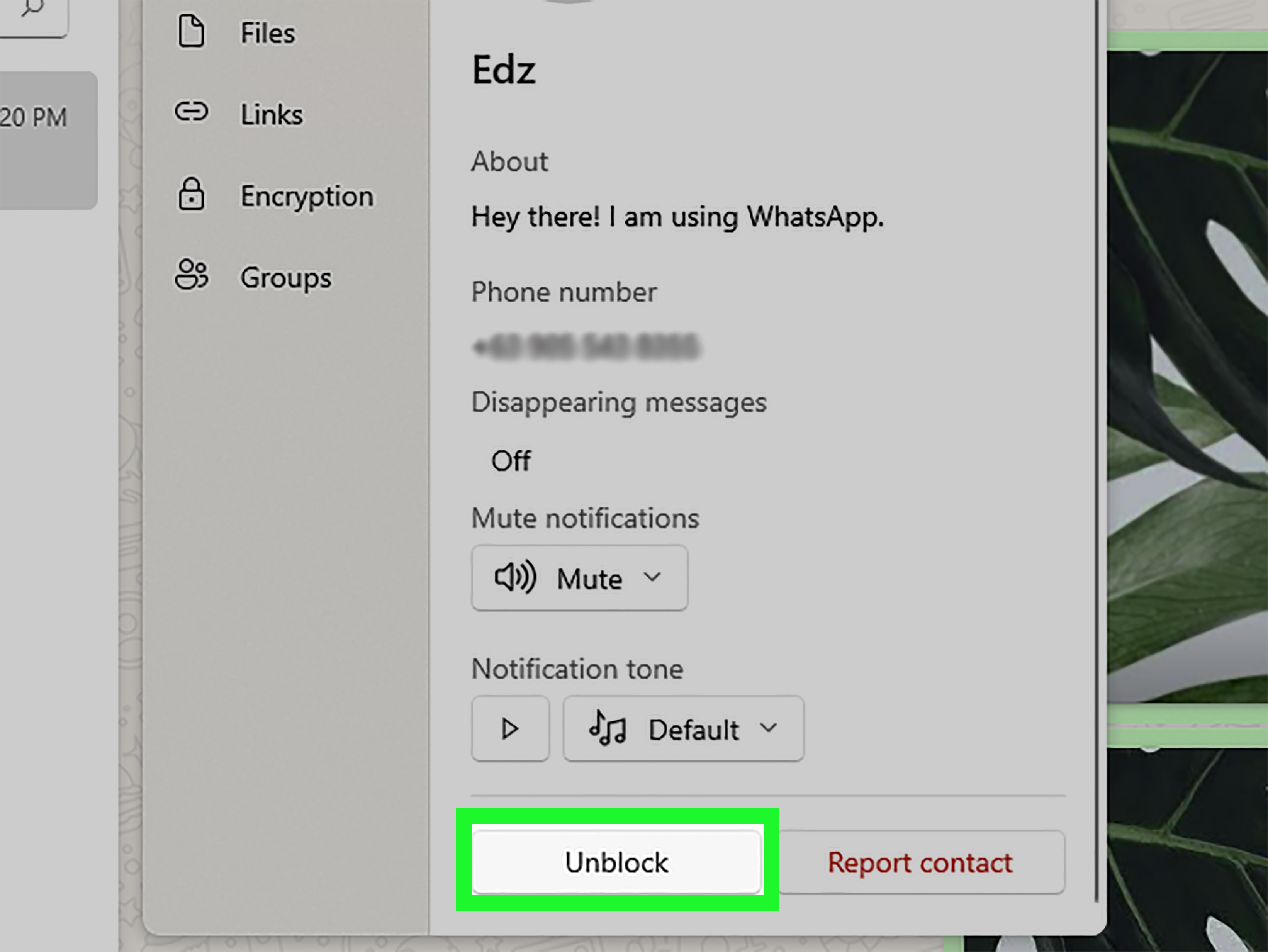
- Click the person’s name or number.
- Scroll down and click Unblock.
If you already have a chat with that person open, you may also see an unblock option directly in the conversation or in the contact details panel. In short, WhatsApp Desktop is no longer just a sidekick. It can handle this job too.
What about WhatsApp Web in a browser?
Depending on the version and interface you are seeing, WhatsApp Web may show an Unblock prompt inside the blocked chat. If it does, great. Click it and move on with your day. If it does not, the safest fallback is to use your phone or the desktop app. The change will apply to your account, so you do not need to perform the unblock in three different places like you are defusing a bomb.
What happens after you unblock someone on WhatsApp?
Once you unblock a person, they can send you new WhatsApp messages and call you again. You can also message them, view their profile information as allowed by privacy settings, and interact with the chat normally. But several people are surprised by what does not happen after unblocking.
First, they are not notified that you unblocked them. WhatsApp does not send out a little announcement that says, “Congratulations, you have re-entered the chat.” So if you want them to know, you need to message them yourself.
Second, you will not receive anything they sent while blocked. If they called six times, sent four apologies, and posted a dramatic status about “fake friends,” none of that gets delivered after the fact.
Third, blocking does not completely erase a person from your WhatsApp universe if you still share a group. If you and that person are both in the same group chat, you can still see each other’s messages there. So if your goal is total peace, unblocking is not the only setting that matters. Group membership can keep the digital door cracked open.
How to tell whether you unblocked the right person
After unblocking, open the chat and check what you see. The blocked banner should be gone, the profile page should show the normal contact options again, and you should be able to send a message. If the person has privacy restrictions in place, you still may not see their profile photo, last seen, or status, so do not panic and assume the unblock failed.
One more thing: unblocking someone on WhatsApp is different from unblocking their phone number in your iPhone or Android calling app. If you still cannot receive regular calls or texts from that person outside WhatsApp, your phone may have them blocked at the system level. That is a separate setting to check.
Common reasons you still cannot talk after unblocking
1. The contact is still blocked in your phone app
WhatsApp blocking and phone-level blocking are two different systems. If standard calls or SMS still do not come through, check your iPhone blocked contacts or Android blocked numbers list too.
2. WhatsApp does not have contact permission
If WhatsApp cannot access your contacts, you may see only a number, an incomplete contact entry, or no obvious way to find the person. Grant contact access and refresh the app.
3. The person changed privacy settings
Even after unblocking, you might not see their profile photo, online status, or status updates if they limit visibility to certain contacts or exclude you.
4. You are expecting old messages to return
They will not. Only messages sent after the unblock can arrive. This is the part people hate, but at least it is consistent.
5. You are both still in a weird social limbo
Technology can unblock a chat. It cannot fix tone, context, or that lingering sense that someone is about to reply with “k.” Use with emotional caution.
Smart privacy moves after unblocking
If you want to reopen communication without giving away too much, adjust your privacy settings right after unblocking. In WhatsApp, visit Settings > Privacy and review who can see your last seen and online status, profile photo, about information, and status updates. You can also manage who can add you to groups.
This is a good middle ground for people who want to communicate but do not want to roll out a red carpet. Think of it as unblocking with boundaries, which is healthier than unblocking and immediately oversharing your brunch location.
Common experiences people have after unblocking someone on WhatsApp
One of the most common experiences is pure practicality. A lot of people block someone in the heat of the moment, then later realize they still need to communicate for a real-world reason. Maybe it is a co-parent, a landlord, a contractor, a coworker, or the family member who somehow controls the reunion spreadsheet. In those cases, unblocking is less about romance or reconciliation and more about getting life back on the rails. People often describe this kind of unblock as boring, necessary, and surprisingly peaceful because the decision is based on logistics instead of emotion.
Another very common experience is curiosity. Someone gets blocked after an argument, a breakup, or a round of social-media nonsense, then days or weeks later you wonder, “Did they calm down?” That curiosity leads to unblocking, even if only temporarily. Some people report immediate relief when nothing dramatic happens. Others get one “hey” message and remember exactly why the block happened in the first place. The lesson here is simple: unblocking someone is easy, but it helps to know your reason before you do it. Curiosity alone is not always the most reliable life coach.
There is also the accidental-block scenario, which is more common than many people admit. Maybe you were clearing spam, maybe you were half asleep, or maybe your finger made a heroic but unhelpful decision. In those cases, the experience after unblocking is usually mild embarrassment mixed with relief. You unblock the person, send a quick message like, “Sorry, I tapped the wrong thing,” and everyone moves on. Technology loves to create modern problems with very human explanations.
Then there is the cautious reconnect. This happens when someone wants to reopen the line of communication, but only a little. They unblock the person, tighten privacy settings, and wait. They do not immediately send a message. They simply remove the wall and see what happens next. This can feel empowering because it gives you control over the pace. You are not promising a full friendship reboot. You are just allowing a door to open one inch instead of kicking it wide open.
Many users also experience a surprise when they realize old messages do not come back after unblocking. People often expect a flood of missed texts to appear, almost like email resyncing after a bad Wi-Fi day. But WhatsApp does not work that way. That moment can be frustrating, especially if the block was short and unintentional. On the flip side, some users find that limitation comforting because it prevents them from reopening a conversation with a pile of old tension waiting in the inbox.
Finally, a lot of people describe unblocking as emotionally smaller than they expected. Blocking can feel dramatic. Unblocking usually feels administrative. Tap a setting, change a status, move on. The real experience is not the button itself; it is what comes after. Sometimes the relationship improves. Sometimes nothing happens at all. Sometimes you unblock, exchange one polite message, and realize that peace and distance can coexist just fine. Honestly, that might be the most grown-up WhatsApp moment of all.
Conclusion
If you need to unblock people on WhatsApp, the actual steps are easy once you know where to look. On iPhone, head to Settings > Privacy > Blocked or use the existing chat. On Android, go to Settings > Privacy > Blocked contacts or unblock directly from the conversation. On a PC, the cleanest route is usually WhatsApp Desktop > Settings > Privacy > Blocked. In many cases, you can also unblock from the chat itself.
Just remember the important fine print: unblocking does not restore old messages, does not notify the other person, and does not override your phone’s own block list. Still, once you know the steps, the process is fast, easy, and far less dramatic than the reasons people usually block each other in the first place.
So go ahead and fix the accidental block, reopen that necessary conversation, or give someone one last chance. WhatsApp makes it easy. Whether the person deserves it is between you, your judgment, and possibly your group chat.