Embedding a video on Reddit sounds like it should be as easy as tossing a pizza roll into an air fryer: add video, press button, enjoy internet applause. In reality, Reddit has a few different ways to share video, and the best method depends on what you mean by “embed.” Do you want a video to play directly in a Reddit post? Do you want to share a YouTube or Vimeo link that generates a preview? Or are you trying to grab a Reddit embed code for your blog, article, or website?
This guide breaks down all of it in plain English. You’ll learn how to embed a video on Reddit from a PC, how to post video from the Reddit mobile app, how link previews work, what to do when a video refuses to appear correctly, and how to avoid the classic “why is my beautiful video just a sad little link?” problem.
The quick answer: Reddit does not work like a normal website editor where you paste an iframe embed code into a post. If you want the video to appear directly on Reddit, you usually need to either upload it as a native Reddit video or submit a supported video URL as a link post. If you want to embed Reddit content on another website, Reddit has a separate embed tool for that. Tiny difference, big headache avoided.
What Does “Embed a Video on Reddit” Actually Mean?
Before clicking every button on the screen like you’re defusing a bomb in a spy movie, it helps to understand the three common meanings of “embed” on Reddit.
1. Uploading a Native Reddit Video
This is the cleanest way to make a video play inside Reddit’s feed. You upload a video file from your computer or phone, Reddit hosts it, and users can watch it directly in the post. This is often what people mean when they ask how to embed a video on Reddit.
2. Posting a Video Link
You can also paste a link from a video platform such as YouTube or Vimeo. Depending on the subreddit, the link, and Reddit’s preview system, the post may show a thumbnail or playable preview. However, it may also appear as a plain link. Reddit previews are convenient, but they are not always as predictable as native video uploads.
3. Embedding a Reddit Post Somewhere Else
This is the reverse situation. Reddit offers an embed option that lets publishers place a Reddit post or comment inside an article, blog, or webpage. That tool is for external websites, not for inserting custom HTML into a Reddit post.
Can You Paste HTML Embed Code Into Reddit?
No, not in the way you might paste embed code into WordPress, Shopify, or a custom website. Reddit posts and comments do not allow arbitrary HTML iframe embeds. That is a safety and formatting decision. If Reddit allowed everyone to paste random code into posts, the platform would become less “community discussion” and more “mysterious pop-up carnival.”
Instead, Reddit supports structured post types such as text posts, image and video posts, link posts, polls, and other community-enabled formats. You can use Reddit’s rich text editor or Markdown for formatting text, but HTML video embed code is not the correct method for posting playable video inside Reddit.
How to Embed a Video on Reddit From a PC
If you are using Reddit on a desktop or laptop, native video uploading is usually the best option when you want your video to play directly in the feed. Here’s how to do it.
Step 1: Choose the Right Subreddit
Go to the subreddit where you want to post. Every subreddit has its own rules, and not every community allows video uploads. Some communities allow text only, some allow links, and others allow images and videos. If the video option is missing, the subreddit may have disabled video posts.
Before posting, read the rules in the sidebar or community information area. If your post gets removed, it is often because the subreddit has rules about self-promotion, titles, flair, video length, spoilers, reposts, or low-effort content. Reddit is not one giant room; it is thousands of tiny rooms, and each room has its own “please wipe your shoes” sign.
Step 2: Click Create Post
On desktop, look for the Create Post button. If you start from a subreddit page, Reddit usually selects that community automatically. If you start from the home page, choose the community from the dropdown menu.
Step 3: Select Images & Video
Choose the Images & Video post type. This is the option you want for a native Reddit video upload. If you choose Link, you are posting a URL. If you choose Post, you are creating a text post. The tabs matter, so do not wander into the wrong one and wonder why the video vanished like a magician with Wi-Fi.
Step 4: Upload Your Video File
Drag and drop your video into the upload area or click to select the file from your computer. For best compatibility, use an MP4 or MOV file. A practical target is a short, compressed video that loads quickly on mobile. Even if a larger file is allowed, smaller files usually upload faster and create fewer headaches.
If your video is huge, consider trimming it before posting. Reddit users are patient about deep discussions, niche hobbies, and 4,000-word arguments about sandwich definitions. They are less patient about waiting for an oversized video to load.
Step 5: Add a Strong Title
Your title matters more than most people think. A clear title helps users understand what they are about to watch and helps Reddit’s search and recommendation systems understand the content. Avoid vague titles like “Look at this” unless the video is so incredible that it can survive on mystery alone.
Good examples include:
- “I fixed my old keyboard and recorded the sound test”
- “Short clip of the thunderstorm rolling over Chicago last night”
- “My first animation test after learning keyframes”
Step 6: Add Flair, Tags, or Spoiler Labels
Many subreddits require post flair. Flair is a label that helps categorize your post, such as “Question,” “Tutorial,” “Showcase,” “Discussion,” or “Feedback.” If your video contains spoilers, use Reddit’s spoiler option. If it contains mature content, follow Reddit’s policies and the subreddit’s rules carefully.
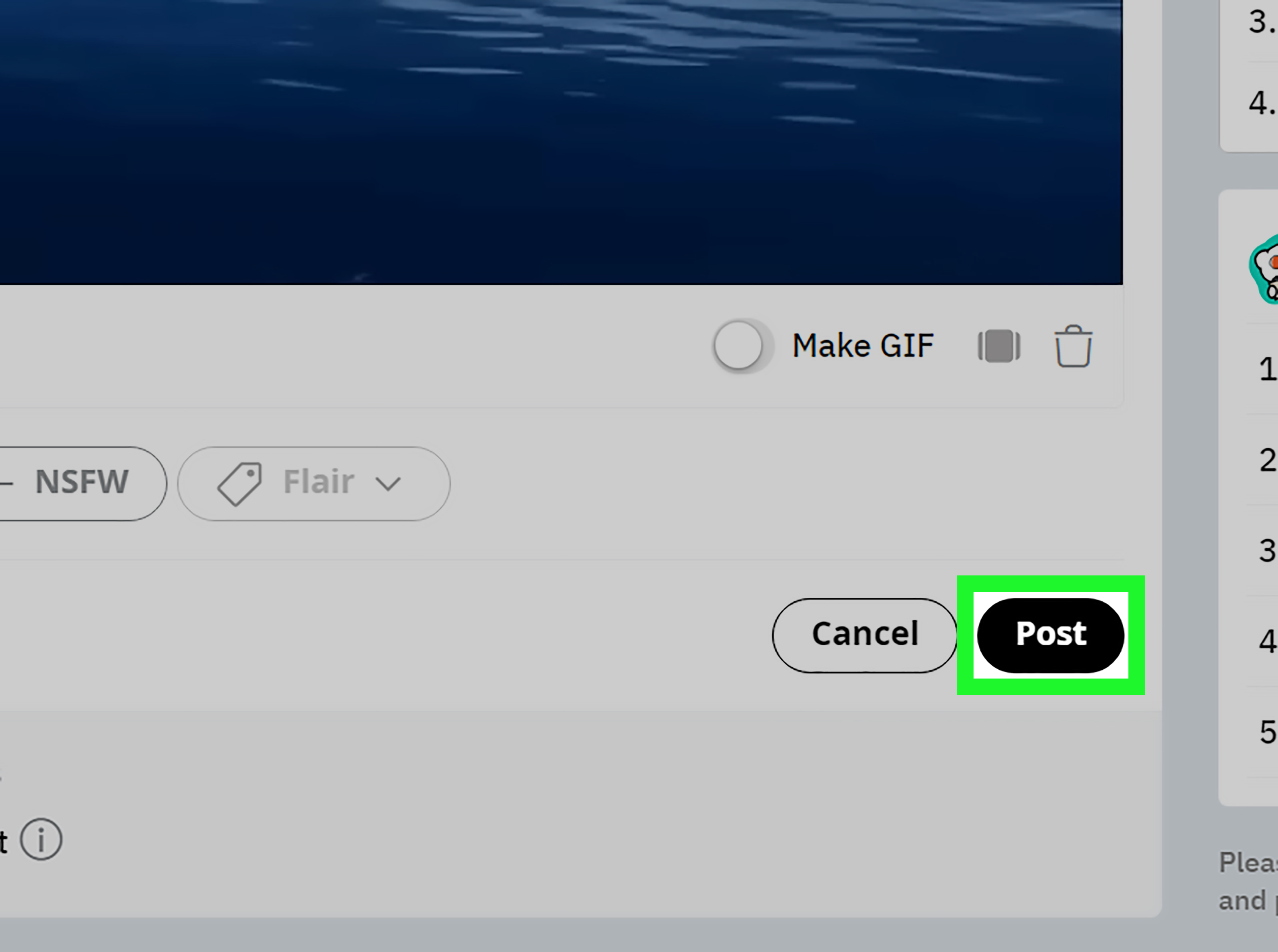
Step 7: Preview and Post
Before publishing, preview your post if the interface allows it. Check that the video uploaded correctly, the title is accurate, and the post is going to the right community. Then click Post.
How to Embed a Video on Reddit From Mobile
Posting from the Reddit mobile app is often smoother for videos recorded on your phone. The steps are similar on iPhone and Android, though button placement can vary slightly after app updates.
Step 1: Open the Reddit App
Launch the Reddit app and sign in. Make sure the app has permission to access your photos and videos. If Reddit cannot see your media library, it cannot upload your video. Technology is powerful, but it still needs permission to open the drawer.
Step 2: Tap the Create Button
Tap the plus or create button, then choose the community where you want to post. If you are already inside a subreddit, Reddit may automatically prepare the post for that community.
Step 3: Choose the Video or Media Option
Tap the media, image, or video icon depending on your app version. Select the video from your camera roll or file storage. If you do not see the option, the subreddit may not allow video posts, or your app may need an update.
Step 4: Trim or Adjust the Video if Needed
Some mobile posting flows may let you trim the video or preview it before posting. Shorter videos usually perform better because Reddit users often scroll quickly. A focused 20-second clip can beat a rambling 5-minute upload if the good part happens immediately.
Step 5: Write the Title and Add Flair
Add a descriptive title and choose any required flair. On mobile, it is easy to miss flair prompts because the screen is smaller. Take a moment to check everything before posting.
Step 6: Publish the Post
Tap Post. Keep the app open until the upload finishes, especially if the video is large. Switching apps, losing signal, or locking your phone during upload can sometimes cause the process to fail.
How to Share a YouTube or Vimeo Video on Reddit
If your video is already hosted on YouTube, Vimeo, or another video platform, you do not need to download and re-upload it. You can share the video link in a Reddit link post.
On PC
- Open the video on YouTube, Vimeo, or your chosen platform.
- Click Share.
- Copy the video link.
- Go to Reddit and click Create Post.
- Select Link.
- Paste the URL.
- Add a useful title and post to the correct subreddit.
On Mobile
- Open the video in the YouTube, Vimeo, or browser app.
- Tap Share.
- Copy the link or choose Reddit from the share options.
- Select the subreddit.
- Edit the title if needed.
- Post it.
Important: do not copy the iframe embed code from YouTube and paste it into Reddit. Reddit needs the normal video URL, not website embed code. The iframe code belongs in websites, not Reddit posts.
Native Video Upload vs. Video Link: Which Is Better?
Both methods can work, but they serve different goals.
Use Native Reddit Video When:
- You want the video to play directly in the Reddit feed.
- The clip is original content.
- You want fewer clicks between the user and the video.
- The subreddit allows video uploads.
Use a Video Link When:
- The video is already on YouTube, Vimeo, or another platform.
- You want to drive traffic to the original video page.
- The file is too large or too long for Reddit upload.
- The subreddit prefers link posts over native uploads.
For engagement, native Reddit video often has the advantage because users can watch without leaving Reddit. For creators building a YouTube channel, a link post may be better because it sends viewers to the platform where subscriptions, playlists, and watch time matter.
Best Video Settings for Reddit
For most users, the safest video format is MP4 with H.264 video encoding and AAC audio. MOV files may also work, especially from iPhones, but MP4 is usually the friendlier choice across devices.
Keep these practical recommendations in mind:
- Format: MP4 is usually the safest choice.
- Length: Keep it short unless the content truly needs more time.
- Aspect ratio: Use 16:9 for landscape, 1:1 for square, or 4:5/9:16 for vertical clips.
- Resolution: 1080p is a good balance of quality and file size.
- Audio: Make sure the audio is clear and not painfully loud.
- Opening frame: Start with something visually clear because users decide fast.
If the video fails to upload, compress it, shorten it, convert it to MP4, or try a different browser or the mobile app. Reddit’s video uploader can be picky, and sometimes the simplest fix is exporting a cleaner file.
Why Your Reddit Video Is Showing as a Link
This is one of the most common Reddit video frustrations. You expect a glorious embedded player. Reddit gives you a lonely blue link. Rude? A little. Fixable? Usually.
You Used the Link Tab Instead of Images & Video
If you upload a file, use the Images & Video tab. If you paste a URL, use the Link tab. Mixing the two can produce weird results.
The Subreddit Does Not Allow Video
Moderators can control what types of posts are allowed. If videos are disabled, you may not be able to post one directly. Try another relevant subreddit or use a link if links are allowed.
The Video Platform Preview Did Not Generate
Not every video link produces a rich preview. Privacy settings, unsupported URLs, removed thumbnails, or platform restrictions can prevent Reddit from showing the video preview properly.
Your File Format Is Not Friendly
If you upload an unusual file type or a file exported with strange settings, Reddit may reject it or process it poorly. Convert the video to MP4 and try again.
Your Account Does Not Meet Posting Requirements
Some subreddits restrict posting based on account age, karma, verified email, or other eligibility rules. If you are new, your post may be blocked, removed, or sent to moderator review.
How to Embed a Reddit Video on a Website
If your real goal is to embed a Reddit post or video into your own article, blog, or publication, the process is different. Reddit provides an embed option for public posts and comments.
- Open the Reddit post or comment you want to embed.
- Click or tap Share.
- Choose Embed if available.
- Customize the embed display if Reddit opens its publishing tool.
- Copy the generated embed code.
- Paste it into your website, CMS, or article editor where HTML embeds are supported.
This is useful for journalists, bloggers, and editors who want to quote or display Reddit content with proper attribution. However, remember that if the original Reddit post is deleted or edited, the embedded version may change or show a notice.
Tips to Make Your Reddit Video Perform Better
Embedding the video is only half the job. The other half is making people care enough to stop scrolling.
Lead With the Best Moment
Do not save the best part for the final three seconds unless your audience already trusts you. Reddit feeds move fast. Start with motion, a clear visual, or a reason to keep watching.
Write a Human Title
A title like “My homemade desk setup after two weekends of work” is better than “Cool video.” Be specific, but do not overhype. Reddit users can smell clickbait through drywall.
Respect the Subreddit Culture
Each subreddit has its own personality. A video that works in a funny community may flop in a technical one if it lacks details. Spend a few minutes reading top posts before publishing.
Add Context in a Comment
If your video needs explanation, add a comment after posting. Tell viewers what they are watching, how you made it, why it matters, or what feedback you want. Context can turn a random clip into a real discussion.
Avoid Spammy Self-Promotion
If every post you make is “Watch my channel,” Reddit will not love that. Participate naturally. Comment on other posts, answer questions, and share useful content. Reddit rewards community behavior more than billboard behavior.
Troubleshooting Checklist
If your Reddit video is not working, run through this checklist before sacrificing your router to the tech gods:
- Check whether the subreddit allows video posts.
- Use the Images & Video tab for native uploads.
- Use the Link tab for YouTube, Vimeo, or other video URLs.
- Convert the file to MP4 if upload fails.
- Shorten or compress large videos.
- Update the Reddit app.
- Check phone permissions for photo and video access.
- Try a different browser on desktop.
- Confirm your account meets the community’s posting requirements.
- Read moderator messages if the post is removed.
Common Mistakes to Avoid
Pasting Website Embed Code Into Reddit
Reddit is not a website builder. Paste the video URL or upload the file instead.
Posting Without Reading Rules
Many video posts fail not because of technical issues, but because they break subreddit rules. Always check before posting.
Uploading Massive Files
A shorter, compressed MP4 is usually better than a giant video file. Fast loading matters, especially on mobile.
Using a Weak Title
Your title is the doorway. If it is boring, people may never enter.
Ignoring Audio
Bad audio can ruin a good video. Normalize the volume, remove unnecessary background noise, and avoid sudden blasts of sound.
Experience-Based Advice: What Actually Works When Posting Videos on Reddit
After watching how Reddit users respond to video posts across different communities, one lesson becomes obvious: Reddit does not reward videos simply because they are videos. It rewards relevance. A polished clip in the wrong subreddit can sink faster than a phone in a swimming pool, while a simple screen recording with useful context can attract great discussion if it solves a problem or fits the community perfectly.
The best experience-based approach is to choose the subreddit before preparing the video. This sounds backward, but it works. Instead of making one generic video and blasting it everywhere, look at the community first. What kind of posts are getting upvoted? Are users asking for tutorials, before-and-after clips, funny moments, product demos, gameplay highlights, repair walkthroughs, or quick explanations? Once you understand the room, you can shape the video for that room.
For example, if you are posting a short tech tutorial, a screen recording with captions may perform better than a long talking-head explanation. If you are sharing a DIY project, viewers often want to see the result early, then the process. If you are posting a funny pet video, the first two seconds matter because nobody wants to wait through a dramatic documentary opening just to see a cat knock over a cup.
Another practical lesson: native Reddit uploads are great for convenience, but they are not always the best choice for creators who care about long-term discovery. A native video may get more frictionless views inside Reddit, but a YouTube link may help build a channel. The smarter choice depends on your goal. If you want discussion inside Reddit, upload natively. If you want subscribers, watch time, or a portfolio link, use a video platform and share the link in a subreddit that allows it.
Titles deserve extra attention. Reddit users are allergic to titles that sound like ads. Instead of “You won’t believe this amazing video,” write something specific: “I tested three ways to clean a mechanical keyboard” or “A 12-second clip showing the bug before and after the fix.” Specific titles feel honest. Honest titles get better comments.
It also helps to add a first comment with useful context. A short note such as “I recorded this on Android, trimmed it to 30 seconds, and uploaded it as an MP4” can answer questions before they appear. If you are asking for feedback, say exactly what kind of feedback you want. “Any suggestions?” is too broad. “Does the pacing feel too slow after the first 10 seconds?” is much easier for people to answer.
Finally, do not panic if your first post underperforms. Timing, subreddit mood, title wording, thumbnail frame, and even the day’s news cycle can affect results. Try again with a better title, a shorter cut, or a more relevant community. Reddit can be unpredictable, but it is not random. The more your video respects the audience, the better chance it has to earn attention.
Conclusion
Learning how to embed a video on Reddit on your PC or mobile device is mostly about choosing the right posting method. If you want a video to play directly inside Reddit, upload it as a native video through the Images & Video option. If your video already lives on YouTube, Vimeo, or another platform, use a link post and paste the normal share URL. If you want to embed Reddit content in an external article or website, use Reddit’s own embed tool.
The most important rule is simple: do not paste iframe embed code into Reddit and expect magic. Reddit is built around post types, community rules, and platform-controlled previews. Use the format Reddit expects, keep your video short and clear, respect subreddit rules, and give people a reason to watch. Do that, and your video has a much better chance of becoming a real conversation instead of a lonely link floating in the void.