The TRS-80 Color Computer, lovingly known as the CoCo, came from an era when a home computer could feel like both a laboratory and a slightly suspicious kitchen appliance. You turned it on, heard the television hiss, saw a friendly BASIC prompt, and suddenly you were one command away from drawing lines, making noise, or asking the machine to roll an invisible die. That last trick came from Color BASIC’s random number function: RND.
Today, random numbers are everywhere. They help secure websites, shuffle playlists, generate video game worlds, and decide whether your character finds a legendary sword or another deeply disappointing potato. But on the TRS-80 Color Computer, randomness had to fit inside a tiny ROM, run on a Motorola 6809E processor, and leave enough room for the rest of BASIC. The result was simple, clever, predictable, useful, and wonderfully educational.
This article explores how the TRS-80 Color BASIC random number function works, why it behaves the way it does, and what modern programmers can still learn from it. Spoiler: the computer was not actually pulling numbers out of a magical hat. It was following a recipe. A very fast, very small recipe.
What Was Color BASIC on the TRS-80 Color Computer?
Color BASIC was the built-in programming language of the TRS-80 Color Computer line. Unlike the original TRS-80 Model I, which used a Zilog Z80 processor, the Color Computer used Motorola’s 6809 family. That made the CoCo a very different machine under the hood, even though the TRS-80 name made it sound like a cousin wearing the same family sweater.
BASIC was the perfect language for home computing in the early 1980s because it was immediate. You did not need a separate compiler, a software development kit, or three browser tabs explaining why your package manager had feelings. You typed a line, pressed Enter, and the machine responded. For beginners, that was magic. For hobbyists, it was power. For kids writing games after school, it was both.
Color BASIC included commands for text, numbers, cassette storage, graphics, sound, and program control. The RND function sat quietly among these tools, but it was essential for games and simulations. Without random numbers, every monster moves the same way, every dice roll is staged, and every guessing game becomes a memory test wearing a fake mustache.
What Does the RND Function Do?
In the simplest explanation, RND returns a pseudo-random number. In Color BASIC, it can be used in more than one way depending on the argument placed inside the parentheses.
Using RND with a Positive Number
The most familiar form is:
This returns a whole number from 1 to 10. That makes it ideal for dice rolls, random menu choices, enemy positions, quiz questions, and other common game mechanics. For example, to simulate a six-sided die, you could write:
This little program keeps printing a number from 1 through 6. It is simple enough to understand at a glance, which was one of BASIC’s great strengths. The language made a computer feel less like a locked cabinet and more like a patient robot tutor.
Using RND(0)
When used as RND(0), the function returns a fractional value between 0 and 1. That behavior is closer to what many later BASIC dialects and modern languages do by default with random functions.
This gives you decimal values that can be scaled for more customized ranges. For instance, a programmer could multiply the result by a value, use INT, and shape the result into whatever range a game or simulation required. On the CoCo, however, the positive integer form was so convenient that many beginner programs used RND(6), RND(10), or RND(255) directly.
Using a Negative Number to Seed RND
The most interesting form is:
A negative argument sets, or seeds, the pseudo-random number generator. Seeding determines where the generator begins in its sequence. Use the same seed, and you get the same sequence. Use a different seed, and the sequence changes. This is not a bug. It is how pseudo-random number generators work.
That repeatability can be useful. A game designer could create the same maze every time by using the same seed. A teacher could make a classroom exercise reproducible. A programmer could debug random behavior without chasing a gremlin through the codebase with a flashlight.
Random, Pseudo-Random, and “Good Enough for Goblins”
The numbers from Color BASIC’s RND are not truly random. They are pseudo-random, meaning they are generated by an algorithm that produces a sequence that appears random enough for ordinary use. The key phrase is “ordinary use.” This was fine for games, educational programs, screen effects, and simple simulations. It was not designed for cryptography, secure tokens, banking, or protecting nuclear launch codes. Please do not protect nuclear launch codes with a CoCo guessing game.
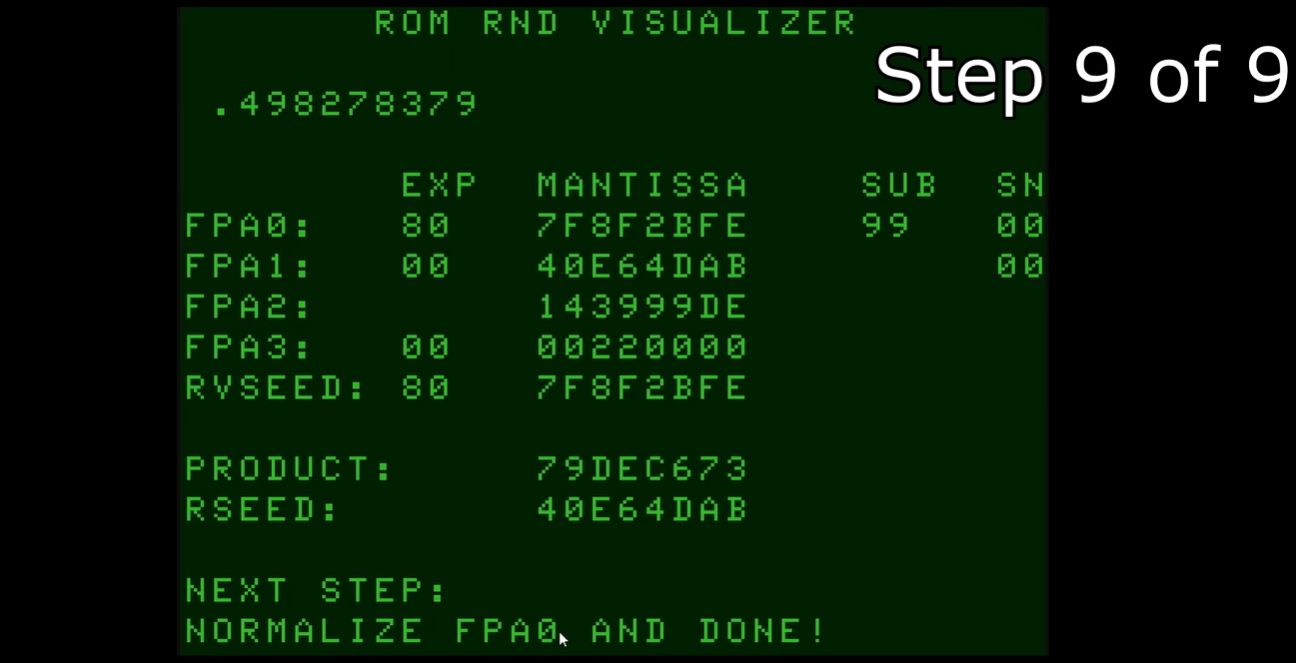
Retro-computing analysis suggests that Color BASIC’s random number routine behaves like a linear congruential generator, or LCG. An LCG creates each new value from the previous value using arithmetic. The basic idea looks like this:
That formula is compact, fast, and memory-friendly. Those qualities mattered enormously on early home computers. The TRS-80 Color Computer did not have memory to waste. A modern browser tab can casually consume more memory than an entire neighborhood of 1980s home computers. Color BASIC had to do its job with discipline.
The tradeoff is that LCG-style generators have patterns. Given enough output, the sequence repeats. Given the same starting seed, the same numbers return in the same order. For a simple dungeon crawler, that is acceptable. For serious statistical work, it is suspicious. For modern security, it is wearing a fake beard and trying to sneak past the bouncer.
Why RND Gives the Same Results After Startup
One of the charming discoveries many CoCo users made was that RND could seem oddly predictable. Turn on the machine, type the same random-number test, and the same values could appear. That happened because the generator started from a known internal state unless the programmer changed it.
This predictability could feel strange to beginners. After all, the function was called random. But a computer follows instructions. Without a changing source of input, such as timing, keyboard delay, or external noise, it has no reason to start somewhere new. It is not moody. It is deterministic.
Programmers often solved this by seeding the generator with the system timer:
The idea is practical. The amount of time between powering on the computer, loading a program, and typing RUN varies from person to person. If TIMER has changed by then, using -TIMER creates a different seed. The machine is still deterministic, but the human adds just enough unpredictability to stir the soup.
Practical Examples of RND in Color BASIC
Rolling Dice
The classic beginner example is a die roll:
Line 10 seeds the generator. Line 20 prints a number from 1 to 6. Line 30 repeats forever, because early BASIC programs enjoyed loops the way toddlers enjoy asking “why?”
Random Screen Positions
Random numbers were also useful for placing objects on screen. A simple game might place a treasure, enemy, or obstacle at a random text position:
On a 32-column by 16-line text display, this gives a rough random coordinate. A more polished program would adjust the values because screen coordinates often start at zero in some contexts. Still, the logic is easy to read, which is why BASIC was such a friendly playground.
A Simple Guessing Game
Here is a compact guessing game that shows RND in a practical role:
The program chooses a number, asks the player to guess, and gives hints. There is no animation, no online leaderboard, and no downloadable cosmetic hat. Yet it contains the bones of countless games: hidden state, player input, feedback, and replayability.
The Quirks That Make RND Worth Studying
Color BASIC’s RND is not just a function; it is a small window into how early software balanced usability and hardware limits. The manual-friendly explanation says that RND(n) returns a random number in a range. The deeper technical explanation reveals special behavior depending on whether the argument is positive, zero, fractional, or negative.
That gap between beginner documentation and internal behavior is common in computing. Good documentation often simplifies. Good programmers eventually learn where the simplifications end. With RND, the simplification helped beginners write games quickly. The deeper behavior helped advanced users seed sequences, test patterns, and understand the machinery behind the curtain.
Another important lesson is that predictable randomness is not always bad. Reproducibility is valuable. If a random maze is generated from seed 451, another player can use seed 451 and explore the same maze. If a bug appears only after a specific random sequence, reseeding with the same value can help recreate the problem. In that sense, pseudo-random numbers are not failed randomness. They are controlled surprise.
Why This Old Function Still Matters
Studying the TRS-80 Color BASIC random number function is more than nostalgia. It teaches core programming ideas in a wonderfully compact form. You can learn about deterministic algorithms, seeds, integer ranges, floating-point values, reproducible sequences, and hardware constraints without installing a giant framework named after a woodland animal.
Modern developers still use pseudo-random number generators every day. The tools are stronger, faster, and better tested, but the concepts remain familiar. A seed still defines a sequence. A range still needs careful handling. A random-looking value can still hide a pattern. And not every random function is suitable for every job.
The CoCo’s RND also reminds us that limitations can encourage clarity. When memory is scarce and every byte matters, software tends to be understandable. You can hold the whole idea in your head. That is refreshing in an age when printing “Hello, world” can sometimes involve a build system, a dependency tree, and a small emotional support animal.
Common Mistakes When Using RND
Forgetting to Seed the Generator
If a program uses RND without seeding, it may produce the same sequence after each startup. For some programs, that is fine. For games meant to feel fresh, it can make the experience predictable.
Using the Wrong Range
RND(10) gives a value from 1 to 10, not 0 to 9. That detail matters when working with arrays, screen positions, or tables. If your array starts at 0 but your random number starts at 1, your program may develop the digital equivalent of stepping on a rake.
Expecting Cryptographic Randomness
Color BASIC’s RND was built for simple programs, not security. It is great for dice, games, classroom demos, and visual experiments. It is not appropriate for passwords, encryption keys, or anything that needs modern secure randomness.
Experience Notes: Learning RND the CoCo Way
The best way to understand Color BASIC’s RND is not only to read about it, but to experience it the way many early users did: by typing small programs and watching the machine answer back. There is something surprisingly satisfying about entering PRINT RND(10) and seeing a number appear instantly. It is not flashy, but it feels direct. You ask the computer for chance, and it hands you a little integer like a fortune cookie with no cookie.
A useful first experiment is to print several values after a fresh startup, then restart the emulator or machine and do it again. The repetition is the lesson. What looks random in a single run becomes predictable when you reset the starting point. That moment can be a small revelation for new programmers. The computer is not inventing uncertainty from nowhere. It is walking through a sequence.
The next experiment is to add A=RND(-TIMER) at the beginning. Suddenly the sequence changes because your timing becomes part of the setup. Maybe you waited two seconds before typing RUN. Maybe you hesitated because the dog barked, the phone buzzed, or you were deciding whether 1980s chiclet keyboards count as exercise equipment. Those tiny delays become enough to make a game feel less predictable.
Another memorable experience is plotting random pixels on the screen. A loop that repeatedly chooses random X and Y positions can slowly fill the display with dots. At first, it looks like digital snow. After a while, patterns and gaps may appear, reminding you that pseudo-random does not mean perfect. This is where retro programming becomes visual mathematics. You are not just reading about distribution; you are watching it accumulate one dot at a time.
Building a small guessing game is also valuable because it connects randomness to design. The player does not care about seeds or algorithms. The player cares that the hidden number feels unknown. That is an important distinction. In real programs, randomness is usually not the goal by itself. It serves the experience. It creates replay value, uncertainty, tension, or variety.
Working with RND also encourages careful thinking about boundaries. Is the result 1 through 10 or 0 through 9? Should a screen coordinate be adjusted by subtracting 1? Does a fractional result need INT? These little details are where many beginner bugs live. They are also where programmers become sharper.
The most enjoyable part of exploring the TRS-80 Color BASIC random number function is how approachable it is. You can understand the practical behavior quickly, then keep digging into deeper layers: seeding, repeatability, memory locations, floating-point representation, and generator design. It starts as a toy and becomes a doorway. That is the charm of the CoCo. It makes computing feel small enough to touch, but deep enough to keep exploring.
Conclusion
The TRS-80 Color BASIC RND function is a tiny piece of code with a surprisingly large teaching value. It shows how early home computers delivered useful randomness within tight hardware limits. It also shows why pseudo-random numbers are both powerful and imperfect: they can make games feel alive, but they remain deterministic sequences shaped by seeds and algorithms.
For retro-computing fans, RND is a nostalgic feature worth revisiting. For programmers, it is a compact lesson in algorithm design, repeatability, and range handling. For anyone who enjoys old machines, it is another reminder that the CoCo did a lot with very little. And honestly, any computer that can teach probability while connected to a television deserves a respectful nod.