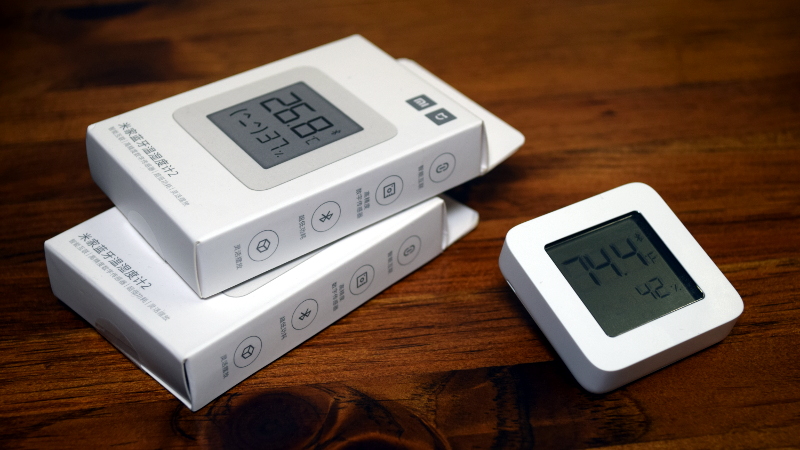
Xiaomi thermometers are tiny, inexpensive, and weirdly addictive. Buy one for the bedroom, and suddenly you are placing them in the kitchen, bathroom, greenhouse, baby room, refrigerator, and that mysterious corner of the house that always feels like a villain’s basement. But the real fun begins when smart-home hobbyists discover that many Xiaomi temperature and humidity sensors can do far more than their stock firmware allows.
Custom firmware on Xiaomi thermometers turns a simple Bluetooth screen into a flexible local sensor for Home Assistant, ESPHome, MQTT, BTHome, and even Zigbee-based smart-home setups. Instead of depending only on the Xiaomi Home app, users can unlock faster updates, calibration options, custom Bluetooth advertisements, improved battery behavior, and more privacy-friendly local automation. In other words, the humble thermometer stops being a quiet wall decoration and becomes a tiny climate data machine with opinions.
What Makes Xiaomi Thermometers So Popular?
The most famous model in this space is the Xiaomi Mijia LYWSD03MMC, also known as the Mi Temperature and Humidity Monitor 2. It is small, usually inexpensive, powered by a CR2032 coin cell, and communicates over Bluetooth Low Energy. Its compact LCD screen shows temperature, humidity, and a small comfort icon, making it useful even before smart-home integration enters the room wearing a cape.
On paper, the device is straightforward: it measures indoor temperature and relative humidity, displays the values locally, and can pair with Xiaomi’s ecosystem. The appeal is that the hardware inside is capable enough for much more. Many versions use Telink Bluetooth chips, which opened the door for community firmware projects such as ATC_MiThermometer and PVVX MiThermometer. These projects gave hobbyists a way to reconfigure how the device broadcasts data and how often it reports readings.
Why Stock Firmware Can Feel Limiting
Stock firmware works fine for casual use. If all you want is a little screen that says “the nursery is 72°F,” congratulations: mission accomplished. But once users want local dashboards, automation triggers, long-range BLE collection, or direct Home Assistant support, stock firmware can become less convenient.
Depending on the model and firmware version, Xiaomi BLE data may require a bind key to decrypt, and pairing through official apps may not fit a privacy-focused smart home. Stock firmware is also less flexible when it comes to advertising intervals, display behavior, calibration, and integration formats. Custom firmware addresses these limitations by making the sensor more open, configurable, and automation-friendly.
What Is Custom Firmware On Xiaomi Thermometers?
Custom firmware is replacement software installed directly on the thermometer’s microcontroller. Instead of using only the factory behavior, the device runs community-developed firmware that changes how it measures, displays, stores, and broadcasts data.
For Xiaomi thermometers, the two names that appear most often are ATC and PVVX. ATC_MiThermometer helped popularize the idea of flashing the LYWSD03MMC with alternative firmware. PVVX later expanded the concept with broader device support, more configuration options, improved power management, encryption support, BTHome compatibility, and advanced calibration features.
Commonly Supported Devices
The classic target is the LYWSD03MMC, but the ecosystem has grown. Custom firmware projects also support several related Xiaomi, Mijia, Miaomiaoce, and Qingping Bluetooth thermometers, depending on hardware revision and chipset. Newer models such as the Xiaomi Thermometer 3, often identified as MJWSD05MMC, have also received community attention through PVVX-based firmware.
This matters because not every Xiaomi thermometer is identical inside. Two devices may look almost the same from the outside but use different chips, hardware revisions, or factory firmware. Before flashing, the boring stepchecking the exact modelis the step that saves the device from becoming a very small paperweight.
Why Flash Custom Firmware?
The biggest reason is local control. A flashed Xiaomi thermometer can broadcast temperature, humidity, battery voltage, and battery percentage in formats that smart-home platforms understand without constantly calling home to a cloud service. For smart-home users, that is the difference between “my automation works because the internet is alive” and “my automation works because the sensor is three feet from an ESP32.”
Better Home Assistant Integration
Home Assistant users are a major audience for Xiaomi thermometer custom firmware. With the right firmware settings, the device can appear through Xiaomi BLE, BTHome, Passive BLE Monitor, ESPHome, or MQTT workflows. BTHome v2 is especially attractive because it is designed as an efficient Bluetooth LE format for broadcasting sensor data in a standardized way.
A practical example: place a flashed LYWSD03MMC in a baby room, set it to BTHome v2, add a nearby ESP32 Bluetooth proxy, and Home Assistant can receive temperature and humidity data for automations. If humidity drops too low, a humidifier can turn on. If the room gets too warm, a fan can start. The baby does not care about your protocol stack, but your sleep schedule might.
Calibration And Precision
Custom firmware can expose calibration offsets for temperature and humidity. This is useful because low-cost sensors are not laboratory instruments. If one thermometer reads 1°F higher than a trusted reference, you can apply an offset rather than mentally subtracting every time you look at the dashboard like a human spreadsheet.
PVVX firmware also supports more precise internal measurement formats than the stock display suggests. The LCD may show rounded values, but your smart-home system can receive more detailed readings depending on configuration.
Flexible Advertising Formats
Custom firmware allows the sensor to broadcast data in different formats, such as ATC, PVVX custom format, Mi-like format, or BTHome v2. This flexibility matters because different collectors understand different protocols. ESPHome, Home Assistant, OpenMQTTGateway, Theengs Decoder, and other tools may prefer specific formats.
In modern setups, BTHome v2 is often the cleanest choice because it is broadly supported, efficient, and built for standardized BLE sensor announcements. Older formats can still be useful for legacy systems, but new builds usually benefit from starting with BTHome unless there is a specific reason not to.
Battery Life Tuning
Battery life depends on many factors: measurement interval, advertisement interval, connection behavior, screen settings, temperature swings, battery quality, and even where the sensor sits. Custom firmware lets users tune intervals so the device does not shout data into the Bluetooth universe every second when once every few minutes would do.
For a bathroom humidity sensor, faster updates may be useful because showers create quick humidity spikes. For a pantry or closet, slower updates are usually fine. The magic is choosing the right balance. More frequent broadcasts are like checking the fridge every five seconds: technically possible, but the battery will start judging you.
How Flashing Usually Works
Most users flash Xiaomi thermometers using a browser-based Telink flasher tool over Bluetooth. In simple terms, the user opens the flasher in a compatible browser, connects to the thermometer, activates the device if needed, selects the firmware file, and starts the over-the-air update process.
The exact steps vary by model, factory firmware, hardware revision, and the firmware being installed. Some devices flash easily over Bluetooth. Others may require a USB-to-serial adapter, special activation steps, or restoring original firmware first. The golden rule is simple: read the current instructions for your exact device before clicking anything that says “Start Flashing.”
A Typical Safe Workflow
- Confirm the model number, such as LYWSD03MMC or MJWSD05MMC.
- Check the hardware revision if the firmware project requires it.
- Install a fresh battery before flashing.
- Use a compatible browser with Web Bluetooth support.
- Keep the thermometer close to the computer during flashing.
- Save the original bind key or device details if available.
- Flash the firmware and wait for the device to reboot.
- Configure advertisement format, measurement interval, display mode, and calibration.
- Add the device to Home Assistant, ESPHome, MQTT, or Zigbee2MQTT depending on the chosen firmware path.
Do Not Skip The Risk Check
Flashing firmware is not the same as changing a wallpaper. There is always some risk. A failed flash, wrong firmware file, weak battery, interrupted Bluetooth connection, or unsupported hardware revision can temporarily or permanently break the device. Custom firmware can also void warranties and may remove compatibility with the official Xiaomi Home app unless the device is restored or re-paired.
There is also a security angle. Older discussions around Xiaomi thermometer flashing highlighted that unauthenticated over-the-air flashing could allow anyone within Bluetooth range to tamper with a vulnerable device. Modern custom firmware options and encrypted beacons reduce some risks, but users should still treat these sensors like networked devices, not magical climate stickers.
Bluetooth, BTHome, MQTT, Or Zigbee?
One of the best parts of Xiaomi thermometer customization is choosing the integration path that fits your home. The “best” option depends on your existing hardware, house size, reliability needs, and tolerance for tinkering.
Bluetooth With Home Assistant
Bluetooth is the natural starting point because these thermometers are BLE devices from the factory. A Raspberry Pi, mini PC, or Home Assistant Yellow may receive data directly if the sensor is nearby. For larger homes, ESPHome Bluetooth proxies can extend coverage using ESP32 boards placed around the house.
Bluetooth works well for many users, especially with BTHome v2 advertisements. Passive broadcast data is efficient because the collector does not always need to maintain an active connection. The thermometer simply announces readings, and the smart-home system listens.
MQTT For Flexible Smart Homes
MQTT is attractive for people who already run smart-home infrastructure. With tools such as OpenMQTTGateway or Theengs-based decoders, BLE sensor broadcasts can be decoded and published to an MQTT broker. From there, Home Assistant, Node-RED, Grafana, and other tools can consume the data.
MQTT setups can be extremely reliable once configured, but they are less beginner-friendly than Home Assistant’s native discovery flow. Think of MQTT as the workshop bench of smart-home data: powerful, flexible, and occasionally covered in metaphorical screws.
Zigbee Conversion
Some custom firmware paths convert the LYWSD03MMC from Bluetooth to Zigbee. That is a surprisingly clever trick because the device was originally sold as a Bluetooth sensor, yet custom Zigbee firmware can let it join a Zigbee network and work through Zigbee2MQTT or ZHA.
Zigbee conversion is useful if your home already has strong Zigbee coverage and weak Bluetooth coverage. It also reduces the need for ESP32 Bluetooth proxies. However, it is not the right path for everyone. Zigbee firmware may expose different configuration options than BLE firmware, and switching back may require additional steps. For many users, PVVX BLE with BTHome is simpler; for Zigbee-heavy homes, conversion can be worth the adventure.
Best Use Cases For Custom Xiaomi Thermometers
Room Comfort Automation
A flashed thermometer can trigger heating, cooling, humidification, or ventilation routines. Place one in each room, then use Home Assistant to compare conditions. If the bedroom is cool but the office is warm, automations can adjust fans, smart vents, or mini-splits by zone.
Bathroom Humidity Control
Bathrooms are perfect for these sensors. When humidity rises after a shower, the exhaust fan can turn on automatically and stay on until humidity returns to normal. This is the kind of automation that feels boring until it prevents mold. Then it feels like winning a tiny homeowner trophy.
Greenhouse And Plant Monitoring
Xiaomi thermometers are not outdoor weather stations, but in protected indoor plant shelves or small greenhouses, they can provide useful temperature and humidity trends. With custom firmware and local data logging, growers can see whether conditions are stable overnight or whether seedlings are secretly living through a climate documentary.
Refrigerator And Freezer Experiments
Some hobbyists place BLE temperature sensors in refrigerators or freezers, though battery performance and signal range can suffer in cold, metal-lined environments. If you try this, test carefully and do not rely on a hacked thermometer as your only food-safety monitor. It is useful for trends, alerts, and curiosity; it is not a certified commercial safety system.
Configuration Tips That Actually Matter
Choose A Reasonable Update Interval
Faster is not always better. A sensor reporting every few seconds may look exciting on a graph, but indoor temperature usually changes slowly. For most rooms, a measurement interval between 30 seconds and several minutes is practical. High-humidity areas may benefit from faster reporting, while storage areas can be slower.
Use Encryption When Available
If your firmware and platform support encrypted BTHome beacons or bind keys, use them. Temperature readings may not feel private at first, but patterns can reveal when people are home, when showers happen, or when rooms are occupied. Privacy is not only about dramatic secrets; sometimes it is about not broadcasting your bathroom schedule.
Label Everything
When you flash one sensor, labeling is optional. When you flash ten, it becomes survival. Write the MAC address, room name, and firmware type on a small sticker or keep a spreadsheet. Otherwise, you will eventually rename the kitchen sensor “Maybe Closet?” and lose a small piece of your soul.
Keep Original Files And Notes
Save the firmware version, configuration choices, bind keys, and restoration notes. Smart-home setups age like sourdough starters: powerful, alive, and confusing if nobody writes down what happened. Documentation helps when batteries die, devices move, or you rebuild Home Assistant six months later.
Is Custom Firmware Worth It?
For casual users, maybe not. If the stock display and Xiaomi app already do everything you need, custom firmware is optional tinkering. But for Home Assistant fans, privacy-minded users, and automation builders, it is absolutely worth exploring.
The main benefits are local control, improved integration, configurable reporting, calibration, better data visibility, and more freedom from cloud ecosystems. The trade-offs are flashing risk, setup complexity, possible loss of official app compatibility, and the need to understand firmware-specific instructions.
In practical terms, custom firmware makes the most sense when you own multiple Xiaomi thermometers and want reliable whole-home climate data. One flashed sensor is a fun experiment. Ten flashed sensors become a low-cost environmental monitoring network.
Real-World Experience: Living With Custom Xiaomi Thermometers
The first experience most people have with custom firmware on Xiaomi thermometers is a mix of excitement and mild panic. The device is tiny, the price is low, and the instructions look simple enoughuntil the browser asks to pair over Bluetooth, the log starts scrolling, and suddenly this $5 sensor feels like mission control. The good news is that when the process works, it feels almost suspiciously easy. Within minutes, a plain LCD thermometer can become a local smart-home sensor reporting temperature, humidity, battery level, and signal strength.
The biggest practical lesson is that preparation matters more than bravery. A fresh battery prevents weird failures. Keeping the sensor close to the computer avoids Bluetooth dropouts. Reading the exact firmware notes prevents flashing the wrong file. It is tempting to rush because the device is inexpensive, but careful setup saves time later. Even cheap devices deserve a little respect before you rewrite their brain.
Once installed, the most noticeable improvement is not always speed; it is consistency. With BTHome or a well-supported custom advertisement format, the sensor becomes easier to integrate into Home Assistant. Instead of fighting cloud pairing, region settings, or unclear app behavior, users can build a local path: thermometer to Bluetooth proxy, Bluetooth proxy to Home Assistant, Home Assistant to automation. The chain is understandable, which makes troubleshooting less mysterious.
In multi-room setups, custom firmware shines. One thermometer in the bedroom tells you whether nighttime heating is too aggressive. One in the bathroom helps control the fan after showers. One near a window reveals drafts. One in a storage closet shows whether humidity is creeping into danger territory. Over time, the sensors turn vague comfort complaints into visible patterns. “This room feels stuffy” becomes “humidity rises above 65% every evening and stays there for three hours.” That is not just data; that is ammunition for better decisions.
Battery life is the part where patience pays off. New users often set very frequent updates because live graphs are fun. After the novelty fades, longer intervals usually make more sense. A bedroom does not need second-by-second reporting. A pantry certainly does not. Slowing the measurement and advertising intervals can extend battery life while keeping the data useful. The best smart-home sensor is not the one that reports the most often; it is the one that reports often enough and quietly keeps doing it.
Calibration is another small but satisfying benefit. When several sensors sit side by side, they rarely agree perfectly. That is normal for inexpensive consumer hardware. Custom offsets let users align readings with a trusted reference or at least make multiple units consistent with each other. For automations, consistency often matters more than laboratory-grade accuracy. If a fan turns on at the right humidity threshold every time, the system is doing its job.
The final experience is philosophical: custom firmware changes how you see cheap smart devices. They stop being closed gadgets and become small platforms. Xiaomi thermometers are popular not only because they are affordable, but because the community discovered how much usefulness was hiding inside. Flashing them is not necessary for everyone, but for smart-home tinkerers, it is one of those projects that makes the house feel a little more personal, a little more local, and a lot more nerdyin the best possible way.
Conclusion
Exploring custom firmware on Xiaomi thermometers is one of the most rewarding entry points into practical smart-home hacking. The hardware is affordable, the community knowledge is deep, and the results are genuinely useful. With firmware such as ATC or PVVX, a simple Bluetooth thermometer can become a flexible local sensor for Home Assistant, ESPHome, MQTT, BTHome, or Zigbee-based systems.
The project is not risk-free. Users should verify hardware revisions, use trusted firmware sources, keep batteries fresh, and understand that flashing can break compatibility or even brick a device. But for people who want local control, better privacy, custom calibration, and smarter automation, Xiaomi thermometer custom firmware is a small project with a surprisingly big payoff.
Note: Flash custom firmware only on devices you own and only after checking instructions for your exact model and hardware revision. This article is based on real public documentation, firmware project notes, smart-home platform documentation, and community experience around Xiaomi BLE thermometers, PVVX, ATC, BTHome, ESPHome, Home Assistant, and Zigbee2MQTT.