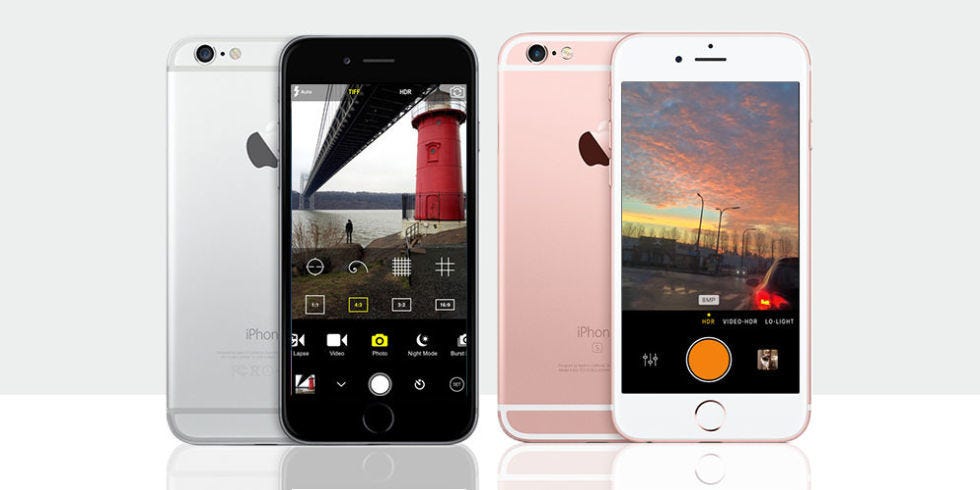
Note: This article is written as a 2016-focused buyer’s guide. App names, pricing, features, and availability may have changed since then, but the recommendations below reflect the real iPhone photography landscape of that period.
Why iPhone Camera Apps Were a Big Deal in 2016
In 2016, the iPhone was already the camera most people carried everywhere. It photographed birthday candles, coffee foam, sunsets, receipts, pets, and that one friend who always said, “Take another one, I blinked.” But even though Apple’s built-in Camera app was fast and reliable, it was also intentionally simple. That simplicity was great when you needed a quick snapshot. It was less great when you wanted manual focus, shutter speed, RAW capture, better filters, serious editing tools, or creative control beyond “tap the yellow square and hope for the best.”
That is where third-party camera apps came in. The best camera apps for iPhone in 2016 helped users turn a pocket phone into a more flexible photography tool. Some apps offered DSLR-style manual controls. Others focused on film-style filters, fast editing, low-light photography, or artistic effects. A few tried to do everything at once, which is brave, ambitious, and slightly like putting a full kitchen inside a lunchbox.
Below are nine top rated photography and camera apps that stood out for iPhone users in 2016. Whether you were shooting street photos, food, portraits, travel scenes, or moody window-light selfies, these apps gave the iPhone camera a serious upgrade.
1. Camera+ Best All-Around iPhone Camera App
Camera+ was one of the classic names in iPhone photography, and by 2016 it had already earned a loyal fan base. The app was popular because it made advanced shooting feel friendly. Instead of burying useful controls under a pile of confusing menus, Camera+ gave users practical tools such as separate focus and exposure, image stabilization, a lightbox for reviewing shots, and editing features that could rescue an otherwise ordinary photo.
Its famous Clarity adjustment became a favorite for people who wanted photos to look sharper and more dramatic without spending twenty minutes pretending to be a professional retoucher. Used carefully, it could make textures pop, skies look richer, and food appear less like a cafeteria mystery. Used too much, of course, it could make a sandwich look like it had survived a thunderstorm. As with hot sauce, moderation was the secret.
Best for:
Everyday iPhone photographers who wanted better control than Apple’s default Camera app without needing a photography degree.
2. ProCamera Best for DSLR-Style Control
ProCamera was one of the strongest choices for users who wanted serious manual controls on an iPhone. In 2016, this mattered because mobile photography was becoming more than casual snapping. People were using iPhones for blogging, social media campaigns, travel photography, and even professional-looking client work. ProCamera gave them tools such as manual exposure, focus control, white balance adjustments, low-light modes, HDR options, and later RAW support on compatible devices.
The app’s appeal came from its balance. It was powerful, but not completely intimidating. You could shoot quickly in automatic mode, then move into more advanced settings when the scene demanded it. For example, if you were photographing a city street at dusk, ProCamera allowed you to slow down, control exposure, and avoid the washed-out lights that often ruin night shots. The stock iPhone Camera app was the reliable family sedan. ProCamera was the same sedan after someone quietly installed a racing dashboard.
Best for:
Advanced beginners, enthusiasts, and mobile photographers who wanted professional controls in a polished interface.
3. ProCam 4 Best Feature-Packed Camera App
ProCam 4 was another major player in the 2016 iPhone camera app scene. It appealed to users who wanted a toolbox rather than a single-purpose camera. Manual focus, shutter speed, ISO control, white balance, slow shutter effects, time-lapse, burst shooting, video controls, and RAW-related workflows made it one of the most versatile options available.
Where Camera+ felt approachable and ProCamera felt refined, ProCam 4 felt like the app for people who enjoyed buttons. Lots of buttons. Useful buttons, to be fair. It was especially fun for creative shooting experiments. Want silky water without carrying a large camera? Try slow shutter mode. Want light trails from cars? Use a tripod and a longer exposure. Want to feel like you are operating a tiny spaceship made of pixels? Open ProCam 4 and start exploring.
Best for:
Users who wanted one powerful app for manual photos, creative long exposures, and video-focused features.
4. Manual Best Minimal Manual Camera App
Manual was perfect for people who wanted manual controls without an interface that looked like an airplane cockpit. The app focused on giving photographers control over core settings such as ISO, shutter speed, focus, white balance, and exposure compensation. That made it ideal for users learning the relationship between light, motion, and image quality.
In 2016, many iPhone photographers were just beginning to understand why manual control mattered. A lower ISO could reduce noise. A faster shutter speed could freeze motion. Manual focus could help when the camera kept focusing on a window reflection instead of the actual subject. Manual made those lessons easier because it removed clutter and kept the experience direct.
The app was not trying to be a full editing suite or social network. It was a camera app with a clear mission: give users control, then get out of the way. Sometimes that is exactly what you need. Not every app has to arrive wearing a cape and juggling filters.
Best for:
Photography learners and minimalists who wanted clean manual controls on the iPhone.
5. Adobe Lightroom Mobile Best for RAW and Editing Workflow
Adobe Lightroom Mobile became especially important in 2016 because iOS 10 opened the door for RAW capture on compatible 12-megapixel iPhones through third-party apps. Lightroom Mobile added DNG capture support, giving iPhone photographers more flexibility when editing exposure, highlights, shadows, and color. For serious shooters, that was not a small feature. It was a “wait, my phone can do that?” moment.
Lightroom Mobile was also valuable because it connected mobile shooting with a larger editing ecosystem. If you already used Lightroom on desktop, the mobile app fit naturally into your workflow. You could shoot, organize, edit, and sync images across devices. For photographers who cared about consistency, that was a major advantage.
Of course, Lightroom was not the fastest choice for someone who simply wanted to slap a filter on a brunch photo before the pancakes cooled. But for careful editing, color correction, and RAW flexibility, it was one of the most important iPhone photography apps of 2016.
Best for:
Photographers who wanted RAW capture, serious editing tools, and a workflow connected to Adobe’s desktop software.
6. VSCO Best for Film-Inspired Style
VSCO was the cool kid of mobile photography in 2016. It was known for tasteful presets, film-inspired color, and a quieter creative community compared with louder social platforms. While many filter apps made photos look like they had been dipped in neon syrup, VSCO usually leaned toward subtle tones, faded blacks, soft contrast, and elegant color palettes.
That made it a favorite for lifestyle photography, travel images, portraits, fashion shots, and Instagram feeds that looked carefully effortless. You know the style: coffee cup, linen shirt, cloudy window, one plant, mysterious caption. VSCO helped define that visual language.
The app also included editing controls for exposure, contrast, temperature, cropping, sharpening, and more. Its real strength, however, was mood. A good VSCO preset could turn a plain image into something that felt intentional. Not necessarily expensive-camera intentional, but at least “I meant to do that” intentional.
Best for:
Creative users who wanted stylish, film-like presets and clean editing tools for social-ready photography.
7. Snapseed Best Free Photo Editing Companion
Snapseed, developed by Google, was one of the strongest free photo editing apps available for iPhone users in 2016. Although it was more of an editing app than a replacement camera app at that time, it belonged in any serious iPhone photography toolkit. Why? Because taking the photo is only half the job. Editing is where a good image often becomes a great one.
Snapseed offered tools such as Tune Image, Selective Adjust, crop, rotate, healing, brush edits, vignette, black-and-white effects, and detail enhancement. The Selective Adjust tool was especially useful because it allowed users to brighten or improve specific areas instead of changing the entire image. That meant you could lift shadows on a face without turning the sky into a glowing white blanket.
The best thing about Snapseed was its power-to-price ratio. The price was free, and the tools were good enough that many paid apps had to stand awkwardly in the corner and reconsider their life choices.
Best for:
Anyone who wanted a powerful free editor to improve iPhone photos after shooting.
8. Hipstamatic Best Retro Camera Experience
Hipstamatic was not just a camera app. It was a tiny nostalgia machine. Long before every app had retro filters, Hipstamatic built its identity around analog-style photography. It used virtual lenses, films, and flashes to create images that looked imperfect in a charming way. Light leaks, vintage tones, contrast shifts, and unpredictable results were part of the appeal.
In 2016, Hipstamatic remained a fun choice for users who did not want every photo to look clinically sharp and perfectly corrected. It was for people who enjoyed surprise. You chose a lens and film combination, took the shot, and let the app add character. Sometimes the result looked beautiful. Sometimes it looked like a vacation photo found in an attic. Both outcomes had personality.
Hipstamatic was especially good for street photography, casual portraits, and creative projects where mood mattered more than technical perfection. It reminded users that photography does not always have to be clean, polished, and optimized. Sometimes a little weird is the whole point.
Best for:
Creative photographers who loved analog looks, retro filters, and unpredictable artistic results.
9. Obscura Camera Best Interface for Focused Shooting
Obscura Camera earned attention because of its thoughtful interface. Instead of trying to copy every DSLR button, it focused on making manual controls feel natural on a touchscreen. The app offered access to controls such as focus, exposure, shutter speed, ISO, and white balance in a design that felt modern and enjoyable.
For iPhone users who cared about the shooting experience itself, Obscura was a refreshing option. It encouraged slower, more deliberate photography. You could adjust settings without feeling as if you were digging through a filing cabinet. That mattered because the best camera app is not always the one with the longest feature list. It is the one you actually enjoy using before the moment disappears.
Obscura was particularly appealing for street photography, portraits, and everyday creative shooting. It made the iPhone feel less like a phone with a camera and more like a compact camera with a phone attached.
Best for:
Users who wanted manual control wrapped in a clean, carefully designed shooting interface.
How to Choose the Best iPhone Camera App in 2016
The best app depended on your style. If you wanted one reliable upgrade from Apple’s Camera app, Camera+ was a safe pick. If you wanted serious manual control, ProCamera or ProCam 4 made more sense. If you were learning photography fundamentals, Manual was clean and useful. If RAW editing mattered, Lightroom Mobile was a major choice after iOS 10. If you cared about mood and style, VSCO and Hipstamatic were hard to ignore. If you wanted free editing power, Snapseed belonged on your home screen. If interface design mattered most, Obscura deserved a look.
It also helped to think about workflow. Some users preferred to shoot in one app and edit in another. For example, you might capture a controlled exposure in ProCamera, fine-tune it in Snapseed, and finish with a subtle VSCO preset. That sounds like a lot, but in 2016 it was a common mobile photography routine. The iPhone had become not just a camera, but a complete pocket studio.
Practical Experiences With iPhone Camera Apps
Using iPhone camera apps in 2016 taught photographers one important lesson: better tools do not automatically create better photos, but they do create better opportunities. A manual camera app would not magically turn a dark restaurant into a magazine shoot. It would, however, let you lower exposure, lock focus, reduce blown highlights, and avoid the dreaded “flash photo of doom” that makes everyone look like they were surprised by lightning.
One of the most useful real-world habits was separating focus and exposure. In Apple’s default Camera app, tapping the screen was quick, but advanced apps like Camera+ and ProCam gave more control. Imagine photographing a friend standing near a bright window. If the phone exposed for the window, the person became a silhouette. If it exposed for the face, the window turned white. With better camera apps, you could lock focus on the face, adjust exposure more carefully, and find a balanced result. It was not magic, but it felt close when compared with tapping randomly and whispering, “Please work.”
Another practical experience was learning when not to use filters. VSCO and Hipstamatic were excellent, but strong filters could overwhelm a photo. A good rule was to edit until the image looked better, then pull the effect back slightly. The goal was not to make every sky teal, every shadow matte, and every coffee cup look like it had emotional baggage. The best edits supported the subject. They did not run into the room wearing tap shoes.
Low-light shooting was also a big test. Apps with manual ISO and shutter speed helped users understand the trade-off between brightness and blur. Raising ISO made a photo brighter but added noise. Slowing the shutter could gather more light but required steady hands or a tripod. This was where small accessories made a big difference. A tiny tripod, a phone clamp, or even a stable surface like a railing could improve night shots dramatically. Yes, you might look slightly intense setting up a mini tripod next to your dessert, but art has always required sacrifice.
RAW capture changed the mindset for serious users. With Lightroom Mobile and other RAW-capable apps, photographers could recover more detail from highlights and shadows than with standard JPEG files. That was especially helpful for sunsets, city lights, and high-contrast travel scenes. RAW files were larger and required more editing, but they gave photographers more room to correct mistakes. In other words, RAW was less like a finished meal and more like ingredients. You still had to cook, but at least you were not stuck with burnt toast.
The best experience came from building a simple app stack. A practical 2016 setup might look like this: Camera+ for daily shooting, ProCamera for manual control, Lightroom Mobile for RAW, Snapseed for detailed edits, and VSCO for final style. That combination covered speed, control, correction, and mood. It also prevented app overload. Downloading twenty camera apps sounds exciting until you miss the sunset because you are still deciding which icon to tap.
Ultimately, the best iPhone camera apps of 2016 helped people become more intentional. They encouraged users to notice light, composition, color, movement, and timing. The apps were useful not because they replaced photographic skill, but because they made skill easier to practice. The iPhone was already convenient. These apps made it creative.
Conclusion
The best camera apps for iPhone in 2016 gave users something Apple’s default Camera app did not always provide: control, personality, and deeper creative options. Camera+ was the everyday hero, ProCamera and ProCam 4 delivered advanced tools, Manual kept things clean, Lightroom Mobile brought RAW workflows into the mobile world, VSCO shaped the look of social photography, Snapseed offered powerful free editing, Hipstamatic made imperfection fun, and Obscura proved that interface design matters.
For casual users, one or two of these apps could make photos noticeably better. For serious mobile photographers, combining several of them created a complete shooting and editing workflow. In 2016, the iPhone was already a great camera. With the right app, it became a far more interesting one.