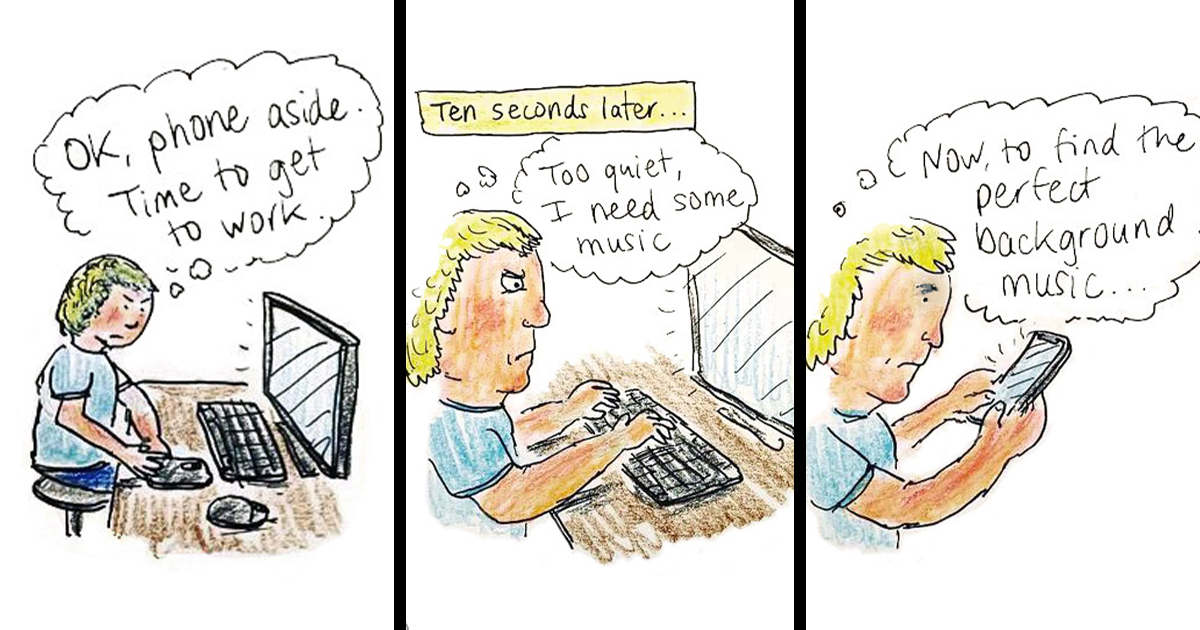
Technology and I have the kind of relationship usually reserved for romantic comedies and dysfunctional office printers. I love it. I need it. I occasionally whisper, “Please don’t update right now,” like I’m negotiating with a tiny, glowing deity. And because therapy is expensive (and drawing is fun), I turned my daily tech drama into 30 cartoonslittle snapshots of modern life where convenience and chaos ride in the same rideshare.
This post isn’t a “phones are bad” sermon. It’s more like a group chat where we all admit we’ve checked the weather, our bank account, and our ex’s dog’s Instagram in the same 90 seconds. We’ll laugh, we’ll cringe, and we’ll maybe change one setting so our devices stop behaving like needy toddlers with Wi-Fi.
Why Technology Feels Like a Best Friend Who Steals Your Fries
The reason tech inspires both devotion and despair is simple: it’s phenomenal at solving problemsand also phenomenal at creating brand-new problems you never ordered. Your phone can translate a menu in seconds, navigate you out of a traffic jam, and summon groceries to your doorstep. It can also convince you that you have “no time” because you spent 47 minutes reading comments under a video of a raccoon washing grapes.
A lot of this tension comes from the way modern apps compete for attention. Notifications, badges, streaks, autoplay, “just one more” recommendationsthese are frictionless by design. The result is a constant tug-of-war between what you meant to do and what your screen suggests you do instead.
Meanwhile, our bodies are out here begging for mercy. Staring at screens for long stretches can leave us with dry, tired eyes, and evening screen glow can nudge sleep routines in an unhelpful direction. Add video meetings (hello, self-view) and you’ve got a recipe for that particular flavor of fatigue where your brain is tired but your face is still “on camera polite.”
So yes: technology is a miracle. It’s also a magnet for distraction. Which makes it the perfect subject for cartoonsbecause humor is basically truth wearing a fake mustache.
How Cartoons Help When Your Brain Is Buffering
Cartoons let you capture what tech life feels like in one frame: the optimism of a new device, the despair of a forgotten password, the spiritual journey of waiting for a file to upload. A drawing can say, “This is ridiculous,” without sounding like you’re yelling at kids to get off your lawn.
And if you’ve ever laughed at a meme that called you out with surgical precisioncongrats. You’ve experienced the healing power of: being accurately roasted.
30 Cartoons From My Love-Hate Tech Universe
Below are the cartoons, described like tiny movie trailers. If any of these feel painfully familiar, please know: I drew them with love… and a slightly clenched jaw.
1–6: My Phone, My Tiny Overlord
- The Morning Scroll of Shame
A person wakes up refreshed… until they check their phone and immediately look like they aged five years. The alarm clock whispers, “I did my part.” - Battery Anxiety Bingo
At 38% battery, the phone is fine. At 37%, it’s suddenly a Victorian orphan on a fainting couch. “Father, I fear I shan’t make it to noon.” - “You’ve Been on Your Phone for 2 Hours”
A screen-time pop-up appears like a disappointed librarian: “So… are we proud of this choice?” The user clicks “Ignore” with the confidence of a person eating chips at 2 a.m. - The Phantom Buzz
Someone checks their pocket 14 times even though their phone is on the table. A ghost labeled “Dopamine” floats by going, “Boo.” - The One Notification You Actually Need
73 alerts: sales, likes, a reminder to breathe. The only missing one: “Your ride is here.” The phone shrugs: “I thought you wanted more coupon codes.” - Auto-Correct: The Chaos Gremlin
A tiny gremlin hits “ducking” with glee, then high-fives itself. The user’s text bubble reads like an accidental insult from a pirate.
7–12: Work Tech, Where Hope Goes to Update
- Zoom Face: A Tragedy in HD
A person stares at their own video tile like it’s a haunted mirror. Caption: “I came to discuss quarterly goals. Instead, I met my pores.” - The Meeting That Could’ve Been a Sticky Note
Eight people in a video call. One person says, “So… we’re aligned?” Everyone nods while secretly Googling “what are we aligned on?” - Muted but Passionate
Someone delivers a heartfelt speech while muted; the team applauds silence. A caption bubble: “This is my best work.” - Calendar Tetris
A worker tries to schedule “Focus Time” and the calendar fights back like a possessed slot machine. Every open block gets instantly filled by “Quick Sync (30 mins).” - Password Reset Olympics
A person hurdles through security questions: “What was your first pet’s middle name?” They collapse at the finish line, whispering, “I just wanted to open a PDF.” - “Let’s Circle Back” Time Loop
Two coworkers stand in front of a literal circle, circling, exhausted. Caption: “We’ve circled back so many times we invented a new orbit.”
13–18: Social Media, the World’s Loudest Mirror
- The Like Economy
A person posts a photo and immediately refreshes like it’s a medical monitor. Caption: “Doctor, their engagement is dropping!” - Algorithm, My Toxic Roommate
The algorithm hands you content like, “You watched one video about bread. Here are 400 videos about sourdough betrayal.” - Doomscrolling Treadmill
Someone scrolls bad news while jogging in place, sweating anxiety. A sign reads: “Welcome to the gym. Today’s workout: existential dread.” - “People You May Know” Jump Scare
The app suggests a person you haven’t thought about since 2011. Your soul exits your body to avoid the awkwardness. - Influencer Morning Routine vs. Reality
Left panel: sunrise yoga, fresh juice, perfect skin. Right panel: you eating cereal dry while replying “sounds good!” to a work email at 6:58 a.m. - The Comment Section Thunderdome
Two strangers argue inside a tiny phone while the user whispers, “I came here for recipes.” The phone replies: “You came here for chaos. Be honest.”
19–24: Smart Devices, Dumb Moments
- Smart Speaker, Selective Hearing
“Play relaxing music.” The speaker: “Playing ‘Songs That Remind You of Your Mistakes.’” The user: “That’s not a genre.” The speaker: “It is now.” - Autofill Betrayal
A form asks for your name; autofill suggests your email from 2008: “hotdude_4ever.” You stare into the distance, regretting your entire adolescence. - Two-Factor Authentication Hide-and-Seek
The code is sent to a device you no longer own. Somewhere, an old flip phone laughs in a drawer. - The Printer’s Personality
A printer sits smugly: “Out of cyan.” The user screams: “It’s a black-and-white document!” The printer: “And I’m an artist.” - Software Update: The Surprise Party You Didn’t Want
“Install now?” appears with two options: “Now” and “Now but angrily.” The user tries to click “Never,” which does not exist. - Smart Fridge Snitch
The fridge sends an alert: “You opened me again.” Caption: “I didn’t ask for a roommate with opinions.”
25–30: The Human Body vs. The Rectangle
- Neck Posture Evolution
A museum exhibit shows humans slowly bending into a question mark while staring at phones. Caption: “Behold: the modern spine.” - Digital Eye Strain Drama
Two eyeballs sit in tiny lounge chairs with cucumber slices, exhausted. One says, “I stared at spreadsheets for eight hours. I deserve a vacation.” - The “Just One Episode” Lie
A person watches one episode. The streaming service whispers, “Next episode starts in 5 seconds.” The person: “I’m in an emotionally abusive relationship with autoplay.” - Bedtime Phone Negotiations
The user tucks their phone under the pillow like it’s a pet. Caption: “If I can’t see the screen, it can’t tempt me.” (The phone glows anyway.) - Fitness Tracker Guilt Trip
The watch says, “Time to stand!” The user is already standing… in the kitchen… eating cheese. The watch: “Not like that.” - Silence, Finally
The last cartoon is peaceful: phone on Do Not Disturb, laptop closed, person outside. A tiny notification bubble floats by: “Are you sure?” The person smiles: “Yes.”
What These Cartoons Are Really About (Besides My Questionable Sleep)
Under the jokes, there’s a pattern: tech isn’t just a tool anymoreit’s an environment. We work inside it, socialize inside it, shop inside it, relax inside it, and sometimes panic-refresh inside it. No wonder our relationship with technology feels intense; we’re basically living in the world’s most interactive vending machine.
The goal isn’t to “quit tech” (good luck paying rent with interpretive dance). The goal is to build a relationship where you are the main character and your devices are supporting actorsnot the director, producer, and unpaid intern who schedules meetings at 7:00 a.m.
A Few Non-Dramatic Ways to Make Tech Less Annoying
Not a detox, not a cleanse, not a 30-day challenge that ends with you living in a cabin and communicating via owl. Just small, practical shifts:
- Mute the chaos. Keep only the notifications that truly matter (real people, real deadlines, real emergencies). Everything else can wait in the notification center like it’s in a polite waiting room.
- Use screen-time tools as mirrors, not judges. Digital wellbeing dashboards can help you notice patterns (late-night scrolling, frequent app checking) without turning your phone into a shame machine.
- Give your eyes a break. Long stretches of screen focus can be roughbuild in quick visual breaks and remember to blink like a human, not like a lizard pretending to be productive.
- Protect your wind-down time. If screens rev your brain up at night, try shifting to calmer, non-screen routines before bed. The point isn’t perfectionit’s reducing the odds you’ll fall asleep to a documentary titled “WORST THINGS EVER: SEASON 19.”
- Make video calls less exhausting. Try hiding self-view sometimes, taking short breaks between calls, and remembering: you are not required to maintain unbroken eye contact like a polite serial killer.
Conclusion: I Love My Tech. I Also Want It to Leave Me Alone Sometimes.
Making these 30 cartoons didn’t turn me into a zen monk with a flip phone. It did something better: it made me notice where my attention leaks, where my stress spikes, and where I’ve accidentally accepted “constant availability” as the default setting for being alive.
If you saw yourself in any of these drawings, consider this your friendly reminder: you’re not weak. You’re humanliving in a world where apps are engineered to be sticky, work is always one ping away, and entertainment is infinite. Laugh at it. Name it. Nudge it into a healthier place. And if all else fails… draw a cartoon of it.
Bonus: of My Real-Life Love-Hate Tech Experiences
I didn’t set out to make “technology cartoons.” I set out to make one sketch after a particularly dramatic morning where my phone asked for an update, my laptop demanded a restart, and my smart watch yelled at me to stand while I was literally pacing in anxiety. That first doodle was a tiny stick figure holding a coffee cup like it was emotional support. The caption: “I miss the era when my toaster didn’t have opinions.”
Once I started paying attention, the material was everywhere. I’d open my phone to check the weather and somehow end up watching a video of someone pressure-washing a driveway in another state. Ten minutes later, I’d realize I never learned whether it was going to rain but I did develop strong feelings about moss removal. That’s the weird magic trick of the attention economy: you start with a simple need, and you finish with niche knowledge and a slightly emptier soul.
Work tech, too, has its own flavor of comedy. I’ve had video calls where I spent more energy trying to look like I was listening than actually listening. I’ve stared at my own face in the corner of the screen thinking, “Do I always look like a concerned substitute teacher?” And I’ve absolutely said, “Sorry, I was on mute,” while realizing the bigger truth was: “Sorry, my brain has 19 tabs open.”
The most revealing moments happened at night. I’d tell myself I was going to read a chapter of a book, then “just check something quickly.” Thirty minutes later, I’d be researching whether octopuses dream, with my eyes dry and my posture shaped like a question mark. The phone is so good at providing tiny dopamine snacks that it’s easy to confuse stimulation with rest. Sometimes the most rebellious thing I can do is put the device in another room and let boredom show upbecause boredom is often the doorway to real recovery.
Drawing the cartoons became my reset button. It turned my frustration into something observableand therefore adjustable. Instead of thinking, “I’m failing at self-control,” I could think, “Wow, this design is persuasive,” and then change a setting, move an app, or create a small rule that actually fits my life. My relationship with technology is still messy, but now it’s at least funny messy. And on good days, it’s also a little more intentionallike I’m holding the remote again instead of being the show.
Research Backbone (No Links)
- Pew Research Center (screen time attitudes and teen tech habits)
- Harvard Health Publishing (blue light, sleep, and screen exposure)
- Stanford University News (video-call fatigue and why it happens)
- American Psychological Association (social media impacts and behavioral research)
- APA Open / peer-reviewed behavioral science writing on doomscrolling
- U.S. Department of Health & Human Services / Surgeon General advisory materials
- Harvard Business Review (notifications, focus, attention management at work)
- WIRED (the attention economy and notification culture)
- The Verge (digital wellbeing tools like Screen Time and Digital Wellbeing)
- American Academy of Ophthalmology (screen habits and eye comfort tips)
- American Optometric Association (digital eye strain guidance)
- Sleep Foundation (technology use and sleep hygiene recommendations)
- National Sleep Foundation (screen cutoffs and bedtime routines)
- NIH / PubMed Central (reviews on digital eye strain and screen-related health topics)