There is a tiny supercomputer sleeping in your junk drawer. It has a multi-core processor, battery-backed power, Wi-Fi, Bluetooth, cameras, sensors, a touchscreen, storage, speakers, microphones, and enough computing power to embarrass desktop machines from not that long ago. We call it an old cellphone. The maker world is starting to call it something else: a surprisingly capable single-board computer.
The idea of turning old cellphones into SBCs is not just a cute recycling trick. It is a practical response to three very modern problems: e-waste, supply-chain cost, and the strange habit of retiring powerful devices simply because their screens cracked or software updates stopped arriving. Projects like Citronics’ circular microcomputers, postmarketOS, Termux, LineageOS, and smartphone-based home servers show that retired phones can become embedded Linux boards, edge-computing nodes, smart-home hubs, camera controllers, dashboards, network tools, and lightweight homelab machines. In other words, yesterday’s “obsolete” phone may be tomorrow’s tiny server with a dramatic backstory.
What Does It Mean to Turn a Phone Into an SBC?
A traditional single-board computer, such as a Raspberry Pi-style board, puts the processor, memory, storage, power management, and I/O on one small circuit board. Old smartphones already contain most of that. The difference is access. A Raspberry Pi exposes GPIO pins, USB ports, display connectors, and hardware buses in a maker-friendly way. A phone hides most of its useful parts behind glue, glass, proprietary connectors, locked bootloaders, and a single USB port that says, “Good luck, human.”
Turning old cellphones into SBCs means changing that relationship. At the simple end, you keep the phone intact and run services through Android using tools like Termux. At the advanced end, you remove the screen and battery, expose the phone’s board, install a Linux-based operating system, and connect the motherboard to a carrier board that provides Ethernet, USB, UART, SPI, I2C, or GPIO. That second approach is closer to a true embedded Linux SBC. It is also where things become both exciting and mildly dangerous, which is the official emotional tone of hardware hacking.
Why Old Phones Make Surprisingly Good Single-Board Computers
Modern smartphones were designed to be power-efficient, always connected, and compact. That makes them excellent candidates for edge computing. Even a five-year-old phone may include an ARM processor, hardware video acceleration, several gigabytes of RAM, flash storage, Wi-Fi, Bluetooth, cellular radios, GPS, an accelerometer, a gyroscope, a microphone, a speaker, and a high-resolution display. Many cheap SBCs require extra modules to add those features. A phone already brings them to the party, wearing a slightly scratched case and pretending it was invited.
There is also the power advantage. Phones are engineered to sip energy because nobody wants a pocket warmer that dies before lunch. For always-on projects like a home automation bridge, MQTT broker, lightweight web server, network monitor, digital dashboard, or personal file drop, that efficiency matters. Add the built-in battery, and the phone becomes a small computer with its own uninterruptible power supply. A Raspberry Pi can do a lot, but it does not usually arrive with a display, battery, charger, camera, microphone, and LTE modem already attached.
The Citronics Approach: Phone Hardware as Circular Computing
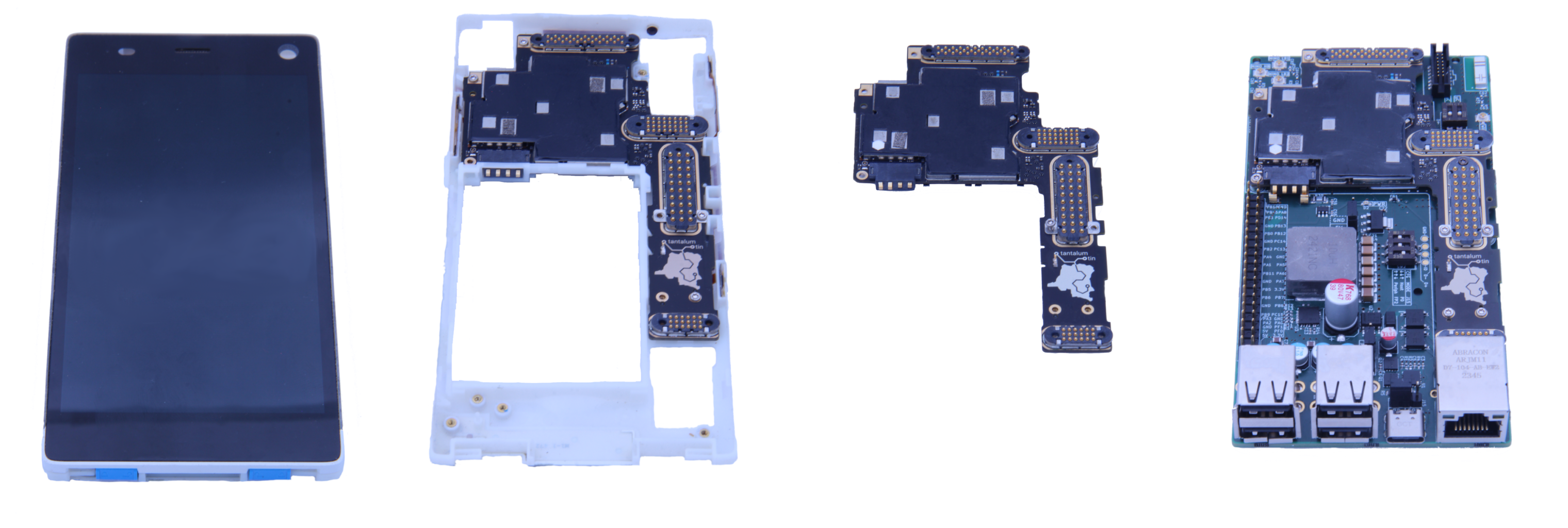
One of the most interesting developments in this space is the circular microcomputer concept promoted by Citronics. The company’s idea is to repurpose retired smartphone components into embedded computers that run a Linux-based operating system. Its development kit concept focuses on turning phone internals into something closer to an industrial SBC, with familiar connectivity such as Ethernet, multiple USB ports, and a Raspberry Pi-style header for interfaces like UART, SPI, I2C, and GPIO.
That last part is crucial. The main obstacle is not raw compute power. Old phones have plenty of that. The obstacle is practical access. Makers and engineers need reliable ways to attach sensors, relays, displays, storage, cameras, and network cables. A purpose-built breakout board can transform a mysterious phone motherboard into something closer to a standard embedded platform. It removes the broken parts that often send phones to recycling bins, such as screens and camera modules, while keeping the useful compute, radio, and power-management hardware.
This is not yet a universal solution. A carrier board designed around one phone model will not magically fit every Samsung, Pixel, Motorola, LG, or OnePlus device in the drawer. Phone internals are famously inconsistent. Connectors, bootloaders, kernels, drivers, schematics, and battery circuits vary wildly. Still, the model-specific approach is realistic. If a community builds strong support around popular used devices, each supported phone becomes a new class of low-cost, reused SBC.
Software Path One: Use Android and Termux
The easiest way to turn an old Android phone into a tiny server is to leave Android installed and run a Linux-like userspace through Termux. Termux provides a terminal emulator and package ecosystem that can install tools such as OpenSSH, Python, Node.js, Git, nginx-style web servers, text editors, compilers, scripting languages, and command-line utilities. No soldering iron is required. No sacrificial goat is required either, though some old Android permissions menus may make you consider it.
With Termux, an old phone can become an SSH-accessible box, a local web server, a personal automation endpoint, a Git mirror, a network testing tool, or a small development environment. Add Termux:Boot and termux-services, and some services can be started after reboot. Connect the phone to Wi-Fi, enable remote access safely, and it starts behaving less like a retired handset and more like a pocket-sized Linux appliance.
This method has limits. Android may kill background processes to save battery. Some phones aggressively suspend apps. Package availability can change. Docker support is not straightforward without root or a different Linux stack. Still, for beginners, Termux is the most practical entry point. It lets you test whether your old device is worth promoting from “drawer fossil” to “tiny server with responsibilities.”
Software Path Two: Install postmarketOS or Another Linux-Based System
For a more SBC-like experience, projects such as postmarketOS aim to bring real Linux distributions to phones and tablets. postmarketOS is built around the idea that consumer electronics should remain useful until the hardware physically breaks. It uses shared Linux components where possible and supports a growing list of devices, although support quality varies by model.
Running a native Linux system can make the phone feel more like a proper embedded board. You may get Alpine Linux, SSH, standard package management, networking tools, and a more conventional server environment. For headless use, display support may not even matter. A phone with a cracked screen but working motherboard can still become a network node if USB networking, Wi-Fi, or Ethernet adapters work correctly.
The catch is compatibility. Some phones have locked bootloaders. Some lack mainline kernel support. Some require proprietary blobs for Wi-Fi, GPU, charging, audio, or display functions. Others are supported by LineageOS but not by a full mobile Linux distribution. Before buying a stack of “cheap broken phones” online, check device support first. A bargain phone with no unlock path is not an SBC. It is a shiny rectangle of regret.
Hardware Access: The Real Challenge
Traditional SBCs are loved because they expose pins. You can connect sensors, motors, buttons, LEDs, radios, relays, and displays without negotiating with a microscopic board-to-board connector designed by someone who hates daylight. Phones are not built for tinkering. Their internals are optimized for thinness, not breadboard friendliness.
There are three common hardware strategies. The first is USB OTG or USB-C host mode. Android has supported USB host mode for years, allowing compatible phones to control USB peripherals such as keyboards, flash drives, serial adapters, Ethernet dongles, and hubs. This is the cleanest route for most projects. A powered USB-C hub can provide Ethernet, extra USB ports, storage, and power delivery.
The second strategy is a custom carrier board. This is what makes the Citronics idea so interesting. Instead of treating the phone as a sealed device, the phone motherboard becomes the compute module. The carrier board breaks out power, networking, USB, and possibly low-level interfaces. It is similar in spirit to how Raspberry Pi Compute Modules rely on carrier boards, except the compute module began life as a cellphone.
The third strategy is internal soldering and board hacking. This is for advanced users who can identify test pads, UART points, power rails, charging circuits, and connector pinouts. It can be rewarding, but it is not a beginner project. One wrong move can turn a promising phone board into modern art with smoke effects.
Best Projects for a Reused Phone SBC
1. Lightweight Home Server
An old phone can run a small web dashboard, personal wiki, webhook receiver, file sync endpoint, or development test server. With Termux and OpenSSH, you can manage it from a laptop. This setup is perfect for learning Linux commands without buying another board.
2. Smart Home Hub
Some hobbyists use Android phones to host or assist smart-home tools. A phone can serve dashboards, relay data, run scripts, display device status, or act as a local controller. It is especially useful when the built-in screen is still good.
3. Network Monitoring Node
Old phones can monitor Wi-Fi, log uptime, check local services, run ping tests, or send alerts when your home network misbehaves. Since phones include Wi-Fi and battery backup, they make handy network sentries.
4. Camera or Display Controller
If the camera and screen still work, the phone can become an IP camera, security monitor, baby monitor, digital signage display, weather station screen, or 3D printer dashboard. Many SBCs need extra accessories for this. The phone says, “I already have a 1080p screen, thank you very much.”
5. Edge AI or Image Recognition Node
Some smartphone chips include GPUs, DSPs, or neural-processing hardware. Reused phone clusters can be useful for experiments in image recognition, lightweight inference, or distributed computing. Academic work on junkyard computing has shown that old smartphones can still run meaningful microservices and extend hardware lifetimes.
Security: Do Not Put a Forgotten Phone Straight on the Internet
A reused phone SBC should be treated like any server. Update what you can. Remove personal data. Factory reset the device before repurposing it. Use SSH keys instead of weak passwords. Disable unnecessary apps. Keep it behind a firewall. Avoid exposing random ports to the public internet. If remote access is needed, consider a private VPN-style solution rather than opening the device directly to the world.
Security is especially important because old phones may no longer receive vendor patches. A phone that is fine for a local dashboard may be a poor choice for public-facing services. The safest use cases are local network tools, lab experiments, offline automation, or services reachable only through secure tunnels.
Battery Safety: The Part Nobody Should Ignore
Old lithium-ion batteries deserve respect. If the phone is swollen, bulging, hot, hissing, leaking, or lifting its screen, stop using it. Do not charge it. Do not puncture it. Do not toss it in household trash. A swollen battery is not a quirky personality trait; it is a fire risk wearing a phone costume.
For long-term SBC use, consider battery health carefully. Some projects run the phone with charging limits, smart plugs, or external power management to avoid keeping the battery at 100 percent forever. More advanced hardware conversions may remove the battery and provide a stable supply through the original battery terminals, but that requires proper voltage regulation, current capacity, and safety knowledge. When in doubt, use a healthy device, monitor heat, and recycle dangerous batteries through appropriate e-waste or hazardous-waste channels.
Phone SBC vs Raspberry Pi: Which One Wins?
A reused phone can beat a cheap SBC in several areas: built-in display, battery, Wi-Fi, Bluetooth, cameras, storage, sensors, cellular connectivity, and power efficiency. It is also environmentally attractive because it extends the life of hardware that already exists.
A Raspberry Pi or similar SBC still wins in openness, documentation, GPIO access, predictable connectors, accessories, community examples, and long-term maintainability. You can buy a HAT, follow a pinout, and connect hardware without reverse-engineering a phone’s internal layout. With a phone, you often trade money savings for time, patience, and the occasional urge to shout at a bootloader.
The best choice depends on the project. For a sensor-heavy robotics build, a standard SBC or microcontroller is easier. For a dashboard, network tool, small server, LTE gateway, or always-on automation box, an old phone can be excellent. For educational projects, the phone SBC concept is especially valuable because it teaches Linux, Android, networking, power management, repair culture, and sustainability in one compact package.
Practical Steps to Start Turning an Old Phone Into an SBC
Start with inventory. Find an Android phone that powers on, holds charge safely, connects to Wi-Fi, and has a working USB port. Factory reset it. Remove old accounts. Update the operating system if updates are available. Then install Termux from a trusted source and set up OpenSSH. Connect from another computer on your local network and test basic commands.
Next, add a project. Install Python and run a tiny web server. Set up a status dashboard. Use a USB-C hub with Ethernet if the phone supports it. Try external storage. Test whether the phone stays awake reliably. Learn its power behavior. Some phones behave beautifully as mini servers; others act like sleepy cats with system privileges.
If you want to go deeper, research the exact model. Can the bootloader be unlocked? Is it supported by LineageOS, postmarketOS, or another community ROM? Are kernel sources available? Does USB networking work? Can it boot headless? Are replacement batteries available? A $25 used phone with strong community support is worth more than a $10 mystery phone that nobody has documented since 2016.
Experience Notes: What It Feels Like to Actually Use Old Phones as SBCs
The first surprise is how fast the setup can feel. After years of thinking of old phones as “slow,” using one as a headless server changes the context. A phone that feels sluggish opening modern social media apps may feel perfectly responsive over SSH. Without animated feeds, background bloat, and twelve apps begging for notifications, the hardware suddenly seems less old and more unfairly unemployed.
The second surprise is that the built-in screen is both a gift and a distraction. For a dashboard project, it is fantastic. You can mount the phone on a wall, show a weather page, display server status, or keep a Home Assistant-style panel open. For a pure server, the screen becomes unnecessary power draw. That is where headless Linux or aggressive screen timeout settings help. If the screen is cracked, do not panic. A cracked display can still be acceptable for a server as long as touch input works long enough to configure the device.
The third lesson is that cables matter more than expected. Cheap USB OTG adapters can cause flaky connections. Some USB-C hubs work well, while others refuse to charge and provide Ethernet at the same time. Power delivery support varies. If you plan to run a phone SBC continuously, buy decent cables and test everything before trusting it with an important job. Nothing says “professional infrastructure” like a server that goes offline because a $3 cable got moody.
Thermal behavior is another real-world detail. Phones are designed for bursty workloads, not always-on compiling, video encoding, or database grinding. For light services, they stay cool. For heavy tasks, they may throttle. Removing the case, adding airflow, or mounting the phone where heat can escape helps. Do not bury it under papers or tape it behind a cabinet next to a heater. Tiny computers also enjoy breathing.
The best experience comes from choosing the right job. Old phones are wonderful as dashboards, low-traffic web servers, SSH boxes, network monitors, data loggers, media remotes, emergency LTE gateways, and learning machines. They are less wonderful as high-reliability industrial controllers unless the hardware, power system, and software stack are carefully engineered. That distinction matters. A weekend project can tolerate quirks. A heating control system in winter should not depend on a half-supported ROM and wishful thinking.
The most satisfying part is psychological. Repurposing an old cellphone feels like rescuing useful technology from a drawer-sized retirement home. You learn more about Linux, Android, networking, batteries, USB, and embedded design. You save money. You reduce waste. And you gain a tiny computer with a story. That is the maker sweet spot: practical, educational, slightly weird, and just risky enough to make success feel earned.
Conclusion
Turning old cellphones into SBCs is one of the most promising ideas in practical reuse. It will not replace every Raspberry Pi, microcontroller, or industrial embedded computer. It will not magically solve e-waste. It will not make locked bootloaders any less annoying. But it does reveal something important: many “obsolete” phones are still powerful, efficient, connected computers waiting for a second job.
For beginners, the best path is simple: install Termux, enable SSH, and build a small local project. For advanced makers, postmarketOS, custom carrier boards, and phone-specific breakout designs open the door to true circular microcomputing. For educators and sustainability-minded engineers, reused phone SBCs offer a compelling lesson in hardware longevity. The old cellphone in your drawer may not be ready to run a factory, but it can absolutely run scripts, dashboards, sensors, web apps, and experiments. Not bad for a device you once replaced because the battery got tired and the camera app became dramatic.