A used iPhone can be a terrific bargainor a very elegant paperweight with three cameras. Before handing over your money, you need to confirm more than whether the screen lights up. A stolen, lost, fraudulently obtained, or unpaid iPhone may look perfectly normal today but become unusable after its IMEI is blocklisted or Activation Lock appears.
Unfortunately, there is no magical button that proves an iPhone has a completely innocent past. The safest approach combines an IMEI check, an Activation Lock test, carrier verification, seller documentation, and an in-person inspection. Each test catches a different problem.
This guide explains how to check if an iPhone is stolen, what “clean IMEI” really means, which warning signs deserve attention, and what to do if you have already purchased a suspicious device.
Quick Answer: How Can You Tell if an iPhone Is Stolen?
Before buying a used iPhone, complete all of these checks:
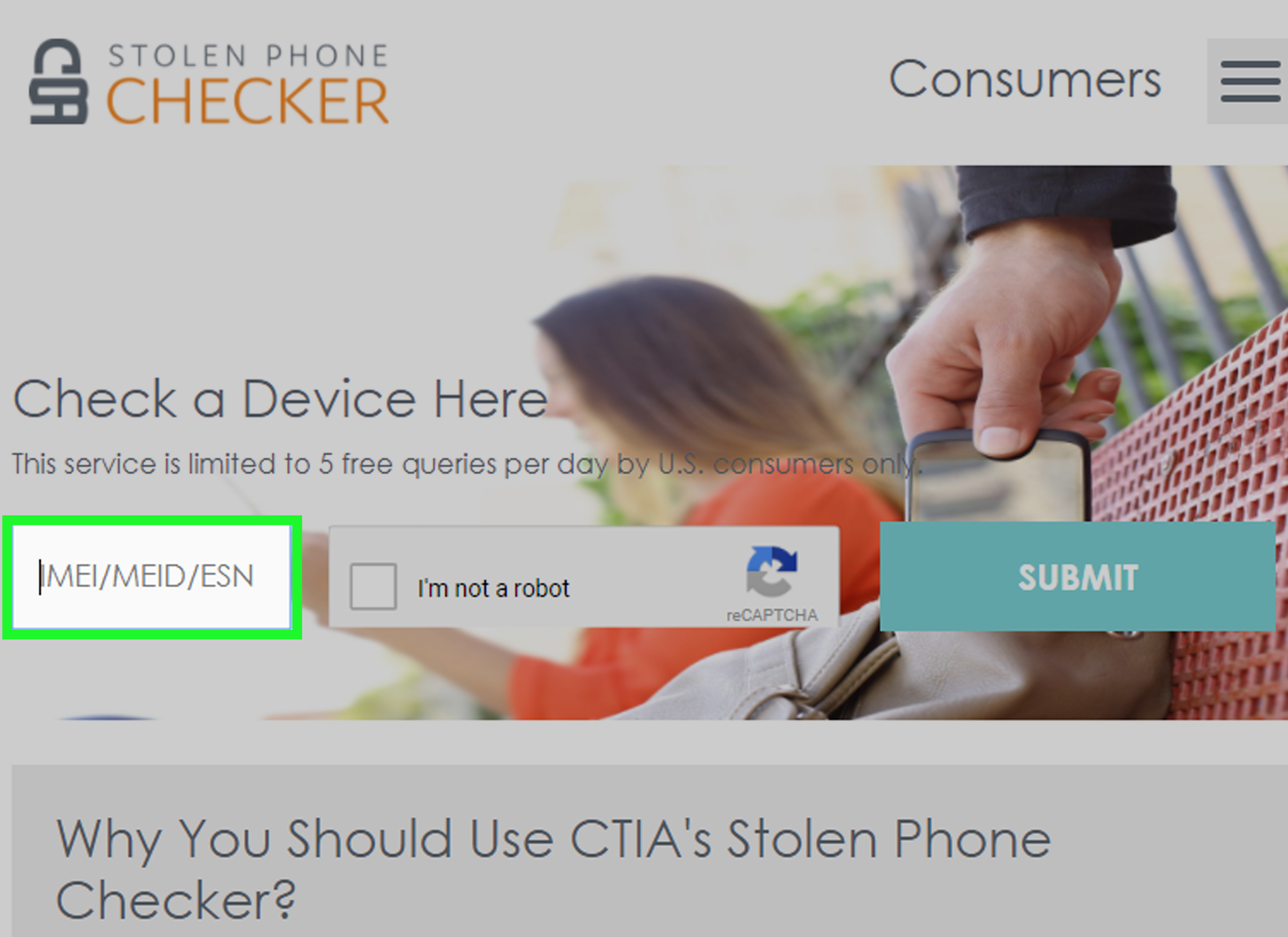
- Ask for the IMEI and verify it through the CTIA Stolen Phone Checker.
- Run the IMEI through your carrier’s compatibility or bring-your-own-device checker.
- Compare the IMEI and serial number in Settings with the device and original packaging.
- Ask the seller to erase the iPhone in front of you.
- Begin setup and confirm that “iPhone Locked to Owner” does not appear.
- Check the carrier-lock, financing, repair, and device-management status.
- Review the seller’s receipt, identity, return policy, and reason for selling.
- Use a protected payment method and keep records of the transaction.
Do not pay until the iPhone passes every relevant check. A clean result from one database is helpful, but it is not a lifetime certificate of innocence.
Understand the Three Types of iPhone Lock
Buyers often use the word “locked” as if it describes one condition. In reality, an iPhone can have several unrelated restrictions.
Activation Lock
Activation Lock is part of Apple’s Find My security system. When Find My is enabled, the device remains associated with its owner’s Apple Account, even after certain types of erasure. The previous owner’s credentials may be required before anyone else can activate it.
An Activation Locked iPhone is not automatically stolen; an honest seller may simply have forgotten to remove it from an account. However, if the seller cannot unlock it, do not buy it. A stranger’s promise that “Apple can remove the lock later” is not a substitute for a working phone.
IMEI Block
The IMEI, or International Mobile Equipment Identity, is a unique identifier used by cellular networks. A carrier may block the IMEI after a device is reported lost, stolen, or associated with fraud. A blocklisted iPhone may still work over Wi-Fi while being unable to obtain normal cellular service.
Carrier Lock
A carrier-locked iPhone is limited to a particular wireless company. This does not mean it was stolen. In Settings, an unlocked iPhone normally displays “No SIM restrictions” beside Carrier Lock. Only the applicable carriernot Applecan approve a carrier unlock.
How to Check if an iPhone Is Stolen Before Buying
1. Investigate the Seller Before Investigating the Phone
Start with a few ordinary questions: Where was the iPhone purchased? Why is it being sold? Is it fully paid off? Is there an original receipt? A legitimate seller should be able to provide clear, consistent answers without turning the conversation into an Olympic event in creative storytelling.
If meeting in person, choose a carrier store, Apple Store, busy public location, or another safe place with Wi-Fi. Ask the seller to bring identification and proof of purchase if available. The name on the receipt should reasonably correspond with the seller or have a believable explanation.
For an online purchase, examine account history, ratings, photographs, return terms, and the device description. Reverse-image searching unusually polished listing photos can reveal pictures copied from another advertisement. Avoid sellers who rush you, refuse basic checks, or demand an irreversible payment.
2. Find the iPhone’s IMEI and Serial Number
On an unlocked iPhone, open Settings > General > About. Scroll down to locate the serial number, IMEI, EID, and other device details. Dialing *#06# can also display the IMEI on many active phones.
Depending on the model, the IMEI may be available on the SIM tray, original packaging, or the information screen during setup. Newer models and eSIM-only devices may not print it on an exterior component.
Compare every available identifier. The IMEI shown in Settings should match the number recognized by carrier systems and, when applicable, the number on the packaging or device. A mismatch does not always prove theftthe box or SIM tray might have been replacedbut it requires a convincing explanation.
Dual-SIM iPhones can have two IMEI numbers. Check both when the relevant service allows it. Do not rely only on a screenshot supplied by the seller; read the identifier from the actual phone whenever possible.
3. Run an Official Lost-or-Stolen IMEI Check
In the United States, the CTIA Stolen Phone Checker uses GSMA device information to identify phones reported lost or stolen. Enter the iPhone’s IMEI and review the result carefully.
- Reported lost or stolen: Stop the purchase. Do not attempt to activate or resell the phone.
- No lost-or-stolen record found: Continue checking. This is a positive result, not a guarantee.
- Unknown or unavailable: Ask the original carrier for assistance and do not guess.
Database information can change. A recently stolen phone may not have been reported yet, and a dishonest seller could report a phone after receiving your payment. That is why the timing of the check matters: run it shortly before purchase and save a screenshot or confirmation.
4. Check the IMEI With Your Wireless Carrier
Major carriers provide bring-your-own-device tools that check whether an IMEI is compatible and eligible for their networks. Run the number through the carrier you plan to use, even if a general lost-phone database shows a clean status.
A carrier result may indicate that the device is compatible, incompatible, blocked, or cannot be verified. “Compatible” does not necessarily mean fully paid off, unlocked, or free from another owner’s Apple Account. If the result says blocked, contact the original carrier or walk away.
For an expensive purchase, meet at a carrier store and ask whether a representative can confirm activation eligibility. Privacy rules may prevent the representative from discussing another customer’s balance, but the seller may be able to resolve that issue while present.
5. Make the Seller Erase the iPhone
A passcode-protected Home Screen is not enough. Ask the seller to back up personal data, sign out correctly, and select Settings > General > Transfer or Reset iPhone > Erase All Content and Settings.
If Find My is active, the seller may need to authenticate with the Apple Account associated with the phone. Once the erase is complete, the multilingual Hello screen should appear.
Never accept excuses such as “I forgot the password, but you can bypass it with software.” Activation Lock bypass advertisements are frequently scams, temporary workarounds, or attempts to defeat an important anti-theft feature.
6. Begin Setup and Test for Activation Lock
Seeing the Hello screen is encouraging, but it is not the final test. Connect the iPhone to Wi-Fi and begin the setup process. Apple’s activation servers will check the device during setup.
If the screen displays “iPhone Locked to Owner” or asks for the previous owner’s Apple Account information, the device remains linked to that person. Hand it back and require the seller to remove it from the account. Do not complete the transaction until setup proceeds without the former owner’s credentials.
You generally do not need to sign in with your own Apple Account just to verify that the device passes the Activation Lock stage. Avoid entering sensitive credentials while the seller is watching.
7. Look for Carrier, Financing, and Management Restrictions
After setup, return to Settings > General > About. If Carrier Lock says “No SIM restrictions,” the iPhone is carrier-unlocked. If it names a carrier or shows a SIM restriction, verify that the phone will work with your service.
Ask whether the iPhone was purchased through an installment plan, leased, or tied to a promotional account credit. Some carrier policies require the balance to be zero before unlocking. A financed phone can have a clean IMEI at the time of sale and be blocked later if the account owner stops paying or reports fraud.
Also watch the setup screens for Remote Management. This can indicate that the phone belongs toor remains enrolled witha business or school. Only the organization can reliably release a managed device. A seller’s assurance that the screen will “probably disappear” should not influence your wallet.
8. Inspect Parts, Coverage, and Physical Identity
On supported iPhones with a recent iOS version, check Settings > General > About > Parts and Service History. Apple may identify replacement components as Genuine, Used, Unknown, Unverified, or in need of repair completion.
A replacement battery or display does not prove the phone was stolen. However, an unknown part, unfinished repair, or unverified logic board deserves investigationespecially when other identifiers do not match.
Apple’s coverage lookup can help confirm that a serial number is recognized and show warranty or AppleCare information. It is not a stolen-iPhone checker and does not establish legal ownership.
9. Test the Actual Phone
Once the ownership and activation checks are complete, verify that the iPhone behaves like a phone rather than an expensive decorative tile. Test the following:
- Cellular calls, mobile data, Wi-Fi, and Bluetooth
- Face ID or Touch ID
- Front and rear cameras, flash, microphones, and speakers
- Charging, buttons, vibration, and screen responsiveness
- Battery Health and Charging information
- Display brightness, dead pixels, and signs of water or impact damage
Insert a compatible SIM or test eSIM activation when practical. A phone that only works on Wi-Fi may have a cellular hardware problem or a network restriction that deserves further checking.
Warning Signs That a Used iPhone May Be Stolen
No single behavioral clue proves a crime, but several red flags together should end the deal:
- The price is dramatically lower than comparable listings.
- The seller refuses to provide the IMEI privately or allow an in-person check.
- The phone is still signed in to someone else’s Apple Account.
- The seller claims not to know the passcode or account password.
- The IMEI, model, storage capacity, or color does not match the box or listing.
- The seller wants cash, cryptocurrency, gift cards, or an off-platform transfer only.
- The meeting location changes repeatedly or the seller pressures you to hurry.
- The device displays Lost Mode, an owner’s message, Remote Management, or Activation Lock.
- The seller offers several nearly new phones without a credible business explanation.
A bargain is replaceable. Money paid for a device you cannot legally or practically use may not be.
Why a Clean IMEI Is Not a Complete Guarantee
An IMEI lookup reports the status available at that moment. It cannot always reveal an unreported theft, a future insurance claim, an outstanding private debt, counterfeit paperwork, or a delayed fraud investigation.
This creates a common trap: the buyer runs a clean check, pays cash, and activates the phone successfully. Days or weeks later, the original account holder reports the device stolen or stops paying the installment balance. The carrier then blocks it.
Reduce that risk by obtaining a dated receipt containing the seller’s name, contact details, sale price, device model, serial number, IMEI, and a statement that the seller owns the phone and that it is fully paid off. Keep screenshots of the listing, messages, IMEI results, payment confirmation, and return terms.
Use a Payment Method With Buyer Protection
When buying online, keep the conversation and payment inside a reputable marketplace. Review its current return deadlines and buyer-protection rules before purchasing. Paying outside the platform can eliminate protections that would otherwise apply when an item is blocked or not as described.
A credit card or marketplace checkout generally creates a better evidence trail than cash, gift cards, wire transfers, payment-app transfers to strangers, or cryptocurrency. Payment protection varies, so read the terms rather than assuming every transaction can be reversed.
What to Do if You Already Bought a Stolen or Blocklisted iPhone
Stop using, modifying, repairing, or reselling the device. Preserve the listing, seller messages, payment records, serial number, IMEI results, photographs, shipping label, and any receipt.
- Contact the seller in writing and request a refund.
- Open a “not as described” or fraud claim through the marketplace promptly.
- Ask your payment provider about its dispute procedure and deadlines.
- Contact the carrier that marked the device as blocked for instructions.
- File a police report when appropriate and provide the transaction evidence.
- Do not confront a suspected thief or attempt to locate the original owner yourself.
Apple generally cannot remove Activation Lock merely because someone purchased the phone secondhand. Legitimate ownership documentation may be required, and a marketplace receipt from an unknown seller may not be sufficient. Your practical remedy is usually against the seller or payment recipient.
Practical Experiences and Lessons From Used-iPhone Purchases
The following composite scenarios reflect common experiences reported by secondhand-phone buyers and repair professionals. They illustrate why checking several systems is more effective than trusting one reassuring screen.
The Clean IMEI That Did Not Stay Clean
One common buyer experience begins with a nearly new iPhone offered at a modest discount. The IMEI is clean, setup works, and cellular service activates normally. The seller explains that the phone was an unwanted gift and requests payment through an instant-transfer app.
Several weeks later, cellular service disappears. The original carrier now identifies the IMEI as blocked. The likely issue is a delayed loss report, insurance claim, account fraud, or unpaid financing. Because the buyer paid outside a marketplace and received no meaningful receipt, recovering the money becomes difficult.
The lesson is not that IMEI checks are useless. The check correctly reported what the database knew at that time. The mistake was treating a temporary clean result as the entire investigation. Proof of ownership, payoff confirmation, protected payment, and written return terms would have provided additional safeguards.
The Seller Who “Forgot” the Apple Account Password
Another familiar scenario involves an iPhone that looks immaculate but remains on the Lock Screen. The seller knows the device passcode and can open Settings, which makes the transaction appear legitimate. When asked to erase it, however, the seller cannot authenticate with the associated Apple Account.
Sometimes this is an honest account-recovery problem. Sometimes the seller is not the owner. Either way, the buyer’s decision should be identical: wait until the seller resolves the issue. Ownership explanations do not remove Activation Lock; valid credentials or proper account removal do.
A careful buyer lets the seller complete account recovery independently and schedules another meeting. If the seller disappears, that inconvenience may have prevented the purchase of an unusable phone.
The Corporate Phone With a Surprise Setup Screen
A factory-erased iPhone may display the Hello screen and pass an IMEI check, yet reveal a Remote Management screen during setup. This often happens when a former employee sells a company phone that was never released from an organization’s device-management program.
The seller may genuinely believe that erasing the phone removed the restriction. It does not. Even if setup can be completed temporarily, the organization can enforce policies, reinstall management, or restrict the device later. The buyer should require documented release from the organization before proceeding.
The Box That Belonged to Another iPhone
Original packaging can make a listing look more trustworthy, but boxes are movable objects with no loyalty whatsoever. In one typical inspection, the storage capacity and color on the box match the phone, while the serial number and IMEI do not.
There may be an innocent reasonthe seller kept several family phones and mixed up the boxes. The appropriate response is still to pause. The identifiers in Settings should be used for carrier and blacklist checks, and the seller should provide documentation for that specific device.
The Safe Transaction That Was Almost Boring
The best used-iPhone experience is pleasantly uneventful. The seller provides the IMEI in advance, meets at a carrier store, shows the purchase receipt, erases the device, and allows the buyer to proceed through activation. The carrier confirms eligibility, the numbers match, and payment is made through a method that records the transaction.
Nothing dramatic happens afterward. That is the goal. When purchasing an expensive used device, boredom is a feature.
Final Used-iPhone Safety Checklist
- Verify the seller and request proof of ownership.
- Read the IMEI directly from the iPhone.
- Check every applicable IMEI through CTIA and the intended carrier.
- Confirm the iPhone is fully paid off.
- Require the seller to erase it.
- Proceed through activation and reject any previous-owner prompt.
- Check for Remote Management, carrier restrictions, and repair history.
- Test cellular service and major hardware functions.
- Document the sale and use protected payment.
Conclusion
Learning how to check if an iPhone is stolen requires more than typing a serial number into a random website. Verify the IMEI through recognized databases and carriers, confirm that Activation Lock is gone, investigate financing and management restrictions, and examine the seller’s documentation.
If a seller refuses any reasonable verification step, leave. There will always be another used iPhone, and most of them will not come with a mystery novel hidden inside the Settings app.